

Ever wondered if there’s a way to make your Samsung battery last longer? What if a simple feature like ‘Extra Dim’ could be the key to saving your precious battery life? Picture this: you’re out and about, your phone battery is draining fast, and you wish there was a solution. That’s where ‘Extra Dim’ comes into play. In this article, we’ll explore the potential benefits of using ‘Extra Dim’ on your Samsung device. Ready to uncover a simple trick that could make a big difference in how long your battery lasts? Let’s dive in and discover if ‘Extra Dim’ is the battery-saving hero you’ve been searching for.
What is Extra Dim on Samsung?
Extra Dim is a feature available on Samsung devices that reduces the screen brightness beyond the device’s lowest standard setting.
- Aims to:
- Save battery by using less power to illuminate the screen.
- Useful in:
- Low-light environments or when you don’t need the screen to be very bright.
- Easy to activate:
- Settings > Display > Extra Dim.
When enabled, Extra Dim dims your screen further than usual, which can be handy when you’re indoors or in the dark.
- Remember:
- Might be harder to see in bright sunlight.
- Not recommended for extended use as it may strain your eyes.
By utilizing Extra Dim wisely, you can potentially extend your Samsung device’s battery life when brightness beyond the standard minimum is not necessary.
- Conserves battery power:
- Useful in low-light situations.
- Simple to enable:
- Helpful when you don’t need maximum screen brightness.
How Does Extra Dim Work to Save Battery?
When you activate Extra Dim on your Samsung device, it decreases the screen brightness beyond the standard lowest setting. This feature operates by minimizing the energy required to illuminate the screen, ultimately leading to battery power conservation.
By reducing the brightness further than what the standard settings allow, Extra Dim consumes less power, which can be particularly beneficial in low-light environments or situations where maximum brightness is not necessary. This way, you can enhance your device’s battery longevity without compromising visibility.
To activate Extra Dim on your Samsung device, navigate to the settings menu and locate the display options. From there, you can easily toggle the feature on to start benefiting from extended battery life.
Remember that while Extra Dim is a valuable tool for conserving battery power, prolonged use might cause eye strain due to the decreased screen brightness. It’s advisable to use this feature judiciously to strike a balance between battery savings and visual comfort.
Testing the Battery Saving Potential of Extra Dim
Are you curious about how much battery you could save with Extra Dim on your Samsung device? Let’s put it to the test!
- Charge your device to 100% to establish a baseline.
- Use your phone as you normally would for a few hours without Extra Dim.
- Note your battery percentage after this period.
Recommended Products

7-Color LED Backlit: This Bluetooth keyboard has a 7 colors backlight mode, 1 breathing light mode, and 3 brightness levels. Even in the dark, it makes your typing more easily and conveniently. You can turn the lights on/off and adjust the backlight mode by the light bulb key, and switch colors among red, yellow, purple, green, ice blue, blue, and white by the RGB key. When the keyboard is idle, the light will automatically turn off to save power.

Novative 180 degree head rotation Design: The usb c cord plug with its user-friendly180 degree right angle usb c head rotatio design,no more breaking cords from constant bending sideways phone charger,to enhance your daily plug-in moments.prioritizes your comfort, curating an effortless connective experience

SUPER FAST WIRELESS CHARGING: Get the charge you need quickly, thanks to up to 15W of Fast Charging support; This boost of battery is compatible with USB PD and Adaptive Fast Charging travel adapters for an easy pick-me-up*
Activating Extra Dim
- Turn on Extra Dim through your device settings.
- Continue using your phone with Extra Dim enabled for the same duration.
- Monitor your battery usage during this time.
Comparing the Results
- Check your battery level after using Extra Dim.
- Calculate the battery savings by comparing the two percentages.
Did Extra Dim Make a Difference?
- If you notice a significant battery saving, Extra Dim is effectively conserving power.
- Consider using Extra Dim in low-light settings or when maximum brightness isn’t necessary to maximize your battery life.
- Using Extra Dim sparingly can help balance battery savings and visual comfort.
- Avoid prolonged use to prevent eye strain from prolonged dim screen exposure.
Tips for Maximizing Battery Life with Extra Dim
When using Extra Dim on your Samsung device to conserve battery, here are some practical tips to maximize its effectiveness:
- Use in Low-Light Environments: Extra Dim works best in dimly lit settings, such as at night or indoors with minimal lighting. Dark Mode can further complement this feature by reducing battery consumption even more.
- Avoid Prolonged Use at Maximum Brightness: While Extra Dim can extend battery life, using it constantly at high brightness levels can still drain your battery quickly. Adjust brightness settings accordingly for optimal results.
- Enable Adaptive Brightness: Turning on Adaptive Brightness can help your device automatically adjust screen brightness based on ambient light conditions. This can complement Extra Dim by further optimizing battery usage.
- Monitor Battery Usage: Keep an eye on your battery usage statistics to see the impact of Extra Dim on power consumption. Check if there’s a noticeable difference when the feature is enabled versus disabled.
| Fact: | Extra Dim can significantly reduce power consumption on Samsung devices. |
| Tip: | To further conserve battery, close background apps and reduce screen timeout settings. |
Remember, using Extra Dim wisely can help you make the most of your Samsung device’s battery life without compromising screen visibility.
Recommended Products
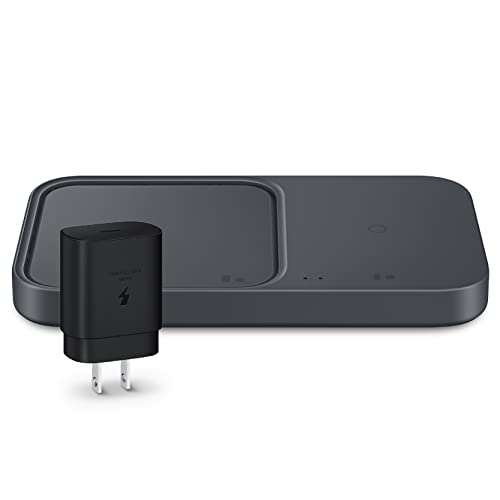
SUPER FAST WIRELESS CHARGING: Get the charge you need quickly, thanks to up to 15W of Fast Charging support; This boost of battery is compatible with USB PD and Adaptive Fast Charging travel adapters for an easy pick-me-up

Compact, light design with 11.6” display
Is Extra Dim the Ultimate Battery-Saving Feature for Samsung?
If you’re wondering whether Extra Dim is the ultimate battery-saving feature for your Samsung device, the answer is a resounding yes! Extra Dim is designed to reduce power consumption significantly, especially in low-light environments. By dimming your screen beyond the device’s lowest brightness setting, Extra Dim conserves battery power without compromising screen visibility.
How Does Extra Dim Save Battery?
- Extra Dim limits the amount of power required to illuminate your screen, resulting in extended battery life.
- By using Extra Dim in darker environments, you can optimize battery conservation more effectively than with traditional brightness settings.
- Activate Extra Dim: Access this feature in your device settings to start benefitting from increased battery efficiency.
- Use in Low-Light Environments: In dimly lit areas, make the most of Extra Dim to save power without sacrificing screen clarity.
- Avoid Maximum Brightness: Prolonged use of maximum brightness drains your battery quickly, so leverage Extra Dim instead.
- Monitor Battery Usage: Keep track of your battery consumption and adjust settings accordingly to complement the impact of Extra Dim effectively.
By integrating Extra Dim as a core element of your battery-saving strategy, you can prolong the battery life of your Samsung device while ensuring optimal screen visibility wherever you go.
Conclusion
You now have a powerful tool at your fingertips to maximize your Samsung device’s battery life – ‘Extra Dim’. By utilizing this feature in low-light conditions, you can significantly reduce power consumption without sacrificing screen visibility. Remember to adjust your settings, avoid prolonged use of maximum brightness, and keep an eye on your battery usage. With ‘Extra Dim’ as part of your battery-saving strategy, you can enjoy extended battery life while ensuring your screen remains crystal clear. Embrace this feature and make the most out of your Samsung device’s battery performance.
Frequently Asked Questions
What is ‘Extra Dim’ and how does it save battery on Samsung devices?
‘Extra Dim’ is a feature on Samsung devices that dims the screen beyond the lowest brightness setting. It reduces power consumption, particularly in low-light conditions, without compromising screen visibility. By activating ‘Extra Dim’ in device settings and using it in dimly lit areas, users can significantly extend their battery life.
How can I activate ‘Extra Dim’ on my Samsung device?
To activate ‘Extra Dim’ on your Samsung device, go to the device settings and look for the display or brightness section. You should find an option to enable ‘Extra Dim’ or a similar feature. Once activated, you can start benefiting from the battery-saving capabilities of ‘Extra Dim’.
Will using ‘Extra Dim’ affect the visibility of my screen?
While ‘Extra Dim’ dims the screen beyond the lowest brightness setting, it is designed to maintain screen visibility even in low-light environments. Users can enjoy extended battery life without sacrificing the clarity of the screen when using ‘Extra Dim’.
How can I optimize battery conservation with ‘Extra Dim’?
To optimize battery conservation with ‘Extra Dim’, consider using it in dimly lit areas instead of relying on maximum brightness for prolonged periods. Monitoring your battery usage and integrating ‘Extra Dim’ into your battery-saving strategy can help you prolong your Samsung device’s battery life effectively.
