

Ever wondered why your laptop battery seems to die out faster than your favorite TV show? Picture this: you’re in the middle of an important project, and your laptop gives up on you. Frustrating, right? But fear not, because in this article, you’ll discover simple ways to breathe new life into that dead laptop battery of yours.
Imagine never having to worry about your laptop dying on you at the worst possible moment. By learning how to revive a dead laptop battery, you’ll not only save money but also gain the freedom to work or binge-watch without constantly searching for a power outlet. It’s time to say goodbye to the anxiety of a dwindling battery life and hello to a rejuvenated laptop that’s ready to keep up with your busy schedule.
Exploring Common Causes of Laptop Battery Death
Charging Habits:
- Overcharging your laptop can reduce battery life.
- Excessive heat can stress the battery and shorten its lifespan.
- Power surges from unstable electrical sources can also harm the battery.
Age and Usage:
- Laptop batteries degrade over time, especially after 2-3 years.
- Heavy use, like gaming or running demanding programs, can wear out the battery faster.
Manufacturing Defects:
- Some laptops may have faulty batteries from the start.
- Poor ventilation and cooling systems can accelerate battery deterioration.
- Running multiple programs can drain the battery quickly.
- High screen brightness, background apps, and unnecessary peripherals can all contribute to faster battery depletion.
- Accumulated dust can disrupt airflow and cause the laptop to overheat.
- Regularly cleaning vents and fans can help prolong battery life.
| Statistics | |
|---|---|
| Overcharging impact on battery life | Reduces lifespan by up to 20%. |
| Average laptop battery lifespan | 2-4 years under normal use. |
| Effect of heat on battery longevity | Can decrease lifespan by half. |
| Percentage of premature battery failures due to manufacturing defects | About 5-10%. |
Understanding the Inner Workings of a Laptop Battery
Laptop batteries are complex systems that power your device on the go. Here’s a closer look at how they function:
- Battery Cells: These are like tiny fuel tanks that store energy.
- Voltage Regulator: Controls the amount of power released to ensure safe operation.
- Battery Management System: Monitors vital stats like temperature and charging levels.
Explained: When you plug in your laptop, electricity flows from the charger to the battery. The battery then stores this energy in its cells for later use. Once you unplug, the stored power is released to keep your laptop running.
- Charging Cycle: Each charge-discharge cycle slightly wears down the battery’s capacity.
- Chemical Reactions: Inside the battery, chemical processes convert stored energy into usable power.
Tip: Avoid frequent full discharges as they can strain the battery. Instead, aim for partial charges to extend its lifespan.
- Heat Control: Excess heat can damage the battery cells and shorten their life.
- Age Factor: Over time, the battery’s capacity naturally decreases due to wear and tear.
Key Point: Regular maintenance and proper charging habits can help optimize your laptop battery’s performance and longevity.
| Statistic | Data |
|---|---|
| Average battery lifespan | 2-4 years |
| Impact of heat on battery life | 30-40% reduction |
| Impact of proper maintenance on battery lifespan | Up to 25% increase |
Remember, understanding how your laptop battery works is the first step towards keeping it in top condition.
Assessing the Condition of a Dead Laptop Battery
To revive a dead laptop battery, you first need to assess its condition accurately. Here’s how you can do it:
- Check for Physical Damage: Look for any signs of physical damage like leaks, cracks, or unusual smells.
- Voltage Testing: Use a multimeter to check the voltage. A fully charged battery should read around 12.6 volts.
- Inspect the Terminals: Ensure the battery terminals are clean and not corroded.
- Capacity Testing: Conduct a capacity test to see how much charge the battery can hold compared to its original capacity.
If you find that the battery is severely damaged or has very low capacity, it might be time to consider replacing it. However, if you believe there is a chance to revive it, there are several methods like deep discharging and recharging, freezing the battery for a few hours, or using a dedicated battery reconditioning tool.
Remember to stay cautious throughout this process, especially when dealing with damaged batteries. Electrical hazards are a real concern, so if you are unsure, it’s always best to consult a professional for assistance.
Assessing the condition of a dead laptop battery is the crucial first step towards potentially bringing it back to life. Through careful evaluation and proper handling, you may just be able to extend the lifespan of your battery.
Recommended Products

VERSATILE FUNCTIONALITY: Measures AC/DC voltage up to 600V, 10A DC current, 2MΩ resistance; additional features include continuity, diode test and battery test

Additional Tips - The following incorrect operations may cause the multimeter not to show results: Firstly, the plugs of test leads are not fully inserted or not inserted into the correct sockets. Secondly, the manual rotary switch is not placed in the correct position. In addition, this meter can not test all AC Current and below 100mV AC Voltage. Please check the user manual carefully before measurement.

【7 Modes Display Monitor】 DROK USB Tester is equipped with digital color LED display screen, which can be switched between 7 display modes. This multimeter can be used to measure voltage, current, power, capacity. Through the 7 modes, you can clearly see the voltage, current, capacity and power during charging. Only 1 button to switch the display mode, simple and handy.
DIY Methods to Revive a Dead Laptop Battery
Let’s explore some DIY methods that could help revive a dead laptop battery:
- Deep Discharging: Sometimes, performing deep discharge cycles can recalibrate the battery and restore some of its lost capacity. Be cautious not to over-discharge the battery.
- Freezing Method: Freezing the battery overnight might help break up crystal formations, potentially improving its performance. Be mindful not to expose the battery to moisture.
- Reconditioning Tools: Consider using battery reconditioning tools that can help reset the battery’s internal circuitry for better efficiency. Always follow the manufacturer’s instructions.
- Optimize Battery Settings: Adjust your device’s power settings to optimize battery usage. Lowering screen brightness and disabling unused applications can help extend battery life.
- Regular Usage: If you have spare batteries, rotate them regularly to prevent them from sitting unused for extended periods. This practice can help maintain battery health.
| Method | Effect |
|---|---|
| Deep Discharging | Recalibrates battery |
| Freezing Method | Disrupts crystal formations |
| Reconditioning Tools | Resets internal circuitry |
| Optimize Battery Settings | Enhances efficiency |
| Regular Usage | Prevents prolonged inactivity |
Recommended Products
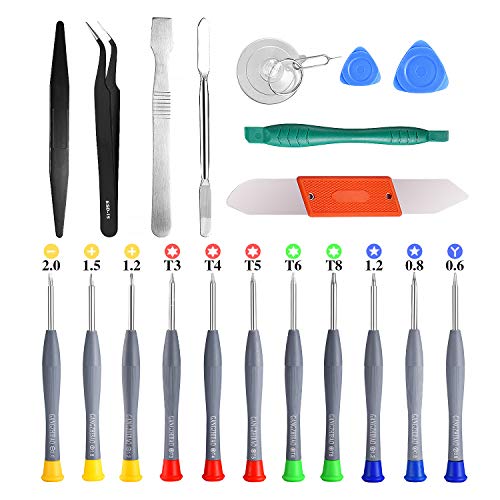
PentalobeScrewdriver Set: p5 Pentalobe screwdriver,PH000 Phillips Screwdriver, Pentalobe T5 Pentalobe T6 Screwdrivers Repair Tool Kit for Apple MacBook Mac Retina Pro Air,T5 for Macbook air & pro repair, it can remove fan screws, including SSD or hard disk replacement. The improved T5 has curved corner tip, which are different from the previous straight corner tip, It will not damage the screws and is more durable

Versatile Torque Settings: Our mini electric screwdriver features three gear torque settings of 0.15/0.35/0.5N.m and a manual torque of 5 N.m for precise control. With a powerful motor delivering a no-load speed of 200 RPM, this electric mini screwdriver ensures quick and efficient screwing. The planetary gear design reduces wear and noise, providing smoother operation and a longer tool lifespan

Say Goodbye to Stripped Screws and Frustrating Repairs: Stop guessing and over-tightening. With 5-level torque control (up to 0.5 Nm) and 7 Nm manual support, this mini electric screwdriver gives you precise control to protect your devices from damage. This electric screwdriver cordless design is perfect for repairing PCs, laptops, phones, MacBooks, RC cars, drones, keyboards, PS4/PS5, and other delicate electronics with confidence
Maximizing the Lifespan of Your Revived Laptop Battery
So, you’ve successfully revived your laptop battery using DIY methods. Now, it’s time to ensure its longevity and performance. Here are some practical tips to maximize the lifespan of your newly rejuvenated battery:
- Optimize Battery Settings:
- Adjust power settings to extend battery life.
- Dim the screen and disable unnecessary features when not in use.
- Regular Usage:
- Don’t let the battery sit idle for extended periods.
- Use your laptop regularly to keep the battery in good shape.
- Avoid Extreme Temperatures:
- Heat and cold can impact battery health.
- Keep your laptop in a moderate temperature environment.
- Calibrate Periodically:
- Recalibrate the battery by fully charging and discharging it every few months.
| Fact | Data |
|---|---|
| Battery Lifespan | 1-3 years |
| Temperature Range for Storage | 20-25°C |
| Ideal Battery Charge Level for Storage | 50% |
- Monitor Battery Health:
- Keep an eye on your battery’s condition.
- Use software tools to track battery health regularly.
- Unplug When Fully Charged:
- Once your battery is fully charged, unplug to prevent overcharging.
By following these simple steps, you can prolong the lifespan of your revived laptop battery and enjoy sustained performance for longer.
Conclusion
You now have a range of DIY methods to try and bring your dead laptop battery back to life. Remember, optimizing battery settings, using your laptop regularly, and following simple maintenance practices can help extend the battery’s lifespan and keep it performing well. By incorporating these tips into your routine, you can ensure that your laptop battery stays healthy and efficient for longer periods. So, go ahead and give these strategies a shot to revive your battery and enjoy uninterrupted laptop usage.
Frequently Asked Questions
Can a dead laptop battery be revived using DIY methods?
Yes, a dead laptop battery can sometimes be revived using DIY methods like recalibrating the battery, deep discharging and recharging, or freezing the battery for a short period.
How can I maximize the lifespan of a rejuvenated laptop battery?
To maximize the lifespan of a rejuvenated laptop battery, optimize battery settings, use the laptop regularly, avoid extreme temperatures, calibrate the battery periodically, monitor battery health, maintain an ideal storage charge level, and unplug the laptop when fully charged.
