

Ever wondered why your laptop seems to lose its charge so quickly, leaving you scrambling for an outlet? Picture this: you’re in the middle of an important task, and your laptop battery is on the verge of dying. Frustrating, right? What if there was a way to extend your laptop’s battery life and keep you productive for longer periods?
Enter the 3 cell laptop battery – a key player in the world of portable technology. But what exactly is a 3 cell laptop battery, and how does it differ from its counterparts? In this article, we’ll unravel the mystery behind this essential component and explore how it can revolutionize your computing experience.
By understanding the ins and outs of a 3 cell laptop battery, you’ll be equipped with the knowledge to optimize your device’s performance and make the most out of every charge. Get ready to dive into the world of laptop batteries and discover how a 3 cell configuration could be the game-changer you’ve been looking for.
What is a 3 Cell Laptop Battery?
When it comes to laptop batteries, you might have heard about 3 cell batteries. These batteries are a crucial component in keeping your laptop running smoothly and efficiently. Here’s a closer look at what makes a 3 cell laptop battery unique:
- Capacity: 3 cell batteries typically have a lower capacity compared to higher cell variants. This means they might offer less run time before needing a recharge.
- Size: These batteries are usually smaller and lighter, making them a popular choice for ultrabooks and thin laptops that prioritize portability.
- Performance: While they may not offer as much power as higher cell batteries, 3 cell batteries can still deliver reliable performance for everyday computing tasks.
- Cost: Due to their smaller size and capacity, 3 cell batteries are often more affordable compared to batteries with higher cell counts.
If you’re someone who values portability and lightweight devices, a laptop with a 3 cell battery could be a great fit for your needs.
How Does a 3 Cell Battery Differ from Other Laptop Batteries?
When comparing 3 cell laptop batteries to other types, one significant difference lies in their capacity. While they offer lower power storage than batteries with more cells, 3 cell batteries are valued for their compactness and lightweight design. These features make them ideal for thinner laptops and ultrabooks where space and weight are crucial considerations.
3 cell batteries are more cost-effective compared to batteries with higher cell counts. Despite providing less power, they are known for their reliability in handling everyday tasks with ease. If you prioritize portability and prefer a lighter laptop, opting for a device equipped with a 3 cell battery could be the right choice for your needs.
Important Data
| Type of Battery | Cell Count | Capacity | Weight |
|---|---|---|---|
| 3 Cell | 3 | Lower | Lighter |
| Higher Cell Count | More | Higher | Heavier |
- 3 cell batteries have lower capacity but are favored for their compact size and lightweight nature.
- They are cost-effective and reliable for everyday tasks.
- Ideal for individuals prioritizing portability and lighter devices.
Benefits of Using a 3 Cell Laptop Battery
When it comes to portability and lightweight design, 3 cell laptop batteries shine. Here are some key benefits of using them:
- Lightweight: Easy to carry around, perfect for travel or commuting.
- Compact: Takes up less space in your laptop, leaving room for other components.
- Cost-effective: Generally more affordable compared to batteries with larger cell counts.
- Efficient: Ideal for everyday use like web browsing, document editing, and video streaming.
- Quick Charging: Charges faster than batteries with higher cell counts, keeping you productive on the go.
In a nutshell, 3 cell laptop batteries strike a balance between portability and performance, making them a practical choice for users who value convenience.
Tips for Extending the Life of a 3 Cell Laptop Battery
If you want to get the most out of your 3 cell laptop battery, optimizing your usage is essential. Here are some practical tips to help you extend its lifespan:
- Avoid Overcharging: Unplugging your laptop when it’s fully charged can prevent overloading the battery and decreasing its longevity.
- Adjust Power Settings: Lowering the screen brightness and setting your laptop to power-saving mode can help conserve battery power.
- Use Battery Saver Mode: Enabling this feature on your device can reduce power consumption and prolong the battery life.
- Keep Your Laptop Clean: Dust and debris can block airflow and cause your laptop to overheat, affecting the battery. Regular cleaning is key.
- Update Software Regularly: Keeping your operating system and drivers up to date can optimize battery performance.
Implementing these suggestions can help maximize the lifespan of your 3 cell laptop battery.
Recommended Products

87W Power to Share: Distribute 87W across three devices, with a single device receiving up to 65W, to rapidly charge iPhones, Samsung phones. Quickly charge a 14" MacBook Pro to 50% in under 40 minutes.
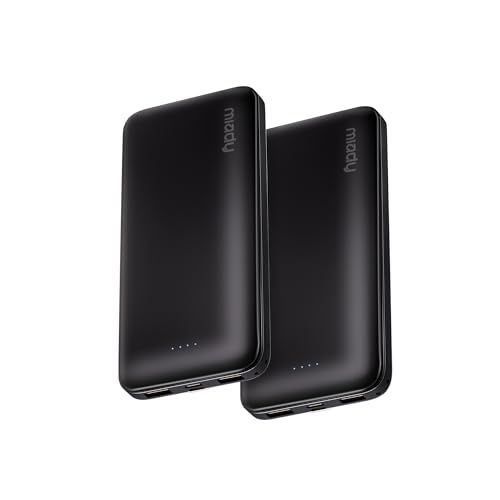
Power 3 Devices at Once—No More Waiting! This powerful portable charger lets you charge up to 3 devices at once—perfect for your phone, tablet, and earbuds all at the same time. Whether you are traveling, commuting, or just tackling a busy day, you'll never have to choose which gadget gets power first. Equipped with dual USB-A ports and a USB-C port, it delivers smart and safe charging to virtually any device. Slim, reliable, this is the ultimate sidekick for students, remote workers, gamers.

Applicable to the following models:EB-CR2477, EB-CR2477_140, BR2477, BR2477-1W, CR2477, DL2477, ECR2477, KCR2477, LM2477.
Conclusion
That’s all about 3 cell laptop batteries! By implementing the tips shared in this article, you can ensure that your battery lasts longer and functions at its best. Remember to avoid overcharging, adjust power settings, use battery saver mode, keep your laptop clean, and update software regularly. These simple steps can make a big difference in the performance and lifespan of your 3 cell laptop battery. Happy computing!
Frequently Asked Questions
1. How can I extend the life of my 3 cell laptop battery?
To extend the life of your 3 cell laptop battery, avoid overcharging, adjust power settings, use battery saver mode, keep the laptop clean, and update software regularly.
2. Is overcharging harmful to a 3 cell laptop battery?
Yes, overcharging can be harmful to a 3 cell laptop battery as it can lead to reduced battery lifespan over time.
3. Why is it essential to keep the laptop clean for battery longevity?
A clean laptop prevents overheating, which can damage the battery. Maintaining cleanliness helps optimize battery performance and lifespan.
4. How does updating software regularly contribute to the battery’s lifespan?
Regular software updates often include optimizations and bug fixes that can enhance battery efficiency, ultimately extending its lifespan.
5. Should I always use battery saver mode to prolong the battery life?
Using battery saver mode can help conserve power and prolong battery life, especially when you need to use your laptop for an extended period without a charger.
