

Ever wondered why your laptop battery seems to lose its juice faster than you can say “fully charged”? Picture this: you’re in the middle of an important project, and suddenly, the dreaded low battery notification pops up. Frustrating, right? But fear not, because in this article, you’ll discover the best way to charge your laptop battery to make sure it stays powered up when you need it most.
Are you tired of constantly searching for the nearest power outlet or carrying around your charger like a lifeline? Well, get ready to bid farewell to those battery woes. By following the right charging practices, you can not only prolong your laptop battery’s lifespan but also ensure that it performs at its peak capacity. Stay tuned to uncover the secrets to maximizing your laptop’s battery life and efficiency.
Understand Your Laptop Battery
When it comes to laptop batteries, understanding how they work is key to optimizing their lifespan and performance. Here are a few essential things you should know:
- Types of Batteries: Most laptops use Lithium-Ion batteries known for their high energy density and reliability. They are designed to handle a specific number of charge cycles before their capacity reduces.
- Charging Cycles: A charging cycle occurs when you use about 100% of your battery’s capacity. For example, using 50% of the battery’s capacity twice would count as one charging cycle.
- Avoid Low Battery: It’s best to avoid letting your battery level drop below 20%. Repeatedly letting it drain completely can strain the battery and reduce its lifespan.
- Heat and Overcharging: Exposing your laptop to high temperatures and leaving it plugged in all the time can also impact the battery’s health. It’s good to unplug it occasionally to let the battery discharge a bit.
Understanding these key aspects of your laptop battery can help you adopt practices that maximize its longevity and performance.
Recommended Products

🌍Portable AC Outlet Power Bank, Easy to Carry: with a lithium-ion battery pack 24,000mAh(AC+DC+USB OUTPUT Total),1*65W AC outlet , the unit can power your laptop, mini-fan and other smart devices which need AC output, as a creative outdoor power bank, about 1.6 lbs only(size:6.89" L x 3.98" W x 1.89" H), we can easily put it in our backpack, Rated power is 65W(Tips:AC output needs to be turned on or off manually. If DC output is only turned on and no electronics are connected, the ac power bank will be turned off within 20 seconds)

Advanced Charging Technology: Experience three-stage charging for safer, more reliable battery care
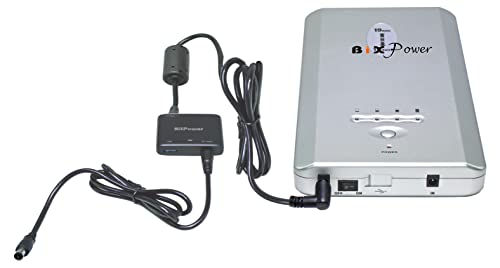
Super High Capacity Battery Pack: The package comes with a BiXPower super high capacity (223 Watt-hour) lithium ion rechargeable battery pack. The Battery is IEC 62133 Certificated, made with high quality premium Li-ion battery cells. The battery itself can provide 15V or 19V DC power for many devices. The package comes with a 24V DC converter specially designed to be compatible with ResMed AirSense 10 machine. It may power ResMed AirSense 10 CPAP machine 2 to 3 nights with the humidifier turned off
Avoid Overcharging
When it comes to laptop battery care, overcharging is a common concern. Overcharging can stress the battery, leading to a shorter lifespan. To prevent this issue:
- Unplug your laptop once it reaches full charge.
- Avoid leaving your laptop plugged in all the time.
- Consider using a smart plug to cut off power automatically when the battery is fully charged.
Remember, a little care in this area can significantly extend the life of your laptop battery.
| Tips for Avoiding Overcharging |
|---|
| Unplug your laptop once it reaches full charge |
| Avoid leaving your laptop plugged in all the time |
| Consider using a smart plug to cut off power automatically |
Recommended Products

AI Physical Disconnect for Battery Health:Unlike standard software limits, this device uses AI intelligent recognition to physically disconnect the charging circuit once your device reaches full capacity. This mechanical air gap achieves true zero standby current, effectively eliminating trickle charging and heat buildup to preserve maximum battery health during overnight charging.

【Stop Charge Smart Charger】 features built-in smart detection that automatically disconnects power when your device reaches 100 battery. Instantly stopping current flow helps extend battery life and protects your phone, laptop, or tablet from overcharging damage.
AI-Powered Physical Disconnect: Unlike standard software limits, this device features AI intelligent recognition to physically disconnect the charging circuit once your device reaches full capacity. This mechanical air gap achieves true zero standby current, effectively eliminating trickle charging and heat buildup to preserve maximum battery health during overnight charging.
Optimal Charging Practices
When it comes to charging your laptop battery, following some optimal practices can help prolong its lifespan. Here are some tips to keep in mind:
- Avoid Overcharging: Unplug your laptop once it’s fully charged to prevent overcharging, which can decrease battery longevity.
- Partial Charging: Frequent partial charges are better than full discharges. This can help maintain your battery’s capacity over time.
- Avoid Extreme Temperatures: High temperatures can degrade your battery faster, so store your laptop in a cool place when not in use.
| Battery Tip | Description |
|---|---|
| Avoid Overcharging | Unplug laptop once fully charged |
| Partial Charging | Opt for frequent partial charges over full ones |
| Temperature Control | Keep laptop in a cool place to avoid damage |
Recommended Products

Smart iPhone Recognition with Care Mode: Automatically recognizes supported iPhone models and adjusts charging for smarter, safer power delivery. Compatible only with iPhone 17 / 16 / 15 series, 11" iPad Pro (2024 / 2023 / 2021 / 2020), 12.9" iPad Pro (2022 / 2021 / 2020), and 13" iPad Pro (2024).Excluding iPhone 17e.

Smart iPhone Recognition with Care Mode: Automatically recognizes supported iPhone models and adjusts charging for smarter, safer power delivery. Compatible only with iPhone 17 / 16 / 15 series, 11" iPad Pro (2024 / 2023 / 2021 / 2020), 12.9" iPad Pro (2022 / 2021 / 2020), and 13" iPad Pro (2024).Excluding iPhone 17e.
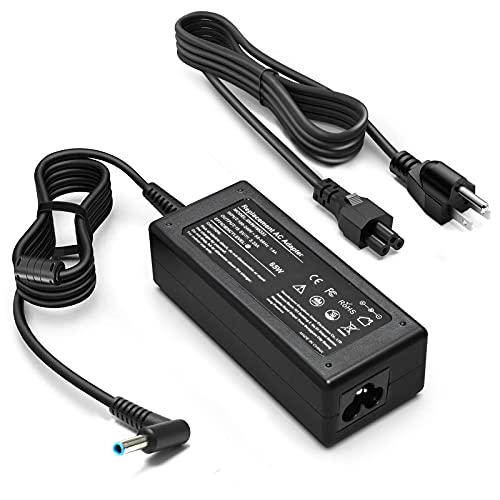
KAQIAR Adapter Compatible with HP Laptop Charger Output Max: DC 19.5V 3.33A 65W; Input: 100~240V~1.7A 50/60Hz; Connector: 4.5 mm outer diameter / 3.0 mm inner diameter blue tip.
Additional Tips for Battery Maintenance
When not in use for extended periods, aim to keep your laptop’s battery level between 20% and 80%. This range can help prolong its lifespan.
Consider adjusting your laptop’s power settings to optimize battery usage. Lowering the screen brightness and setting shorter sleep times can be beneficial.
Avoid exposing your laptop to extreme temperatures, as they can negatively impact battery health. Store your device in a cool, dry place to prevent overheating.
Periodically calibrating your laptop battery can help ensure accurate power readings. Allow the battery to fully discharge and then fully charge it at least once every few months.
If you find yourself rarely using your laptop on battery power, consider removing the battery while it’s plugged in to prevent overcharging.
It’s essential to use the charger that comes with your laptop to avoid damage to the battery. Generic chargers might not provide the correct voltage or amps, affecting the battery’s longevity.
Regularly updating your laptop’s software and drivers can also contribute to better battery efficiency by optimizing performance.
Conclusion
Remember, maintaining your laptop battery between 20% and 80% when not in use is key to extending its lifespan. Adjusting power settings, avoiding extreme temperatures, and calibrating the battery periodically are simple practices that can make a big difference. If you rarely use your laptop on battery power, consider removing the battery. Always use the correct charger and keep your software and drivers up to date for optimal battery efficiency. By following these tips and being mindful of your charging habits, you can ensure that your laptop battery lasts longer and performs better in the long run.
Frequently Asked Questions
How can I prolong the lifespan of my laptop battery?
To extend your laptop battery’s lifespan, keep its charge between 20% and 80% when not in use for long periods, adjust power settings, avoid extreme temperatures, calibrate the battery occasionally, remove the battery if rarely used on battery power, use the correct charger, and regularly update software and drivers for optimal efficiency.
What charging habits should I adopt to improve my laptop battery’s longevity?
To improve the longevity of your laptop battery, avoid frequently charging it to 100%, charge it in shorter intervals, and aim to keep the charge level between 20% and 80% for daily use. These practices can help maintain the battery’s health and efficiency over time.
