
Close Menu
Battery Spotlight
    Battery Spotlight
    • Home
    • Phone Batteries
    • Laptop Batteries
    • Car Batteries
      • Golf Cart Batteries
    • Battery Info
      • Battery Chargers
      • Battery Life
      • Battery Maintenance
      • Marine Batteries
      • Rechargeable Batteries
      • Solar Batteries
    • About Us
      • Contact
    Battery Spotlight
    Navigation: Home » Laptop Batteries » How to Replace CMOS Battery in HP Laptop: A Step-by-Step Guide
    Laptop Batteries

    How to Replace CMOS Battery in HP Laptop: A Step-by-Step Guide

    Jackson DoyleBy Jackson DoyleJuly 22, 20246 Mins Read
    Share Facebook Twitter Pinterest LinkedIn Tumblr Email WhatsApp Copy Link
    Share
    Facebook Twitter LinkedIn Pinterest Email Copy Link

    Ever wondered why your HP laptop keeps forgetting the date and time? It might be time to check on that little but mighty CMOS battery. Picture this: you power up your laptop, only to be greeted by a wrong date stamp. Frustrating, isn’t it? But fret not, because in this article, you’ll discover the simple steps to replace the CMOS battery in your HP laptop.

    Table of Contents

    Toggle
    • Check if Your HP Laptop Needs a CMOS Battery Replacement
    • Gather the Necessary Tools and Replacement CMOS Battery
    • Power Off and Prepare Your HP Laptop for Maintenance
    • Replace the CMOS Battery in Your HP Laptop
    • Power On and Verify the New CMOS Battery
    • Conclusion
    • Frequently Asked Questions
    • How often should I replace the CMOS battery in my HP laptop?
    • How much does a new CMOS battery for an HP laptop cost?
    • How can I verify if the new CMOS battery is installed correctly?
    • Why is it important to verify the functionality of the new CMOS battery?

    Check if Your HP Laptop Needs a CMOS Battery Replacement

    Is your HP laptop acting up and displaying the wrong date and time each time you power it on? This could be a sign that your CMOS battery needs replacing. To confirm if it’s time for a new CMOS battery, follow these steps:

    • Power off your HP laptop completely.
    • Restart the laptop, and as it begins to boot up, pay close attention to the date and time displayed.
    • Enter the BIOS settings by pressing the designated key as the laptop starts up.
    • Check if the date and time reset again within the BIOS settings.

    If you notice that the date and time keep resetting, it’s likely your CMOS battery is running out of juice. It’s recommended to replace it to avoid further date and time discrepancies.

    Remember, a CMOS battery is a small but crucial component in maintaining accurate data within your HP laptop’s system. Stay tuned for the next steps on how to easily replace it yourself.

    Recommended Products

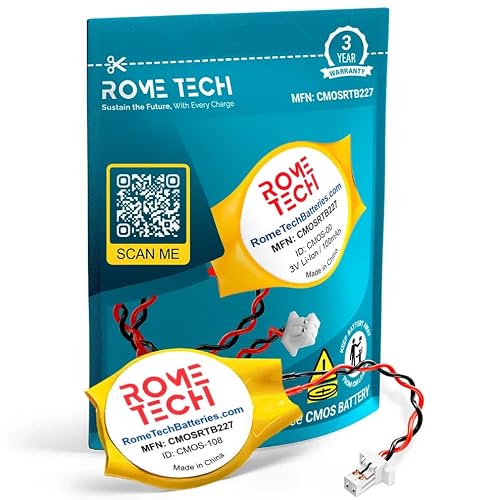
    Rome Tech CR2016 CMOS BIOS Battery for HP ProBook 450 G6, G7, 440 G7 - Backup 3V RTC CR 2016 HP Laptop CMOS Battery with 2 Wire Cable
    Rome Tech CR2016 CMOS BIOS Battery for HP ProBook 450 G6, G7, 440 G7 - Backup 3V RTC CR 2016 HP Laptop CMOS Battery with 2 Wire Cable

    Rome Tech 840 G6 BIOS battery CR2016 best suits to replace your broken or non-working old HP G60 CMOS battery - we provide premium quality only

    VIEW LATEST PRICE

    As an affiliate, we earn on qualifying purchases.

    Rome Tech CR1620 CMOS Battery for HP EliteBook 830 G5, 830 G6, 830 G7, x360 435 G7, 830 G8, HP ZBook Firefly 14 G8 - BIOS RTC 3V CR 2016 CMOS Battery with 2 Pin 2 Wire Cable
    Rome Tech CR1620 CMOS Battery for HP EliteBook 830 G5, 830 G6, 830 G7, x360 435 G7, 830 G8, HP ZBook Firefly 14 G8 - BIOS RTC 3V CR 2016 CMOS Battery with 2 Pin 2 Wire Cable

    Rome Tech BIOS HP Elitebook CMOS battery CR1620 best suits to replace your broken or non-working old battery - we provide premium quality only
    SEE ALSO  How to Save Money on Dell Laptop Batteries: Tips and Strategies
    VIEW LATEST PRICE

    As an affiliate, we earn on qualifying purchases.

    Rome Tech CR1620 CMOS BIOS Battery for HP EliteBook 840 G7 - Backup 3V RTC CR 1620 HP Laptop Battery with 2 Wire Cable
    Rome Tech CR1620 CMOS BIOS Battery for HP EliteBook 840 G7 - Backup 3V RTC CR 1620 HP Laptop Battery with 2 Wire Cable

    Rome Tech BIOS CMOS HP mu06 notebook battery CR1620 best suits to replace your broken or non-working old CMOS battery for PC motherboard - we provide premium quality only

    VIEW LATEST PRICE

    As an affiliate, we earn on qualifying purchases.

    Gather the Necessary Tools and Replacement CMOS Battery

    When it comes to replacing the CMOS battery in your HP laptop, it’s important to have the right tools on hand. Here’s what you’ll need:

    • Small screwdriver: To open up your laptop and access the CMOS battery.
    • Anti-static wrist strap: To prevent any damage from static electricity.
    • Replacement CMOS battery: Make sure to purchase the correct battery type for your specific HP laptop model.

    Before you start the replacement process, ensure you have a clean and well-lit workspace to comfortably work on your laptop. It’s also a good idea to power off your laptop and remove any external power sources before proceeding to avoid any electrical mishaps.

    Once you have all the necessary tools and the replacement CMOS battery ready, you’re all set to begin the process of replacing the CMOS battery in your HP laptop.

    Recommended Products

    LeFix 2 Pins 2 Wires BIOS CMOS Battery for DELL(D830 E6530 N4050 E7270 .) HP(CQ41 8440p G4.) ASUS(S56 X611.) Samsung(R467 R458) Backup Reserve Button Cell Batteries (Regular Polarity)
    LeFix 2 Pins 2 Wires BIOS CMOS Battery for DELL(D830 E6530 N4050 E7270 .) HP(CQ41 8440p G4.) ASUS(S56 X611.) Samsung(R467 R458) Backup Reserve Button Cell Batteries (Regular Polarity)

    We use high quality battery,manufactured by Japanese battery giant to produce the CMOS battery.

    VIEW LATEST PRICE

    As an affiliate, we earn on qualifying purchases.

    Rome Tech Dell Inspiron CMOS Battery CR2032 3V – BIOS RTC Coin Cell Replacement for Dell Inspiron 15 3511, 15 1564, 15 3555, 15 3559, 15 3565, 15 3567, 3568, 15 5566, 5583, 15 7560, 7572-1 Pack
    Rome Tech Dell Inspiron CMOS Battery CR2032 3V – BIOS RTC Coin Cell Replacement for Dell Inspiron 15 3511, 15 1564, 15 3555, 15 3559, 15 3565, 15 3567, 3568, 15 5566, 5583, 15 7560, 7572-1 Pack

    Rome Tech Dell Inspiron CMOS Battery Replacement – This dell inspiron cmos battery is a CR2032 3V BIOS RTC coin cell designed to restore motherboard clock and BIOS settings in compatible Dell Inspiron laptops. Please verify your exact model before purchasing.

    VIEW LATEST PRICE

    As an affiliate, we earn on qualifying purchases.

    PCRepair Replacement CMOS RTC Battery for HP Elitebook 8460p 8460w 8770w Probook 6460b 651948-001
    PCRepair Replacement CMOS RTC Battery for HP Elitebook 8460p 8460w 8770w Probook 6460b 651948-001

    Replacement CMOS RTC Battery For HP Elitebook 8460p 8460w 8770w Probook 6460b 651948–001

    SEE ALSO  How to Extend Panasonic AA Battery Life: Practical Tips for Longevity
    VIEW LATEST PRICE

    As an affiliate, we earn on qualifying purchases.

    Power Off and Prepare Your HP Laptop for Maintenance

    Before you begin replacing the CMOS battery in your HP laptop, it’s crucial to properly power off the device and prepare your workspace. Here’s how to do it:

    • Save and close any open files on your laptop to prevent data loss.
    • Power off your HP laptop completely and unplug it from any power source.
    • Wait a few minutes for the laptop to cool down before continuing.

    Next, take these steps to set up your workspace for a successful battery replacement:

    • Choose a clean, well-lit area with enough space to comfortably work on your laptop.
    • Gather all the necessary tools and the replacement CMOS battery specific to your HP laptop model.
    • Use an anti-static wrist strap to prevent damaging sensitive electronic components.
    • Avoid static electricity by working on a non-carpeted surface or using an anti-static mat.

    With your laptop powered off and your workspace ready, you’re set to begin the CMOS battery replacement process. Let’s move on to the next steps in this guide.

    Replace the CMOS Battery in Your HP Laptop

    To replace the CMOS battery in your HP laptop, follow these simple steps:

    • Locate the CMOS battery: Look for a coin-shaped battery on the motherboard – this is your CMOS battery.
    • Remove the Old Battery: Carefully detach the old CMOS battery from its holder.
    • Insert the New Battery: Place the new CMOS battery into the holder securely.
    • Reassemble: Put back any components you removed and reassemble your laptop.
    • Power On: Turn on your HP laptop to ensure the new battery is functioning properly.
    Important pointDetails
    Average Lifespan of a CMOS Battery2-4 years
    Cost of a New CMOS Battery$5-$15

    Remember to consult your HP laptop’s manual for model-specific instructions.

    Recommended Products

    Rome Tech RTC CMOS Battery for HP Pavilion g7-1075dx, g7-1150us, g7-2000, dv7-6101sa - Laptop Backup BIOS CR2032 with 2 Pin Wire Cable (1-Pack)
    Rome Tech RTC CMOS Battery for HP Pavilion g7-1075dx, g7-1150us, g7-2000, dv7-6101sa - Laptop Backup BIOS CR2032 with 2 Pin Wire Cable (1-Pack)

    Rome Tech BIOS HP Pavilion CMOS battery best suits to replace your broken or non-working old battery for HP Pavilion DV7- we provide premium quality only

    VIEW LATEST PRICE

    As an affiliate, we earn on qualifying purchases.

    Rome Tech CR2032 CMOS BIOS Battery for Dell Wyse 3040 / HP EliteBook 480 G3, 745 G6, 840 G1 - Laptop Backup 3V RTC with 2 Wire Cable
    Rome Tech CR2032 CMOS BIOS Battery for Dell Wyse 3040 / HP EliteBook 480 G3, 745 G6, 840 G1 - Laptop Backup 3V RTC with 2 Wire Cable

    Rome Tech BIOS CMOS battery CR2032 best suits to replace your broken or non-working old HP Elitebook 840 G3 battery - we provide premium quality only

    SEE ALSO  Choosing the Best HP Battery: Unveiling the Differences for Top Laptop Performance
    VIEW LATEST PRICE

    As an affiliate, we earn on qualifying purchases.

    Rome Tech RTC CMOS Battery for HP EliteBook 640 G1, 645 G1, 650 G1 - BIOS CR2032 with 2 Pin Wire Cable
    Rome Tech RTC CMOS Battery for HP EliteBook 640 G1, 645 G1, 650 G1 - BIOS CR2032 with 2 Pin Wire Cable

    Rome Tech CMOS Battery best suits to replace your broken or non-working old BIOS battery - we provide premium quality only

    VIEW LATEST PRICE

    As an affiliate, we earn on qualifying purchases.

    Power On and Verify the New CMOS Battery

    To ensure the successful replacement of your CMOS battery, it’s important to power on your HP laptop and verify that everything is working as it should.

    Here are the steps to power on and verify the new CMOS battery:

    • Reassemble your HP laptop by putting back the screws and covers that were removed earlier.
    • Connect the power adapter and turn on your laptop.
    • Access the BIOS by pressing the specified key during the boot process (common keys include F2, F10, or Del).
    • Check if the date and time settings are retained after powering off and on the laptop. If they remain unchanged, congratulations, your new CMOS battery is installed correctly.
    • If the date and time get reset, power off your laptop, revisit the CMOS battery, ensure it’s properly inserted, and repeat the above steps.

    By verifying the functionality of your new CMOS battery, you’ll ensure that your HP laptop continues to operate smoothly.

    Average Lifespan of CMOS Battery2-4 years
    Cost of a New CMOS Battery$5 to $15

    Conclusion

    That’s it! By following these simple steps, you’ve successfully replaced the CMOS battery in your HP laptop. Remember to verify the functionality of the new battery to ensure your laptop operates smoothly. Keeping an eye on the date and time settings in the BIOS will help you confirm that the replacement was a success. With an average lifespan of 2-4 years, it’s good to know that a new CMOS battery won’t break the bank, typically costing between $5 to $15. Now that you’ve completed this task, you can enjoy uninterrupted performance from your HP laptop.

    Frequently Asked Questions

    How often should I replace the CMOS battery in my HP laptop?

    On average, the CMOS battery in an HP laptop should be replaced every 2-4 years to ensure proper functionality.

    How much does a new CMOS battery for an HP laptop cost?

    The cost of a new CMOS battery for an HP laptop typically ranges from $5 to $15, depending on the model and brand.

    How can I verify if the new CMOS battery is installed correctly?

    After replacing the CMOS battery in your HP laptop, reassemble it, power it on, access the BIOS, and check if the date and time settings are retained.

    Why is it important to verify the functionality of the new CMOS battery?

    Verifying the functionality of the new CMOS battery ensures the smooth operation of your HP laptop and prevents any date and time issues.

    Share. Facebook Twitter Pinterest LinkedIn Tumblr Email WhatsApp Copy Link
    Jackson-Doyle
    Jackson Doyle

      Battery industry professional with 5+ years of experience. Bachelor of Science in Electrical Engineering from Georgia Tech. Specializes in power systems and renewable energy.

      Related Posts

      Laptop Batteries

      Maximize Your Laptop Battery Life: Effective Tips You Need to Know

      January 6, 2025
      Laptop Batteries

      Unlocking the Power: Does MSI Battery Calibration Really Work?

      January 2, 2025
      Laptop Batteries

      Does the Samsung S7 Have a Removable Battery? Understanding the Implications

      December 31, 2024
      Laptop Batteries

      Ultimate Guide: Where to Buy Authentic Laptop Batteries Directly from Manufacturers

      December 28, 2024
      Laptop Batteries

      5 Signs Your Laptop Battery Is Dead: Tips to Extend Battery Life

      December 27, 2024
      Laptop Batteries

      Should You Replace Your Laptop Battery? Signs, Tips & Lifespan Facts

      December 26, 2024
      Add A Comment
      Leave A Reply Cancel Reply

      Search
      Affiliate Disclaimer

      As an Amazon Associate I earn from qualifying purchases.

      Latest Articles

      How to Replace Battery in Samsung Phone: A Step-by-Step Guide for Easy Replacement

      Android Batteries

      How to Remove Battery from Samsung Smart TV Remote: A Step-by-Step Guide for Easy Replacement

      Android Batteries

      How to Check Your Battery Health on Samsung: Simple Methods to Extend Your Phone’s Lifespan

      Android Batteries

      How Much Is a Battery for a Samsung Galaxy S6: Pricing and Replacement Options Explained

      Android Batteries

      How to Remove Battery from Samsung Galaxy S7: A Step-by-Step Guide for Easy DIY Fixes

      Android Batteries

      Why is My Battery Going Down While Charging Android – Effective Solutions to Fix the Issue

      Android Batteries
      Battery Spotlight

      Battery Spotlight is a website dedicated to helping you solve common battery problems.

      Read more about us here

      Affiliate Disclaimer
      As an Amazon Associate I earn from qualifying purchases.

      Site Navigation
      • Above Mirror Bathroom Lighting
      • Android Batteries
      • Bathroom Pendant Lighting
      • Battery Chargers
      • Battery Life
      • Battery Maintenance
      • Car Batteries
      • Ceiling Lighting Ideas
      • Golf Cart Batteries
      • Japandi Lighting
      • Laptop Batteries
      • Marine Batteries
      • Mood Lighting Living Room
      • Phone Batteries
      • Rechargeable Batteries
      • Reviews
      • Solar Batteries
      • Uncategorized
      • Vaulted Ceiling Lighting
      Latest Articles

      How to Replace Battery in Samsung Phone: A Step-by-Step Guide for Easy Replacement

      How to Remove Battery from Samsung Smart TV Remote: A Step-by-Step Guide for Easy Replacement

      How to Check Your Battery Health on Samsung: Simple Methods to Extend Your Phone’s Lifespan

      How Much Is a Battery for a Samsung Galaxy S6: Pricing and Replacement Options Explained

      How to Remove Battery from Samsung Galaxy S7: A Step-by-Step Guide for Easy DIY Fixes

      • Home
      • About
      • Contact
      • Privacy Policy
      • Editorial Policy
      • Disclaimer
      • Terms and Conditions
      • Affiliate Disclosure
      © 2026 Battery Spotlight

      Type above and press Enter to search. Press Esc to cancel.