

Ever found yourself stranded outside your Honda Odyssey, frantically pressing the buttons on your key fob to no avail? It’s like trying to start a car with an empty tank. But fear not, because in this article, you’ll discover the simple yet essential skill of changing the battery in your car key.
Imagine being able to effortlessly unlock your car with just a click of a button, without any worries of a dead key fob. By learning how to replace the battery in your Honda Odyssey’s key, you’ll save time, money, and unnecessary stress. It’s a small task that can make a big difference in your daily life.
So, grab your car key, a new battery, and let’s dive into the step-by-step guide that will empower you to take control of your key fob’s battery life. It’s time to say goodbye to those moments of key fob panic and hello to smooth sailing with your Honda Odyssey.
Gather the Necessary Materials
When replacing the battery in your Honda Odyssey’s key fob, it’s essential to have the right tools at hand. Here’s what you’ll need:
- Small screwdriver: for opening the key fob
- Replacement battery: check your owner’s manual for the correct type
- Tweezers or gloves: for handling the small battery
- Clean cloth: to keep your hands free of dirt and grease
Remember, having these items ready will make the battery replacement process smooth and hassle-free.
Identify the Key Fob Type
When identifying the key fob type for your Honda Odyssey, the first step is to determine if you have a standard key fob or a smart key fob that allows for keyless entry and push-button start. The standard key fobs are more traditional and require manual unlocking, while smart key fobs provide advanced features with proximity sensors.
Standard Key Fob
- The standard key fob is typically smaller in size and has physical buttons for locking and unlocking the car.
- You’ll need to manually press the buttons on the key fob to lock or unlock your Honda Odyssey.
- The smart key fob is larger and may have a smooth surface with no visible physical buttons.
- It allows for keyless entry, where you can unlock the car by simply approaching it with the key fob in your pocket or bag.
- Smart key fobs often have a push-button start feature, allowing you to start the car with the press of a button.
Knowing the type of key fob you have is crucial as it will determine the battery replacement process. Next, you’ll need to proceed with caution when handling the key fob to prevent any damage during the battery replacement.
Locate the Battery Compartment
When changing the battery in your Honda Odyssey car key, the first step is to locate the battery compartment. Follow these simple steps to find it:
- Check Your Owner’s Manual: Start by referring to your Honda Odyssey owner’s manual for specific instructions on locating the battery compartment in your key fob.
- Look for a Seam: Examine your key fob closely to identify a small seam around the edges. This seam indicates where the battery compartment is located.
- Use a Tool: If you can’t find a seam or have difficulty opening the key fob, use a small flathead screwdriver or a coin to carefully pry open the key fob.
Remember to proceed with caution when opening the key fob to avoid damaging it. Once you’ve located the battery compartment, you can move on to the next steps in replacing the battery.
Recommended Products

1. High performance: attestations come directly from trusted battery suppliers in China, ensuring seamless compatibility and reliable keychain performance

COMPATIBLE WITH AIRTAG & KEY FOBS: Works with Apple AirTag, all major car key fobs (Toyota, Honda, BMW, Ford, Chevrolet, Lexus), fitness trackers, glucose monitors, tire pressure sensors, and any CR2032 / 3V lithium coin battery device.
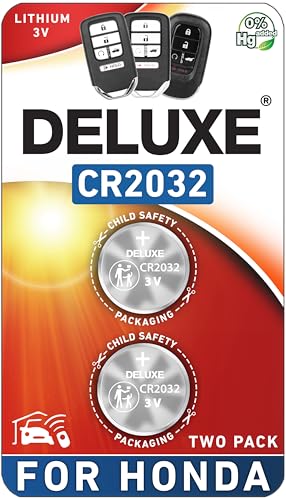
CONFIRM FIT - **Please confirm compatibility using the fitment guide located in the product images**
Replace the Battery
When it comes to replacing the battery in your Honda Odyssey key fob, it’s essential to follow a few simple steps to ensure a smooth process. Here’s how you can do it:
- Step 1: Gather the necessary tools: You’ll need a small flathead screwdriver or a coin to open the key fob.
- Step 2: Open the key fob: Locate the seam around the edges of the key fob and carefully insert the screwdriver or coin to pop it open.
- Step 3: Remove the old battery: Once the key fob is open, gently remove the old battery. Pay attention to how the battery is positioned, so you can insert the new one correctly.
- Step 4: Replace with a new battery: Insert the new battery into the same position as the old one. Ensure it’s snugly in place.
- Step 5: Close the key fob: Carefully align the cover and press it until you hear it snap back into place.
- Step 6: Test the key fob: Make sure the key fob is working properly by testing it to lock and unlock your car.
By following these simple steps, you can easily replace the battery in your Honda Odyssey key fob without any hassle.
Recommended Products

Compatible with a 2014-2024 Honda Odyssey Smart Keyless Remote with a low or dead battery.

Perfect Fit for Honda Key Fobs - Designed to match a wide range of Honda models, including the Civic, Accord, CRV, Pilot, Odyssey, HRV, Fit, Passport, Ridgeline, Crosstour, Insight, Clarity, CR-Z this CR2032 battery set ensures a precise fit for your key fob. Say goodbye to compatibility worries and hello to a hassle-free solution.

PACKAGE INCLUDED : Two (2) CR2032 Remote key Fob Battery and Opening/Pry Tools , Five item bundle (total 5pcs) , Please confirm compatibility using the fitment guide located in the product images.
Test the Key Fob
- Step 1: Stand close to your Honda Odyssey.
- Step 2: Press the lock or unlock buttons on the key fob.
- Step 3: Verify that the doors respond by locking or unlocking.
- Step 4: Check if the key fob’s buttons are working without any issues.
- Step 5: If everything functions correctly, your key fob battery replacement was successful!
Conclusion
That’s it! You’ve successfully replaced the battery in your Honda Odyssey key fob. By following the steps outlined in this guide, you’ve ensured that your key fob is working smoothly and efficiently. Remember to test the key fob’s functionality to confirm that the battery replacement was a success. Enjoy the convenience of a properly functioning key fob for your Honda Odyssey!
Frequently Asked Questions
1. Why is it important to replace the battery in a Honda Odyssey key fob?
It is essential to replace the battery to ensure proper functionality of the key fob. A weak or dead battery can result in the key fob not working correctly, leading to inconvenience or potential lockouts.
2. What tools do I need to replace the battery in a Honda Odyssey key fob?
You will need a small flathead screwdriver to open the key fob and a new CR2032 battery for replacement. Ensure to have these tools handy before starting the battery replacement process.
3. How do I check if the key fob battery needs replacement?
If the key fob buttons are unresponsive or work intermittently, it is likely that the battery needs replacement. Testing the key fob’s functionality is a good way to determine if a new battery is required.
4. Can I replace the key fob battery myself?
Yes, replacing the key fob battery is a simple process that you can do yourself by following the specific steps outlined in the article. It does not require advanced technical skills.
