

Checking the Key Fob Model
To ensure you get the right battery, check the key fob model first. Here’s how you can identify your Volkswagen key fob model:
- Look for the key fob model number on the back.
- Some key fobs have the model number in the battery compartment.
- If you can’t find the model number, you can contact a Volkswagen dealership with your VIN.
Remember, the correct key fob model is crucial for a successful battery replacement.
Gathering the Necessary Tools
When it comes to replacing your Volkswagen key fob battery, having the right tools on hand is crucial. Here’s what you’ll need:
- Replacement Battery: Ensure it matches the specifications for your key fob model.
- Small Flat-Head Screwdriver: Useful for opening the key fob case.
- Tweezers or Small Pliers: Handy for handling the small components inside the key fob.
- Clean Cloth: To wipe down the key fob and your hands during the process.
Before you start, gather all these tools in a well-lit and comfortable workspace. This will make the battery replacement task easier and more efficient.
Opening the Key Fob
Unlocking the key fob is the first step in the battery replacement process.
To open the key fob, locate the tiny slot on the side and insert a small flat-head screwdriver.
Gently twist the screwdriver to pop open the case without damaging it.
Once the case is open, be careful not to lose any internal components, such as batteries or buttons.
Remember to work on a clean surface to prevent any dirt or debris from getting inside.
| Tip | Keep track of the screws you remove to ensure you can easily put the key fob back together. |
|---|
Replacing the Battery
When it’s time to replace the battery in your Volkswagen key fob, follow these steps:
- Step 1: Look for the seam along the side of the key fob.
- Step 2: Insert a small flat-head screwdriver into the seam.
- Step 3: Gently twist the screwdriver to pop open the key fob.
- Step 4: Locate the battery inside the key fob.
Always ensure you have the correct battery size for your key fob model.
Testing the Key Fob
When replacing your Volkswagen key fob battery, it’s crucial to test the key fob afterward to ensure everything is functioning correctly. Here’s how you can do it:
- Step 1: Stand near your vehicle and press the buttons on the key fob to check if it locks and unlocks the doors.
- Step 2: If the key fob does not work as expected, try replacing the battery again to ensure it was correctly installed.
- Step 3: In some cases, the key fob may require reprogramming after battery replacement. Refer to your vehicle’s manual or contact a professional if needed.
Testing the key fob is a crucial step to ensure that your Volkswagen key fob is fully functional after replacing the battery.
Recommended Products

LONG-LASTING BATTERIES DESIGNED FOR DEPENDABILITY: Duracell Lithium Coin CR2032 3 Volt batteries deliver long-lasting power and performance you can count on for devices throughout the home or on-the-go, such as key fobs, remote controls, Apple AirTag️, flameless candles, wireless cameras, thermometers, toys, and more.

Compatible with Key Fobs for Volkswagen Models: Designed for key fobs for Volkswagen vehicles, this battery replacement kit works with popular models, including Atlas, Jetta, Tiguan, Golf, Arteon, and Passat.
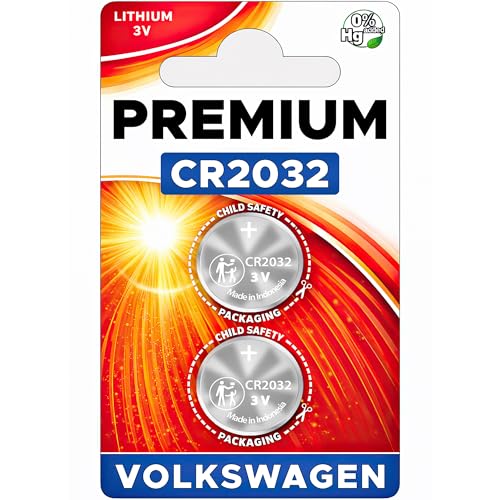
Elite Batteries Replacement are compatible with most 2003-2024 Volkswagen key fobs remotes. Possiblly compatible with VW key fobs before 2003; check fitment guide.
Conclusion
You’ve learned the importance of using the right tools and following a step-by-step guide to replace your Volkswagen key fob battery. Remember to work on a clean surface, keep track of screws, and ensure you have the correct battery size. Testing the key fob post-replacement is crucial to confirm proper functionality. If needed, re-replace the battery and refer to the vehicle’s manual or seek professional advice for reprogramming. With these tips, you can easily maintain your Volkswagen key fob for continued convenience and security.
Frequently Asked Questions
What tools are required to replace a Volkswagen key fob battery?
To replace a Volkswagen key fob battery, you will need a small flat-head screwdriver, a clean surface to work on, and a replacement battery of the correct size.
How do I open the key fob to replace the battery?
You can open the key fob by using a small flat-head screwdriver to gently pry it open.
What should I do to ensure I don’t lose any components while replacing the battery?
It’s important to work on a clean surface and keep track of any screws that you remove during the process.
Why is it crucial to use the correct battery size for the key fob?
Using the correct battery size ensures that the key fob functions properly after replacement.
How can I test the key fob after replacing the battery?
After replacing the battery, you should test the key fob to make sure it locks and unlocks the doors. If any issues arise, consider re-replacing the battery or consulting the vehicle’s manual for reprogramming instructions.
