

Key Takeaways
- Operating Without a Battery: Many Lenovo laptops can run solely on AC power when the battery is removed or fails, allowing uninterrupted work while connected to a power source.
- Risks to Consider: Potential risks include sudden power loss, which could lead to data loss, and hardware stability issues without the battery facilitating voltage stabilization.
- Power Source Management: Always ensure using a reliable outlet and consider employing an uninterruptible power supply (UPS) for protection against unexpected outages.
- Troubleshooting Assistance: If experiencing battery issues, temporarily using the laptop on AC power can help identify whether the problem is with the battery or the device itself.
- User Experiences: Many users have reported satisfactory performance running their Lenovo laptops on AC power, but emphasize the importance of regular data backups and utilizing auto-save features to prevent data loss.
- Maintenance Importance: Regularly check the condition of your AC adapter and cables to ensure consistent power delivery, enhancing the reliability of your laptop while operating without a battery.
Have you ever wondered if your Lenovo laptop can run without a battery? It’s a question many users ask, especially when dealing with battery issues or when they want to extend their device’s lifespan. Imagine being in the middle of an important task, and your laptop suddenly shuts down because the battery’s dead.
This article will guide you through the ins and outs of using your Lenovo laptop without a battery. You’ll discover whether it’s possible, the potential risks involved, and how to ensure your device runs smoothly. By the end, you’ll have the knowledge to make informed decisions about your laptop’s power options.
Overview of Lenovo Laptops
Lenovo laptops are known for their reliability and performance. They serve various needs, from casual use to professional tasks. Many models include various features such as high-resolution displays, powerful processors, and ample storage options.
Lenovo’s ThinkPad series is particularly popular among business users. These laptops focus on durability and productivity, with features like spill-resistant keyboards and advanced security options. For gaming enthusiasts, the Legion series offers high-performance graphics and fast refresh rates.
Most Lenovo laptops connect to an AC power source, allowing you to use them effectively. When functioning correctly, they rely on a battery for portability. However, you can run many Lenovo models on AC power alone. This capability provides flexibility when the battery encounters issues or requires replacement.
Each Lenovo laptop has specific power requirements and compatibility factors. Before running a laptop without a battery, consult the user manual for guidelines. Proper precautions ensure safe operation and prevent damage to the device.
Recommended Products

Lenovo Retail Packaged And Factory Sealed Item , Lenovo Part Number 4X20M26268.
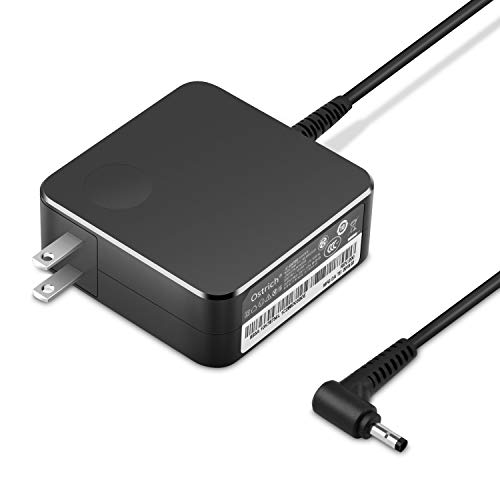
POWER SPECS Output Max: 20V 3.25A 65W/20V 2.25A 45W Input Volt Range: 110-240V/50/60Hz (For Worldwide Use) Compatible with Lenovo Charger Laptop AC Adapter Power Cord

Output:20V-3.25A / 15V-3A / 9V-2A / 5V-2A, 65W USB Type C
Running Lenovo Laptops Without Battery
Many Lenovo laptops can operate directly on AC power, even when disconnected from their batteries. This capability provides a convenient option for users facing battery issues or needing to extend their laptop’s lifespan.
Recommended Products

Power up your portable devices with the constant voltage supply

【Power Product Type】 : Max 65W 45W (compatible) AC Input: 100 - 240V 50 - 60Hz, Output: DC 5V/3A, 9V/3A, 12V/3A, 15V/3A, 20V/2.25A, 20V/3.25A. Connector size: USB Type-C

Safety - passed stringent safety tests to ensure you and your devices' safety
How Laptops Function Without Batteries
Laptops utilize both the power supply and the battery to operate. When plugged in, your Lenovo laptop draws power from the AC adapter, bypassing the battery. This setup allows you to work uninterrupted as long as the power source remains active. For instance, models like the ThinkPad and Legion series are specifically designed to function smoothly on AC power alone, providing flexibility in different situations.
Potential Risks Involved
Running your Lenovo laptop without a battery can pose some risks. One primary concern is the sudden loss of power. If you unexpectedly unplug the laptop or experience a power outage, you could lose unsaved data. Another risk involves potential damage to the hardware; without a battery, your device may lack the necessary voltage stability. It’s essential to always save your work frequently and consider using an uninterruptible power supply (UPS) to mitigate these risks.
Scenarios for Using a Lenovo Laptop Without Battery
Using a Lenovo laptop without a battery has specific scenarios, primarily focusing on power management and troubleshooting.
Recommended Products
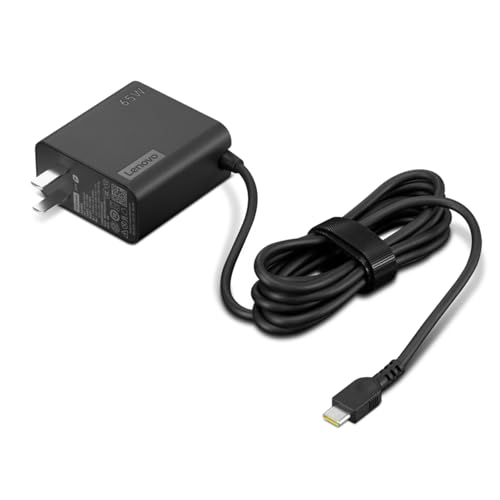
[PORTABLE CHARGING] Slim, light design and extra-long 1.7 m (5.9 ft) cable lets you charge in any spot, making powering up more convenient.
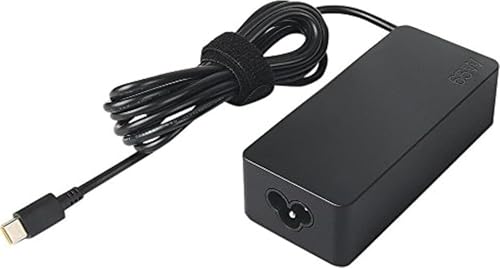
Lenovo AC adapter offers Fast and efficient charging. Keep one in the office, one at home, and another in your carrying case for convenient access to power.

【GaN 120W USB-C Travel Charger for Laptops】 -- This high-power USB-C travel adapter delivers ultra-fast charging for laptops, tablets and phones. USB-C1 supports up to 100W max when used alone, perfectly compatible for MacBook Air / MacBook Pro / Dell XPS / HP Spectre / Lenovo ThinkPad / Steam Deck / Nintendo Switch / iPad Pro / Watch / Kindle / Laptop / Tablet / iPhone 17/ 16 / 15 / 14 Series / Samsung Galaxy Series, computer, and more. A true laptop travel charger for carry-on travel, business travel, backpacking, family vacations, power users and frequent flyers who need reliable charging in different countries
Using Laptop on AC Power
You can run your Lenovo laptop solely on AC power. Ensure the laptop is plugged into a functional wall outlet using the correct power adapter. This setup allows you to continue working even if the battery is removed or damaged. Keep in mind that this operation remains uninterrupted as long as the laptop remains connected to the power source.
However, be aware of the risks associated with this approach. For instance, if a power outage occurs, your laptop will shut down immediately, potentially causing data loss. To safeguard your work, save your documents frequently and consider using an uninterruptible power supply (UPS) to provide backup power in case of outages.
Troubleshooting Battery Issues
If your Lenovo laptop exhibits signs of battery failure, such as not charging or overheating, using it on AC power can serve as a temporary solution. Assess the battery’s condition before proceeding. Remove the battery if it’s removable, then connect the laptop directly to the AC adapter.
Engage the laptop and monitor its performance. If it operates correctly, the issue likely stems from the battery. Check for battery updates in the Lenovo Vantage software or remove and reseat the battery to ensure proper connection. If the battery remains faulty despite these actions, consider replacement options.
In all scenarios, maintain regular backups of your data to minimize risk and frustration.
User Experiences and Opinions
Many users report positive experiences using Lenovo laptops without a battery. They find the laptops run smoothly on AC power alone. Various users confirm this setup works seamlessly, especially when plugged into a reliable outlet.
Some users do express concerns about potential data loss. For instance, if the power goes out unexpectedly, their unsaved work may disappear. Frequent saving mitigates this risk. Configuring auto-save features can help prevent data loss as well.
A few users recommend using UPS systems. These devices provide backup power during outages, protecting data and hardware. Investing in a UPS ensures an uninterrupted workflow, particularly for those handling sensitive tasks.
Several users emphasize the importance of regular maintenance. Checking the condition of your AC adapter regularly can prevent issues when using the laptop without a battery. Loose connections can disrupt power, making it essential to inspect cables and ports.
User opinions also highlight the visibility of performance changes. You might notice minimal lag while running demanding applications. Those who use Lenovo laptops solely on AC power often share tips for optimizing settings for performance.
For troubleshooting battery issues, many users suggest utilizing Lenovo’s built-in diagnostic tools. These tools offer insights on battery health and performance. Running these tests can help determine whether the battery needs replacement or if the issue lies elsewhere.
In general, experiences reveal that while using a Lenovo laptop without a battery is feasible, taking precautions significantly enhances usability. Stay proactive in your approach by backing up data, maintaining hardware, and considering alternative power sources.
Conclusion
Using your Lenovo laptop without a battery is definitely possible and can be a practical solution during battery issues. Just remember that while you can run it on AC power, there are risks involved. Sudden power loss can lead to data loss or even hardware damage.
To keep things running smoothly, make it a habit to save your work often and consider a UPS for backup power. Regular maintenance of your laptop and its components will help ensure you have a reliable experience. With these tips in mind, you can confidently navigate using your Lenovo laptop without a battery.
Frequently Asked Questions
Can a Lenovo laptop run without a battery?
Yes, many Lenovo laptops can operate without a battery by utilizing the AC power adapter. When plugged into a power source, the laptop will draw energy directly, allowing you to work smoothly.
What are the risks of using a laptop without a battery?
Using a laptop without a battery poses risks like sudden power loss during outages or unplugging, which can result in data loss and potential hardware damage due to lack of voltage stability.
How can I mitigate the risks of running a laptop without a battery?
To minimize risks, save your work frequently and consider using an uninterruptible power supply (UPS) for backup power during outages. Regularly check your AC adapter to ensure it’s in good working condition.
What should I do if my Lenovo laptop battery is malfunctioning?
If your battery is not working properly, try using the laptop on AC power alone to diagnose the issue. Check for software updates and utilize Lenovo’s diagnostic tools to troubleshoot battery problems.
Are there performance differences when running a Lenovo laptop on AC power without a battery?
Most users report minimal performance differences when operating on AC power alone. However, be aware that demanding applications could potentially be disrupted by sudden power loss. Regular maintenance is recommended for optimal performance.
