

Key Takeaways
- Easy Battery Replacement: Changing the battery in your Samsung Smart Tag is a straightforward process that requires minimal tools—primarily a CR2032 battery and a flat-head screwdriver.
- Key Features: Samsung Smart Tags support Bluetooth tracking, allowing users to locate items within 120 meters using the SmartThings app, compatible with Samsung Galaxy devices and some non-Galaxy devices.
- Regular Battery Checks: Monitor the battery life regularly to prevent loss of connectivity, aiming for a replacement every 6 to 12 months depending on usage.
- Maintenance Tips: Keep your Smart Tag clean, store it with essential items, and update the SmartThings app for optimal performance and functionality.
- Utilize Smart Functions: Explore the customizable alerts and features in the SmartThings app to enhance your tracking experience and stay informed about your belongings.
Have you ever found yourself frantically searching for your keys, only to realize your Samsung Smart Tag has run out of battery? It’s a frustrating situation that can leave you feeling unprepared. Fortunately, changing the battery is a simple task you can tackle in just a few minutes.
Overview of Samsung Smart Tags
Samsung Smart Tags are small, Bluetooth-enabled devices that help you keep track of your belongings. You can attach them to items like keys, bags, or pets. Smart Tags provide real-time tracking through the SmartThings app, making it easier to locate lost items.
Key Features
- Tracking Functionality: Smart Tags use Bluetooth Low Energy (BLE) to connect with your smartphone. This allows for effective tracking within 120 meters when in range.
- Compatibility: Smart Tags work with Samsung Galaxy devices running Android 8.0 or later. You can also use them with certain non-Galaxy devices with the SmartThings app installed.
- Battery Life: Each Smart Tag operates on a CR2032 battery. Under normal usage, the battery lasts about 6 to 12 months. However, frequent usage can deplete the battery faster.
Benefits
- Peace of Mind: Keeping track of valuables reduces the stress associated with lost items. You can quickly locate your belongings with a simple tap in the app.
- Smart Features: The Smart Tags offer additional functionalities like customizable alerts. You can receive notifications if you move too far away from your tagged items.
Practical Usage Tips
- Attach to Essentials: Attach your Smart Tag to important items, such as car keys or a backpack. This ensures you always know where these essentials are.
- Utilize the App: Download the SmartThings app for personalized tracking. Set up notifications to alert you when you’re about to forget an item.
By understanding the features and benefits of Samsung Smart Tags, you enhance your ability to keep track of your belongings efficiently.
Tools Needed for Battery Change
Changing the battery in your Samsung Smart Tag requires minimal tools. You’ll commonly need:
- CR2032 Battery: This is the specific battery type for Samsung Smart Tags. Make sure to use a fresh, high-quality battery for optimal performance.
- Flat-head Screwdriver: A small flat-head screwdriver helps pry open the battery compartment without damage.
- Non-abrasive Cloth: Use this to clean the battery contacts if necessary. Keeping the area clear ensures a better connection.
- Tweezers: Tweezers can assist in removing the old battery from the compartment if it’s snug.
Ensure you gather these tools before starting the battery change process. With everything in place, you’ll find the task quick and straightforward.
Step-by-Step Guide
Changing the battery in your Samsung Smart Tag is a simple process. Follow these steps to ensure a hassle-free experience.
Recommended Products

2 PACK - SMART TAG BATTERY REPLACEMENT: Specifically selected to fit Android-compatible trackers including the Samsung Galaxy SmartTag2, Motorola Moto Tag, and Chipolo Point.

Optimized for Air Tracker: Specifically designed to be the perfect for MiLi MiTag, Moto Tag, Samsung Galaxy SmartTag, Samsung Galaxy SmartTag 2 ensuring your device runs smoothly without interruptions.
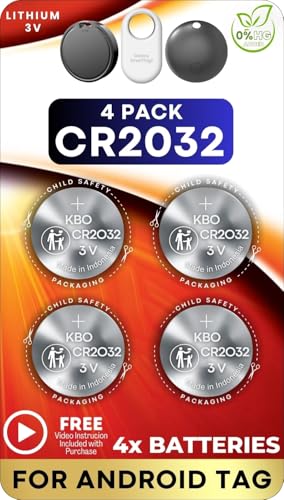
4 PACK - SMART TAG BATTERY REPLACEMENT: Specifically selected to fit Android-compatible trackers including the Samsung Galaxy SmartTag2, Motorola Moto Tag, and Chipolo Point.
Removing the Old Battery
- Prepare the Area: Find a clean, flat surface to work on. This prevents losing small parts.
- Open the Smart Tag: Use a flat-head screwdriver to gently pry open the back cover of the Smart Tag. Insert the screwdriver into the slot and lift the cover off.
- Take Out the Old Battery: Locate the CR2032 battery inside. Use tweezers to carefully lift it out. Be gentle to avoid damaging any internal components.
Inserting the New Battery
- Check the Orientation: Note the positive (+) and negative (-) sides of the battery compartment. Ensure the new CR2032 battery is positioned correctly.
- Insert the New Battery: Place the new battery into the compartment. Press down gently until it clicks into place.
- Replace the Back Cover: Align the back cover with the Smart Tag. Press down firmly until you hear a click, indicating it’s securely closed.
With these steps, your Smart Tag is ready to track your belongings again. Regularly check the battery to avoid losing connectivity.
Tips for Maintaining Your Smart Tag
- Regularly Check the Battery: Monitor the battery life of your Smart Tag to avoid unexpected disconnections. Check for signs like diminished tracking accuracy or notifications from the SmartThings app.
- Keep It Clean: Wipe the surface of the Smart Tag with a non-abrasive cloth to prevent dirt build-up. This helps maintain signal strength and the overall appearance.
- Store in a Safe Place: Attach your Smart Tag to items that you use frequently. This keeps it within easy reach and reduces the risk of losing the tag along with the item.
- Update Software: Ensure your SmartThings app and device’s software are updated regularly. This maintains compatibility and improves functionality.
- Avoid Extreme Conditions: Keep your Smart Tag away from extreme heat or moisture. High temperatures or water exposure may affect battery performance and signal reliability.
- Use a Quality Battery: When replacing the battery, always opt for a high-quality CR2032 battery. This ensures longer life and better performance.
- Familiarize with Features: Explore the features of the SmartThings app. Understanding customizable alerts can help you stay informed about your belongings’ locations.
- Test Regularly: Regularly test the Smart Tag’s tracking feature. Ensure it operates correctly by checking its range and connection status through the app.
Following these maintenance tips ensures your Smart Tag functions effectively, helping you keep track of your belongings without hassle.
Conclusion
Changing the battery in your Samsung Smart Tag is a simple yet essential task that keeps your tracking device working effectively. By following the steps outlined, you can easily replace the battery and ensure your belongings stay within reach.
Remember to check the battery life regularly and keep your Smart Tag clean for optimal performance. Staying proactive with maintenance will save you from the stress of lost items and help you make the most of your Smart Tag’s features.
With a little care, your Smart Tag will continue to be a reliable companion in keeping your essentials safe. Happy tracking!
Frequently Asked Questions
What is a Samsung Smart Tag?
Samsung Smart Tag is a small Bluetooth-enabled device used to track belongings such as keys, bags, or pets through the SmartThings app. It helps users locate misplaced items within a range of about 120 meters.
How long does a Samsung Smart Tag battery last?
The CR2032 battery in a Samsung Smart Tag typically lasts between 6 to 12 months, depending on usage conditions. Regularly checking its battery life helps in maintaining effective functionality.
How do I change the battery of a Samsung Smart Tag?
To change the battery, you will need a CR2032 battery, a flat-head screwdriver, tweezers, and a non-abrasive cloth. Carefully open the Smart Tag with the screwdriver, remove the old battery using tweezers, insert the new battery, and reassemble it.
What tools do I need to change the Samsung Smart Tag battery?
You need a new CR2032 battery, a flat-head screwdriver to open the device, tweezers to handle the battery, and a non-abrasive cloth to keep the device clean during the process.
How can I maintain my Samsung Smart Tag?
Regularly check the battery life, keep the device clean, and ensure it’s stored in an accessible place. Update the SmartThings app and software, avoid extreme conditions, and use high-quality batteries for optimal performance.
