

Key Takeaways
- Battery Life Overview: The Samsung Watch 5 typically lasts up to 40 hours on a single charge under standard usage, but intensive tasks like GPS and heart rate monitoring can reduce this to around 24 hours.
- Charging Practices: Full charging requires approximately 1.5 hours using the included wireless charger, and battery saver mode can extend life significantly.
- Maximizing Battery Longevity: Limit notifications, adjust display settings, and optimize app usage to conserve battery life throughout the day.
- Impact of Usage Patterns: Regular usage, such as notifications and fitness tracking, yields longer battery life, while constant screen-on and intensive features drain power faster.
- Standby Time Benefits: When not in active use, the Samsung Watch 5 can last several days in standby mode, highlighting the importance of feature management.
- Regular Monitoring: Check battery performance via settings to identify and address high-drain applications and adjust habits accordingly.
Wondering how long the battery lasts on your Samsung Watch 5? You’re not alone. Many users find themselves checking their watch’s battery life throughout the day, hoping it can keep up with their busy schedules.
Imagine you’re out for a run or in the middle of an important meeting, and your watch suddenly runs out of juice. That’s frustrating! In this article, you’ll learn everything you need to know about the battery life of the Samsung Watch 5, including tips to maximize its longevity. By the end, you’ll have a clearer understanding of what to expect and how to make the most of your smartwatch.
Overview Of Samsung Watch 5 Battery Life
The Samsung Watch 5 features a battery designed for all-day use, typically lasting up to 40 hours on a single charge. Battery life varies based on usage patterns and settings. Heavy usage, such as running multiple apps or using GPS, may reduce battery longevity.
Typical Battery Performance
- Standard Use: Running common functions like notifications and fitness tracking offers around 40 hours.
- Intensive Use: Activities like continuous heart rate monitoring and GPS tracking can decrease battery life to approximately 24 hours.
- Always-On Display: Enabling this feature may cut battery performance significantly.
Charging Options
- Charging Time: It takes about 1.5 hours to fully charge the Samsung Watch 5 using the included wireless charger.
- Battery Saver Mode: Activating this mode can extend battery life by limiting background processes and reducing display brightness.
Maximize Battery Life
- Limit Notifications: Disable notifications for non-essential apps to save power.
- Adjust Display Settings: Reduce screen brightness and time-out settings.
- Optimize Apps: Close unused apps running in the background.
These strategies can help you enjoy extended use of your Samsung Watch 5, keeping it operational throughout your day.
Factors Affecting Battery Longevity
Battery longevity on the Samsung Watch 5 depends on several factors, including usage patterns and settings. Understanding these elements can help you maximize your watch’s performance.
Recommended Products

Interface: USB Type-C
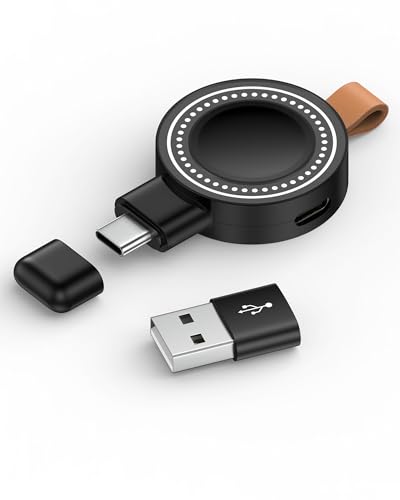
【Samsung Watch Charger Compatibility】: The galaxy smartwatch charger is only compatible with the samsung galaxy series watch. Compatible with Samsung Galaxy Watch 8, Galaxy Watch8 Classic, Galaxy Watch 7, Galaxy Watch Ultra, Galaxy Watch FE, Galaxy Watch 6, Galaxy Watch 6 Classic, Watch 5 Pro, Watch 5, Watch 4 Classic, Watch 4, Watch 3, Watch Active 2, Watch Active 2 Aluminum, Watch Active. Not for Galaxy watch (released in 2018) and Gear S2/S3/S4.

【Charger Dock Only】This USB Type C charging dock compatible with Samsung Galaxy Watch 8 40mm 44mm, Samsung Galaxy Watch 8 Classic 46mm, Samsung Galaxy Watch 7 40mm 44mm, Watch Ultra, Watch FE, Samsung Galaxy Watch 6 40mm 44mm, Samsung Watch 6 Classic 43mm 47mm, Samsung Galaxy Watch 5 40mm 44mm, Samsung Galaxy Watch 5 Pro 45mm, Samsung Galaxy Watch 4 40mm 44mm, Samsung Galaxy Watch 4 Classic 42mm 46mm, Samsung Galaxy Watch 3 41mm, Samsung Galaxy Watch active 2 40mm 44mm, Samsung Galaxy Watch active 40mm 44mm, Samsung Galaxy Watch 42mm.
Usage Patterns
Usage patterns impact battery life significantly. Regular activities, like checking notifications and tracking workouts, typically yield around 40 hours of battery use. However, intensive tasks, such as continuous heart rate monitoring or using GPS for extended periods, can reduce battery life to approximately 24 hours.
You can optimize battery life by:
- Limiting Screen Time: Keeping the screen on constantly drains the battery faster.
- Reducing Tracking: Disable heart rate or sleep tracking if not needed.
- Managing Notifications: Limit notifications to essential apps only.
Settings and Customizations
Settings and customizations for the Samsung Watch 5 can also affect battery longevity. Adjusting various options lets you strike a balance between functionality and power management.
Consider these tips:
- Display Brightness: Lowering brightness can conserve energy.
- Always-On Display: Turning off this feature can extend battery life.
- Power Saving Mode: Activating this mode temporarily reduces performance to prolong battery use.
By making these adjustments, you’ll enhance the battery performance and enjoy your Samsung Watch 5 throughout the day.
Battery Life Estimates
Battery life on the Samsung Watch 5 varies based on how you use it. Understanding your usage scenarios helps in estimating the duration you can expect between charges.
Typical Usage Scenarios
For standard daily use, like checking notifications and tracking fitness, the Samsung Watch 5 can last up to 40 hours. Frequent activities like monitoring heart rate or using GPS can reduce battery life to approximately 24 hours. If you wear the watch throughout the day without using intensive features, anticipate getting close to the maximum battery estimate.
Standby Time Comparison
When not in active use, the Samsung Watch 5 offers impressive standby time. In this mode, the battery can last significantly longer, up to several days. For instance, if you turn off most features and utilize power-saving modes, the standby time can stretch up to 40 hours. This highlights the importance of understanding how specific features impact overall battery longevity, allowing you to make informed decisions regarding your watch’s settings.
Charging Options and Efficiency
The Samsung Watch 5 offers several convenient charging options that cater to your lifestyle. You can charge the watch using the included magnetic charger. Simply align the charger with the back of the watch, and it will snap into place. This method is quick and easy, taking about 1.5 hours for a full charge.
For those on the go, wireless charging pads compatible with Qi-enabled devices can also power the Samsung Watch 5. These pads provide flexibility, allowing you to charge without needing a specific charging station.
Recommended Products

Wide Compatibility: Compatible with most Samsung and Android devices that support wireless charging, including the Galaxy S, Note, and Z Fold series, Galaxy Watch models, and Galaxy Buds earbuds. 【Important Notice: NOT Support Galaxy Z Flip & Galaxy A series & Apple Watch】
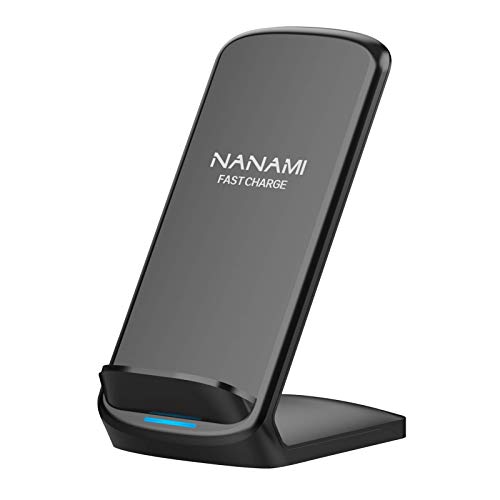
[Easy Wireless Charging]: Say goodbye to tangled cords and enjoy convenient wireless charge experience by simply laying your phone on the charging stand, no more plug in/ out troubles (Supports most phone cases not thicker than 5mm such as armor case, rubber case, hybrid case, plastic/TPU/PC cases.Please remove all metal and magnetic attachment or credit cards before placing your phone.)

MORE COILS MAKE IT EASIER TO ALIGN: Six coils inside the Wireless Charger Trio makes it simple for you to put your device down and charge it up. No more messing with alignment — just set it on the pad to get a boost of power.Compatible devices:Cellular Phones;Smartphones; smartwatches, headphones.Special Feature:Wireless Charging;Fast Charging.Input voltage: 9 volts
Battery-Saving Features
Activating battery saver mode can significantly improve efficiency. This feature limits background activity and reduces display brightness, extending battery life. To enable this mode, swipe down on the watch face, tap the battery icon, and select battery saver.
Practical Tips for Extended Battery Life
You can apply several practical tips to optimize your watch’s battery life:
- Limit Notifications: Too many notifications can drain the battery quickly. Customize which app notifications you receive.
- Adjust Display Settings: Reduce brightness and set the screen timeout to the shortest feasible duration.
- Manage App Usage: Close apps running in the background that you don’t frequently use.
Monitoring Battery Performance
You can monitor battery performance through the settings. Go to Settings > Battery, where you also get insights into which features consume the most power. Understanding this information helps you make informed choices about your usage habits.
With the right strategies in place, you can enhance the efficiency of your Samsung Watch 5, ensuring it stays powered throughout your daily activities.
Conclusion
The Samsung Watch 5 offers a solid battery life that can keep up with your daily activities. By understanding how your usage impacts battery performance you can make simple adjustments to get the most out of your watch. Whether it’s limiting notifications or using power-saving modes you have the tools to extend that battery life.
With a little attention to your settings and habits you can enjoy all the features of your smartwatch without constantly worrying about recharging. Embrace the convenience of the Samsung Watch 5 and make it work for you throughout the day.
Frequently Asked Questions
How long does the battery of the Samsung Watch 5 last?
The Samsung Watch 5 typically lasts up to 40 hours on a single charge under standard usage, such as notifications and fitness tracking. However, intensive activities like continuous heart rate monitoring or GPS tracking may reduce its battery life to approximately 24 hours.
How long does it take to charge the Samsung Watch 5?
Fully charging the Samsung Watch 5 takes about 1.5 hours using the included magnetic charger. You can also use compatible Qi-enabled wireless charging pads for added convenience.
What can I do to extend the battery life of my Samsung Watch 5?
To maximize battery life, consider activating battery saver mode, limiting notifications, reducing display brightness, and managing app usage. Adjusting settings can significantly help improve battery longevity.
What factors affect the battery longevity of the Samsung Watch 5?
Battery longevity varies based on usage patterns and settings. Features like screen time, heart rate monitoring, GPS usage, and notifications significantly impact the overall battery performance.
How can I monitor the battery performance of my Samsung Watch 5?
You can monitor battery performance through the watch’s settings, which provide insights into which features consume the most power. This allows you to make informed adjustments to optimize battery life.
