

Key Takeaways
- Understanding Super Fast Charging: Samsung’s Super Fast Charging (SFC) utilizes advanced technologies like Power Delivery and Adaptive Fast Charging to quickly recharge devices, restoring battery life significantly in less than an hour.
- Convenience & Efficiency: SFC allows users to enjoy rapid charging, achieving up to 50% battery in around 30 minutes, making it advantageous for busy lifestyles.
- Heat Management: Fast charging generates heat, which can negatively impact battery health over time; monitoring charging environments and avoiding excessive heat exposure is crucial.
- Impact on Battery Longevity: Regular use of SFC may accelerate battery cycle depletion and shorten overall lifespan, so balancing fast charging with traditional methods is recommended.
- Best Practices: Using original Samsung chargers, monitoring charging habits, and allowing devices to cool before charging will help maintain battery health while enjoying quick recharge capabilities.
Do you ever wonder if using Samsung’s Super Fast Charging is actually harming your battery? You’re not alone. Many smartphone users love the convenience of quick charging but worry about the long-term effects on their devices.
Imagine rushing out the door and needing a quick power boost. You plug in your phone for just a few minutes and it’s good to go. But is that speed worth the potential risk? This article will help you understand how Super Fast Charging works and whether it could impact your battery life. By the end, you’ll have the knowledge to make informed choices about your charging habits.
Overview of Samsung Super Fast Charging
Samsung’s Super Fast Charging (SFC) technology enables you to quickly recharge your device. Utilizing Power Delivery (PD) and Adaptive Fast Charging (AFC), this system can deliver up to 45W of power. Such speeds often restore a phone’s battery to 100% in less than an hour, making it convenient for users on the go.
How It Works
Samsung’s SFC technology employs a smart charging algorithm. When you connect your device, it communicates with the charger to determine the optimal voltage. The charger then adjusts its output to maximize charging efficiency while safeguarding the battery’s life.
Benefits of Super Fast Charging
- Speed: You can get hours of usage from just a short charging session. For instance, 30 minutes can add up to 50% battery.
- Convenience: Quick recharges mean less downtime, especially when you’re busy.
- Compatibility: Many devices support SFC, so you can use the same charger across different models.
Potential Concerns
- Heat Production: Fast charging generates more heat, which can degrade battery materials over time.
- Battery Cycles: Regularly using fast charging might lead to quicker battery cycle depletion compared to standard charging methods.
- Battery Longevity: Prolonged reliance on high-speed charging could impact overall battery health and lifespan over time.
Best Practices for Use
- Use Original Chargers: Always opt for Samsung-approved chargers for optimal performance and safety.
- Avoid Heat Exposure: Charge your phone in a cool environment to minimize heat impact.
- Limit Frequent Fast Charging: Use regular charging overnight or during longer breaks to preserve battery health.
Understanding how Samsung Super Fast Charging works enables you to use it effectively while considering its potential impacts on battery longevity. With proper practices, you can enjoy both convenience and battery health on your device.
Benefits of Super Fast Charging
Super Fast Charging (SFC) delivers many advantages, making it a favorable option for smartphone users. This technology offers significant speed and efficiency, enhancing user experience while accommodating the demands of modern life.
Recommended Products

【45W Samsung Super Fast Charger 2.0】USB C super fast charger type c charger with maximum power of 45W Super Fast Charge 2.0 capability uses Power Delivery technology to provide the most efficient charge possible. Super fast charge for Samsung Galaxy S26/S25/S24 Ultra from 0% to 50% in just 20 min, more faster than other 25W/15W chargers.
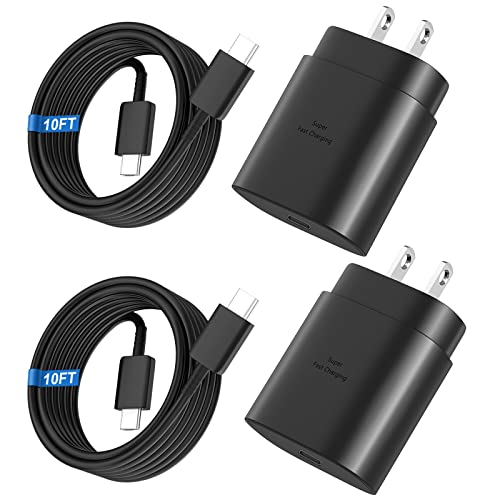
Small & Powerful: With 25W charging power but smaller size, this Vilive Samsung charger fast charging cord is more convenient and portable. Equipped with a type c port, you can charge your device back to full power in no time by using the 25W USB C fast charger for Samsung Galaxy S26 S25 series. It takes about 1 hour to fully charge your Samsung Galaxy S26 ultra, S25 ultra, S24 ultra, S23 ultra, 3 times as fast as standard PC USB-C charger.

[PD25w Samsung Super Fast Charger] - 25 watt Type C charging block for samsung phones & 10ft samsung charger fast charging cord, charges Samsung Galaxy S26/S25/S24/S23 from 0 to 100 percent in about 60 min or full charges iPad Pro 12.9 inch in 2 hours. It is 5 times as fast as standard fast charger usb c, 10 times as fast as PC USB port and saves your time.
Convenience and Efficiency
Convenience stands out as one of the main benefits of SFC. You can charge your device to a sufficient level in just 30 minutes, making it ideal during a busy day. With SFC, a quick power-up lets you get back to using your phone in no time, particularly beneficial when you’re short on battery before heading out. For instance, charging from 0% to 50% in around 30 minutes means you’ll have enough power for essential tasks like navigation or messaging.
Efficiency also plays a key role. SFC minimizes downtime by allowing multiple rapid charging sessions throughout the day. Whether at work, home, or on the go, you can frequently top off your battery without feeling tethered to a wall outlet.
Battery Management Features
Battery management features contribute to the advantages of SFC as well. Modern devices incorporate advanced software that optimizes charging speeds while monitoring battery health. For instance, Samsung devices often include Adaptive Battery Management that regulates charging rates, preventing overheating and potential damage.
Some smartphones use smart algorithms to slow down charging once the battery reaches around 80%. This approach not only saves time in achieving a full charge but also preserves battery longevity. Such features ensure that you benefit from fast charging without sacrificing health over time.
By embracing Samsung’s Super Fast Charging, you unlock a world of convenience and technology-driven efficiency, making your device usage smoother and more manageable.
Potential Drawbacks of Super Fast Charging
Samsung’s Super Fast Charging (SFC) offers excellent convenience, but certain drawbacks exist that can affect battery health over time.
Recommended Products

40% Smaller & Lighter Portable Charger: Powered by the industry’s first TinyCell high-density battery technology, this ultra-compact 10,000mAh portable charger power bank is 40% smaller and 36% lighter than conventional chargers. Whether you are an office user slipping a mini small portable battery into a purse for commuting, or a student looking for lightweight college essentials, you get powerful daily carry convenience without the extra bulk to keep you powered on the go.

Large Capacity Xbox Controller Battery Pack:2 pack 6200mWh rechargeable batteries provide up to 28 hours running time. Ukor xbox rechargeable battery pack is compatible with Xbox One /Xbox One X / Xbox One S / Xbox Series X|S/Xbox One Elite Wireless Controller.
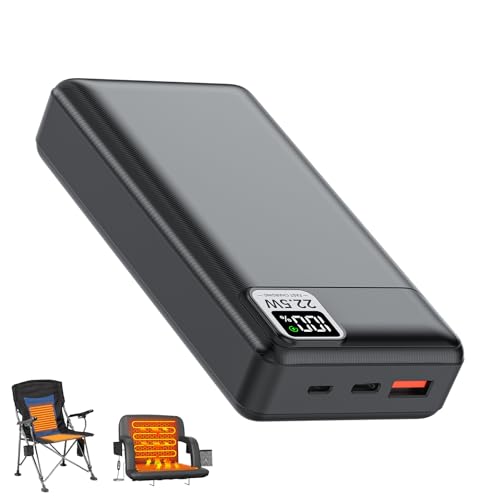
【Designed for 5V&12V USB Input Heated Gears】Specially designed for 5V or 12V USB input heated camping chair (for Youtanic, EVER ADVANCED, REALEAD, Suteck, Overmont..), heated stadium seat (for HOPERAN, ACELETIQS, Suteck, MZQLN, Alpcour MENOLY... ), electric heating pad (for URMONA, Ksheat, Thyle, Lslpin, TIDEWE, MYDAYS... ), heated blanket(for KFUBUO Mefine Qfun Wodesid Zireot KADORVA Diweez...), heated vest/ jacket (for KOVNLO, DR.PREPARE, Loowoko, Hoson, TIDEWE, Burngogo... ), red light therapy pad etc. Note: No DC port
Heat Generation
Heat generation poses a primary concern with Super Fast Charging. Rapid charging produces heat, which can negatively impact battery capacity and lifespan. When charging speeds reach up to 45W, the temperature of the battery rises significantly. Excess heat can accelerate chemical reactions inside the battery, leading to degradation. To reduce heat, you should consider using your device in a cooler environment and remove cases during charging.
Impact on Battery Lifespan
Battery lifespan sometimes shortens due to frequent reliance on SFC. Lithium-ion batteries face wear with each charge cycle, and quick charging can stress the battery more than standard methods. While fast charging allows for quick boosts, it can contribute to a gradual decline in overall battery health. Monitoring your charging habits is essential; limit fast charging sessions and opt for standard charging whenever possible to extend battery life.
User Experience and Feedback
User feedback highlights both satisfaction and concerns regarding Samsung’s Super Fast Charging (SFC). Many users appreciate the ability to quickly recharge their devices, especially those with busy lifestyles. Comments frequently focus on the convenience of obtaining several hours of battery life from just a short charging session.
Consumer Opinions
Consumers often express contentment with SFC’s efficiency. Users commonly cite the benefits of reaching a 50% charge in around 30 minutes. However, some users report concerns about battery degradation over time. Issues like overheating during rapid charging sessions have come up in reviews, with users noting elevated temperatures as a potential risk. Many suggest balancing fast charging with standard charging to alleviate these worries.
Expert Reviews
Experts generally agree that SFC provides significant advantages for users. Technicians emphasize the importance of heat management, noting that while rapid charging can generate heat, Samsung’s battery management systems help mitigate risks. Various studies indicate that frequent use of fast charging does not drastically impact battery lifespan when users follow recommended practices. For example, allowing the device to cool down before charging can enhance longevity. Experts recommend using original chargers to ensure optimal performance and safety.
Different reviews also mention that while SFC offers convenience, users should remain mindful of their charging habits. Combining fast charging with standard charging methods can promote longer battery life and consistent performance.
Conclusion
Using Samsung’s Super Fast Charging can definitely enhance your daily routine by providing quick power boosts when you need them most. However it’s important to be mindful of how often you rely on this feature. While the technology is designed to protect your battery, excessive heat and rapid charging cycles can still take a toll over time.
By following best practices like using original chargers and allowing your device to cool down, you can enjoy the convenience of fast charging while keeping your battery healthy. Balancing fast and standard charging methods is key to maintaining optimal battery performance and longevity. So go ahead and charge up but keep an eye on those habits to ensure your device stays in top shape for years to come.
Frequently Asked Questions
What is Samsung’s Super Fast Charging (SFC)?
SFC is a rapid charging technology that allows compatible Samsung devices to recharge quickly, delivering up to 45W of power. It utilizes Power Delivery (PD) and Adaptive Fast Charging (AFC) to help charge devices to 100% in less than an hour, making it ideal for users needing a quick power boost.
Does Super Fast Charging affect battery health?
Yes, frequent use of SFC can potentially affect battery health over time. Rapid charging generates heat, which may lead to battery degradation. However, following best practices and using Samsung’s battery management systems can help mitigate these risks.
What can I do to protect my battery while using SFC?
To protect your battery, use original chargers, avoid charging in hot environments, and limit frequent use of fast charging. Allow your device to cool down before charging and combine fast charging with standard charging methods for better battery longevity.
How long does it take to charge a smartphone with SFC?
With Samsung’s Super Fast Charging, you can recharge compatible smartphones to about 100% in under an hour. For many users, charging for just 30 minutes can provide several hours of battery life, making it a convenient option for busy lifestyles.
Are there any downsides to using Super Fast Charging?
While SFC provides speed and convenience, it can lead to heat generation, which may shorten battery lifespan. Additionally, some users report concerns about overheating during rapid charging sessions, although Samsung’s battery management systems help manage this issue effectively.
