

Key Takeaways
- Samsung 3D glasses require either CR2032 or CR2016 coin batteries, with each type offering different dimensions and power levels.
- Changing the batteries is a simple process; locate the compartment, remove old batteries, insert new ones, and ensure proper alignment of positive and negative terminals.
- Regular battery maintenance includes keeping spares on hand, checking battery levels before use, and storing batteries in a cool, dry place to extend their lifespan.
- Active 3D glasses sync electronically with displays and require batteries, while passive glasses do not require power due to their polarizing lenses.
- Battery life can vary based on usage; typically lasting 30-40 hours of active use and up to a year in standby mode.
- To ensure optimal performance, clean battery contacts and turn off the glasses when not in use.
Have you ever settled in for a movie night only to realize your Samsung 3D glasses are dead? It’s frustrating when you’re all set to enjoy a cinematic experience, but the batteries let you down. Knowing what batteries your glasses need can save you from that last-minute scramble.
In this article, you’ll find everything you need to know about the types of batteries that power your Samsung 3D glasses. Whether you’re looking to stock up or just replace a dead battery, we’ve got you covered. By the end, you’ll have the knowledge to keep your glasses ready for action anytime you want to immerse yourself in 3D entertainment.
Overview of Samsung 3D Glasses
Samsung 3D glasses enhance your viewing experience by providing an immersive 3D effect. Various models exist, each designed to pair with specific Samsung devices. Knowing the type of batteries required for your glasses is essential for uninterrupted enjoyment.
Battery Types
Samsung 3D glasses typically use one of two battery types: CR2032 or CR2016 coin batteries. These batteries are commonly available at stores and online. Here’s a breakdown:
- CR2032: This battery measures 20mm in diameter and 3.2mm in thickness. It generally has a longer life, making it suitable for frequent use.
- CR2016: With a diameter of 20mm and thickness of 1.6mm, this option is slightly slimmer but provides less power.
How to Change Batteries
Changing the batteries in Samsung 3D glasses is a straightforward process. Follow these steps:
- Locate the battery compartment: Usually found on the temple or side of the glasses.
- Open the compartment: Use your fingers or a small flat tool to gently pry it open.
- Remove old batteries: Take out the dead batteries and dispose of them properly.
- Insert new batteries: Ensure the + and – signs align according to the compartment diagram.
- Close the compartment: Snap it back into place until you hear a click.
Tips for Battery Maintenance
- Keep spares on hand: Stock extra batteries to avoid last-minute troubles.
- Check regularly: Test your glasses before an event to ensure they’re working properly.
- Store properly: If not in use, store your glasses in a cool, dry place to extend battery life.
Frequently Asked Questions
- How long do the batteries last? Battery life can vary based on usage, but expect anywhere from a few hours to several weeks.
- Can I recharge the batteries? No, these coin batteries are not rechargeable. Replace them when they die.
Understanding the battery requirements for your Samsung 3D glasses ensures you’re always ready for a fantastic 3D viewing experience.
Types of Samsung 3D Glasses
Samsung 3D glasses come in two main types: active and passive. Each type offers a unique viewing experience and battery requirements.
Recommended Products

(1) Support 2016~2023 3D TVs of Sony/Samsung/Panasonic, and Epson RF Projectors, RF communication method, work without emitter, light design, USB rechargeable.


Fits over your glasses, achieves far more life like 3D images.
Active 3D Glasses
Active 3D glasses contain electronic components that sync with a 3D display. These glasses often use CR2032 or CR2016 coin batteries. When choosing active glasses, look for models compatible with your Samsung device, as different models may vary in technology and performance. Regularly check the battery status before use to avoid interruptions.
Passive 3D Glasses
Passive 3D glasses rely on polarized lenses instead of batteries. These glasses don’t require power, making them convenient for extended use. They’re typically used in theaters or with certain Samsung TVs. While they don’t need batteries, ensure they remain in good condition to maintain the best 3D experience.
Battery Specifications
Samsung 3D glasses require specific coin batteries to function effectively. Knowing the correct specifications helps you keep your glasses ready for use.
Recommended Products

3V LITHIUM COIN 2032 BATTERY PACK: One 10 pack of Energizer lithium 2032 Batteries. Packaging may vary

Our CR2016 lithium 3v coin battery deliver the long lasting power and longer battery life. Capacity 90mAh, Diameter 20mm, Height 1.6mm, Weight 1.7g. These CR2016 coin cell batteries have full 3 Volts Charge, 5 Years Shelf Life. UL, REACH and RoHS Certified. The CR2016 battery is an excellent choice for the remote that controls tea light candles, flash lights, LED lights, Christmas LED Lamps that we put out during the Holidays
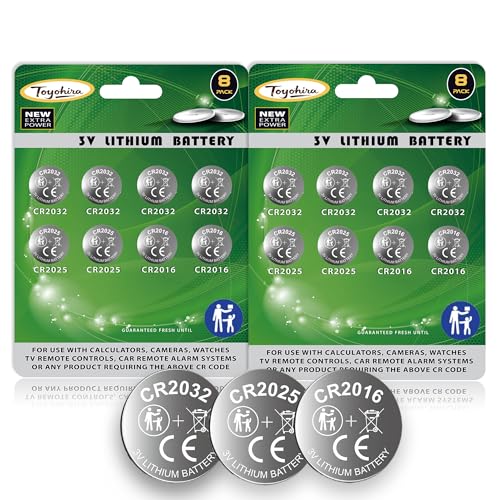
【16-Pack Assorted Button Cell Batteries】 Includes 8x CR2032, 4x CR2025, and 4x CR2016 3V lithium batteries — one pack covers multiple devices like key fobs, AirTag, remote controls, thermometers, and glucose monitors.
Common Battery Types Used
The most common battery types for Samsung 3D glasses are CR2032 and CR2016.
- CR2032: This battery measures 20mm in diameter and 3.2mm in thickness. Often used in devices like watches and electronic toys, it’s widely available at stores and online.
- CR2016: This battery is thinner, measuring 20mm in diameter and 1.6mm in thickness. Typically found in remote controls and calculators, it’s also easy to find.
Both batteries are reliable and should last several months, depending on usage. Always check your user’s manual for your specific model to ensure compatibility.
Battery Lifespan and Performance
Battery lifespan for Samsung 3D glasses varies based on usage frequency. Generally, you can expect the following:
- Active use: About 30 to 40 hours of viewing time.
- Standby use: Batteries can last up to a year when the glasses aren’t in use.
For optimal performance, store your glasses in a cool, dry place. Before each use, check battery levels and replace them if necessary. Keeping a spare set on hand ensures you won’t miss out on the 3D experience when your batteries run low.
How to Replace Batteries in Samsung 3D Glasses
Replacing batteries in Samsung 3D glasses is a quick and straightforward task. Follow these steps to ensure your glasses are ready for your next viewing session.
Recommended Products

High Quality Made in Japan

Applicable to the following models: CR2032,,2032, CR2032BP,DL2032,ECR2032,KCR2032,BR2032,LM2032,5004LC,5004LB,L14,SB-T15,EA2032C,EA-2032C,L2032,2032,DJ2032,KL2032,E- CR2032,KECR2032,GPCR2032,KT-CR2032

High Capacity: 240 mAh of charge provides long-lasting power, 30% more than conventional button cells
1. Gather Your Supplies
- CR2032 or CR2016 batteries: Check which battery your model requires.
- Small screwdriver: Most glasses need a Phillips head to open the battery compartment.
2. Locate the Battery Compartment
- Find the compartment: It’s usually on the temple arm or inside the frame.
- Look for a small cover: Some compartments may have a latch or a screw.
3. Open the Battery Compartment
- Unscrew if necessary: If your model has a screw, gently remove it with the screwdriver.
- Slide or lift the cover: Carefully open the compartment to prevent any damage.
4. Remove Old Batteries
- Take out the old batteries: Note the orientation (positive and negative sides) to install the new ones correctly.
5. Insert New Batteries
- Place the new batteries: Ensure they’re positioned according to the markings inside the compartment.
- Apply gentle pressure: Make sure they fit snugly.
6. Close the Battery Compartment
- Replace the cover: Slide or secure it back into place.
- Screw in the latch: If your model has a screw, tighten it gently.
7. Test Your Glasses
- Turn on the glasses: Activate them to check if they’re working properly.
- Adjust settings if needed: Some models might require syncing with your device.
Additional Tips
- Keep spare batteries handy: Always have a couple of extra CR2032 or CR2016 batteries available.
- Check battery status regularly: Assessing battery levels before each use helps avoid interruptions.
Following these steps ensures a seamless viewing experience with your Samsung 3D glasses.
Tips for Maintaining Battery Life
- Store batteries properly
Store spare batteries in a cool, dry place. Avoid sunny windowsills or humid areas like bathrooms, as heat and moisture can shorten battery life.
- Check battery levels
Regularly check the battery levels in your Samsung 3D glasses. Testing them before major usage ensures you’re ready for movie night without surprises.
- Replace old batteries promptly
Replace batteries when they start to show signs of weakness. If you notice flickering images or reduced brightness, it’s time for a change.
- Keep spare batteries handy
Always have a few CR2032 and CR2016 batteries on hand. This simple precaution can prevent last-minute trips to the store.
- Avoid extreme temperatures
Never expose your glasses and batteries to extreme temperatures. Both heat and cold can negatively impact battery performance and lifespan.
- Clean contacts regularly
Clean the battery contacts in the glasses with a soft cloth. This helps maintain a solid connection and can extend battery life.
- Turn off when not in use
Always turn off your Samsung 3D glasses when not in use. This simple action helps preserve battery life significantly.
- Use quality batteries
Opt for reputable battery brands. High-quality batteries provide better performance and longer lifespan compared to cheaper alternatives.
Following these tips ensures your Samsung 3D glasses remain ready for use, enhancing your viewing experience while maximizing battery life.
Conclusion
Knowing what batteries your Samsung 3D glasses need can save you from those frustrating moments before movie night. By keeping a supply of CR2032 or CR2016 batteries on hand you can ensure your glasses are always ready to go.
Regularly checking battery levels and following maintenance tips will help extend battery life and enhance your viewing experience. With the right care your Samsung 3D glasses can provide hours of immersive entertainment. Enjoy your next movie night without a hitch!
Frequently Asked Questions
What type of batteries do Samsung 3D glasses use?
Samsung 3D glasses typically use either CR2032 or CR2016 coin batteries. The CR2032 measures 20mm in diameter and 3.2mm in thickness, while the CR2016 is thinner at 20mm in diameter and 1.6mm in thickness. These batteries are widely available in stores and online.
How long do the batteries last in Samsung 3D glasses?
The battery life for Samsung 3D glasses varies depending on usage. Active use typically provides about 30 to 40 hours of viewing time, while standby mode can last up to a year before needing replacement.
Can I recharge the batteries in my Samsung 3D glasses?
No, the CR2032 and CR2016 batteries used in Samsung 3D glasses are not rechargeable. They need to be replaced with new batteries once depleted.
How do I change the batteries in my Samsung 3D glasses?
To change the batteries, locate the battery compartment, usually found on the side or bottom of the glasses. Open it, remove the old batteries, insert new ones while following the correct orientation, and close the compartment securely.
How can I maintain the battery life of my Samsung 3D glasses?
To maximize battery life, store glasses in a cool, dry place, regularly check battery levels, turn off glasses when not in use, and use quality batteries. Keeping spare batteries handy is also advisable for convenience.
