

Key Takeaways
- The Sony A7II uses the NP-FW50 lithium-ion battery, which is essential for its optimal performance and functionality.
- With a capacity of 1020 mAh, the NP-FW50 battery allows for approximately 310 shots per charge under standard conditions, making it crucial to carry spare batteries for extended shoots.
- This battery is compatible with multiple Sony camera models, including the A7, A7R, A5, and NEX series, simplifying your photography equipment.
- Charging options include the standard charger that comes with the camera and external battery packs, both of which enhance shooting flexibility and minimize downtime.
- Proper battery maintenance tips include storing batteries in cool, dry places, avoiding full discharges, and regularly cleaning contacts to ensure longevity and optimal performance.
- Regularly monitoring battery health and keeping extra batteries on hand are vital practices to prevent missing crucial shots during your photography sessions.
Have you ever found yourself out in the field with your Sony A7II, only to realize your battery’s running low? It’s a frustrating situation that can ruin a perfect shot. Knowing the right battery for your camera is crucial to avoid those unexpected moments.
In this article, you’ll discover which battery powers the Sony A7II and why it’s important to choose the right one. You’ll learn about the features and benefits of the compatible battery options, helping you make informed decisions for your photography adventures. With the right battery in hand, you can focus on capturing stunning images without worrying about your camera’s performance.
Overview of Sony A7II
The Sony A7II is a full-frame mirrorless camera known for its compact design and impressive image quality. This model features a 24.3-megapixel sensor that captures stunning photos in various lighting conditions. The A7II offers advanced image stabilization, which reduces blur and enhances clarity in your shots.
You’ll find a robust autofocus system with 117 phase-detection points and 25 contrast-detection points. This combination allows for quick and accurate focusing, making it easier to capture moving subjects. The A7II also supports continuous shooting at up to 5 frames per second, ideal for fast-paced photography.
Built-in Wi-Fi and NFC connectivity enable you to share images effortlessly. You can control the camera remotely through your smartphone or tablet, adding convenience to your shooting experience.
The camera’s ISO range spans from 100 to 25,600, with options to expand it up to 51,200. This breadth allows you to shoot in low-light environments without sacrificing detail or introducing excessive noise.
When it comes to video, the A7II supports full HD 1080p recording at 60 frames per second. This feature provides flexibility for videographers looking to capture high-quality footage.
The Sony A7II’s combination of image quality, autofocus performance, and versatile settings position it as an excellent choice for both photographers and videographers alike.
Battery Specifications
The Sony A7II uses a specific battery type essential for optimal performance. Understanding these specifications ensures you select the right battery and make the most of your camera.
Recommended Products

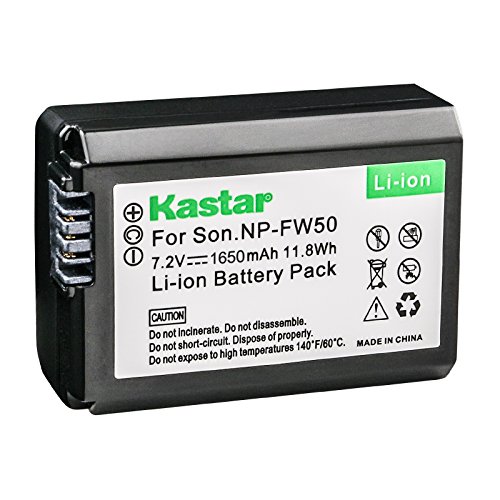
Kastar Brand Replacement Lithium-ion (Li-ion) Battery. High Quality, Long Lasting and Manufacture Price.

【Wide Compatibility】2 Pack np fw50 replacement batteries are 100% compatible with Sony NP-FW50 Li-on Battery. They are suitable for Sony Alpha 7, A7, A7II, A7S, A7SII, A7S2, A7R, A7RII, A7R2, A5000,A6000, A6500, A6300, NEX-3, NEX-3N, NEX-5, NEX-5C, NEX-5N, NEX-5R, NEX-5T, NEX-6, NEX-7, NEX-C3, NEX-F3, DSC-RX10, etc
Battery Type
The Sony A7II operates with the NP-FW50 lithium-ion battery. This rechargeable battery is widely recognized for its reliability and longevity. Using genuine or approved third-party batteries ensures proper functionality and camera safety.
Capacity and Voltage
The NP-FW50 battery features a capacity of 1020 mAh and a voltage of 7.2V. This capacity translates to approximately 310 shots per charge under standard CIPA testing conditions. Powering your A7II with this battery allows for adequate performance during various shooting scenarios, including continuous shooting and video recording. Always keep a spare battery handy for extended shoots, especially in environments where charging isn’t feasible.
Compatibility with Other Models
The NP-FW50 battery offers compatibility across several Sony camera models. You can use this battery with:
- Sony A7 Series: Apart from the A7II, the NP-FW50 works with the original A7 and A7R models.
- Sony A5 Series: This battery fits the A5 and A5R cameras as well.
- Sony NEX Series: The NEX-6 and NEX-7 also utilize the NP-FW50, making it versatile for users of different models.
When considering a backup or alternative, remember that the NP-FW50 battery provides the same functionality across these cameras. This compatibility simplifies your photography gear, as one battery can serve multiple devices.
You might also come across third-party alternatives for the NP-FW50. Ensure they meet similar specifications, including 1020 mAh capacity and 7.2V voltage, to guarantee proper performance. Using brands reputable in the photography community can help maintain your camera’s performance.
Stored correctly, spare NP-FW50 batteries retain their charge for up to three years, facilitating ease of use during extended shooting sessions. Always check battery health before significant shoots.
Charging Options
Charging options for the Sony A7II enhance your shooting experience and keep you powered up. Below are two main choices along with key details.
Recommended Products

STANDARD COMPATIBILITY: LP NP-FW50 Battery Charger meets or exceeds the NP-FW50 Battery Charger (BC-TRW W Series Battery Charger). Works with Alpha A3000, A5000, A5100, A6000, A6300, A6500, A7, A7II, A7S, A7SII, A7R, A7RII, SLT-A33, A35, A37, A55, RX10, RX10II, RX10 III, RX10 IV, NEX-3/5/7 series and more.

Replacement Batteries for NP-FW50: A bigger capacity of 1100mAh/8.1W, can charge inside the camera, or using the 2.1A USB input charger to maximize charging efficiency. NOTE: For optimal battery longevity, please fully charge the battery before first use

3-Slot NP-FW50 Battery Charger: The NP-FW50 battery fast charger is equipped with micro-USB and Type-C dual interface, efficiently charge 3 pcs ZV-E10 batteries simutaneously or independently. Note: Only Type-C cable is included.
Standard Charger
Using the standard charger that comes with the A7II is the most straightforward way to charge your NP-FW50 battery. This charger plugs into a power outlet and takes around 2.5 hours for a full charge. An LED indicator shows the charging status, turning from red to green when fully charged. For added convenience, consider picking up an extra charger. This allows one battery to charge while you use another, minimizing downtime and keeping you ready for more shots.
External Battery Pack
An external battery pack provides flexibility, particularly during long shoots. These packs can recharge your NP-FW50 batteries on-the-go, making them perfect for outdoor or event photography. Look for packs that offer USB charging capabilities, as they often support multiple battery types and devices. When choosing a pack, consider the capacity; higher mAh ratings mean longer usage times before needing to recharge the external pack itself. Opt for a lightweight design for easy portability. This option keeps your workflow uninterrupted, allowing you to focus entirely on capturing stunning images.
Tips for Battery Maintenance
- Store batteries properly: Keep your NP-FW50 batteries in a dry, cool place to extend their lifespan. Avoid extremes of temperature and humidity to maintain optimal performance.
- Avoid full discharges: Don’t let your battery drain completely before recharging. Charge it when the battery level drops to around 20%. This practice helps prolong the overall lifespan of the battery.
- Use the right charger: Utilize the original charger that came with your A7II. Non-compatible chargers can damage the battery or lead to unsafe charging situations.
- Clean contacts regularly: Clean battery contacts with a soft, dry cloth. This practice prevents corrosion and ensures a solid connection between the battery and the camera.
- Monitor battery health: Check the battery health indicator in the camera’s menu. Replace the battery if it shows a significant drop in performance or fails to hold a charge.
- Charge before storage: Charge your batteries to about 50% before storing them for extended periods. This amount of charge prevents deep discharge and keeps the battery functional for future use.
- Use spare batteries: Keep one or two extra NP-FW50 batteries on hand during shoots. Having backup power ensures you won’t miss a shot due to battery failure.
- Avoid extreme conditions: Avoid exposing your battery to extreme cold or heat. Such conditions can impact performance and charging efficiency.
- Check compatibility with third-party chargers: If using a charger from another brand, ensure it’s compatible with the NP-FW50. Mismatched chargers can cause issues.
- Consider a battery maintenance routine: Establish a routine for checking and maintaining your batteries. This routine could include testing battery health, cleaning contacts, and ensuring proper storage conditions.
By following these tips, you can maximize the lifespan and performance of your NP-FW50 batteries for your Sony A7II, ensuring you capture amazing images without interruption.
Recommended Products

Higher Capacity, Longer Shooting: 2-Pack 1100mAh zv-e10 batteries outperform the original 1020mAh, delivering up to 3x longer runtime for more photos and videos per charge. With two backup a6400 batteries in hand, you'll never miss a critical shot during travel, outdoor shoots, or wedding videography

Powerful Battery Capacity: Li-ion rechargeable battery 7.4V, 1500mAh and 11.1Wh, professional replacement for Sony NP-FW50 Battery. Premium Li-ion cells for longer battery life with no memory effect. Fully compatible with the Sony camera, camcorder and charger.

NPFW50 Li-ion Battery for Sony NEX 3, NEX-C3, NEX 5, NEX 5K, NEX 5N, NEX 5T, NEX 7, NEX-6, NEXF3, Alpha A33, A35, A55, SLT-A37, Alpha 7, Alpha 7R, Alpha A7R, A7R II, A7S, A7S II, A3000, A5000, A5100, A6000, A6100, A6300, A6400, A6500, DSC-RX10, DSC-RX10 II, DSC-RX10 III, ILCE-QX1
Conclusion
Choosing the right battery for your Sony A7II is key to a smooth shooting experience. The NP-FW50 lithium-ion battery not only powers your camera but also supports its impressive features. Keeping a spare battery on hand ensures you won’t miss those perfect moments.
Remember to take care of your batteries by following maintenance tips and checking their health regularly. Whether you’re using the standard charger or an external pack, staying powered up is essential for capturing stunning images. With the right battery and a little preparation, you’ll be ready to focus on what matters most—your photography.
Frequently Asked Questions
What type of battery does the Sony A7II use?
The Sony A7II uses the NP-FW50 lithium-ion battery. This battery is essential for powering the camera and ensuring optimal performance during your photography sessions.
What are the specifications of the NP-FW50 battery?
The NP-FW50 battery has a capacity of 1020 mAh and a voltage of 7.2V. This specification allows the battery to provide approximately 310 shots per charge under standard conditions.
How long does it take to charge the NP-FW50 battery?
Using the standard charger that comes with the Sony A7II, the NP-FW50 battery takes about 2.5 hours for a full charge. The charger also has an LED indicator to show the charging status.
Can I use NP-FW50 batteries with other Sony cameras?
Yes, the NP-FW50 battery is compatible with several other Sony camera models, including the original A7, A7R, A5, A5R, NEX-6, and NEX-7. This versatility allows you to use one battery across multiple devices.
How can I extend the lifespan of my NP-FW50 battery?
To maximize the lifespan of your NP-FW50 battery, store it in a cool, dry place, avoid full discharges, use the original charger, and monitor its health regularly. Keeping spare batteries on hand during shoots is also recommended.
What charging options are available for the Sony A7II?
The Sony A7II offers two main charging methods: using the standard charger that comes with the camera or an external battery pack for on-the-go charging. The external pack provides added flexibility and longer usage times.
How long can NP-FW50 batteries retain their charge?
Properly stored NP-FW50 batteries can retain their charge for up to three years. This makes them convenient for photographers who want reliable power during extended shooting sessions without frequent recharging.
