

Key Takeaways
- Battery Replacement is Possible: You can replace the battery in a Samsung S22, either through a DIY approach or by seeking professional services.
- Signs of Battery Deterioration: Key indicators that you may need to replace your battery include rapid drainage, overheating, unexpected shutdowns, charging difficulties, and physical damage such as swelling.
- DIY vs. Professional Options: A DIY battery replacement can save you money but comes with risks, including potential damage and voiding your warranty. Professional replacement ensures quality and maintains your warranty but typically costs more.
- Required Tools for DIY Replacement: Essential tools include a Pentalobe screwdriver, Phillips screwdriver, plastic spudger, tweezers, and a compatible new battery.
- Consider Warranty and Skill Level: Check your warranty status before replacing the battery and assess your comfort level with electronic repairs to choose the best option.
- Battery Maintenance Tips: To prolong battery life, adjust settings such as screen brightness and background app usage, and monitor battery health regularly through built-in features or apps.
Have you noticed your Samsung S22 struggling to hold a charge? You’re not alone. Many users face battery issues as their devices age, and it can be frustrating when you rely on your phone for everything from staying connected to capturing memories.
If you’re wondering whether you can replace the battery yourself, you’re in the right place. This article will guide you through the process, helping you decide if it’s worth tackling on your own or if you should seek professional help. By the end, you’ll know what steps to take to keep your phone running smoothly and efficiently.
Overview of Samsung S22 Battery
The Samsung S22 features a lithium-ion battery with a capacity of 3,700 mAh. This battery type offers efficient power management and longer lifespan, averaging around 1,000 charge cycles. Users typically experience one full day of usage on a single charge, depending on usage patterns and settings.
Battery Health and Performance
Battery health decreases over time, affecting performance. Common signs of declining battery health include rapid drainage, overheating, and slow charging speeds. To prolong battery life, adjust settings like screen brightness and background app usage.
Replacement Options
You can replace the Samsung S22 battery through two main routes:
- DIY Replacement: This method involves purchasing a compatible battery and tools. Expect the process to take around 30-45 minutes, but opening the device may void your warranty.
- Professional Service: Seek authorized service centers or technicians. This option typically guarantees quality support and maintains any existing warranty.
Key Considerations
When deciding on battery replacement, consider the following:
- Warranty Status: If your device is still under warranty, check if battery replacement is covered.
- Skill Level: If you lack tools and experience, professional services might be the safest choice.
- Quality of Parts: Use genuine batteries and parts to avoid further issues.
Understanding these aspects prepares you for maintaining your Samsung S22’s battery performance effectively.
Can You Replace Battery in Samsung S22?
Yes, you can replace the battery in a Samsung S22, but it’s essential to consider several factors before proceeding. Whether you choose a DIY approach or seek professional help, understanding when and why to replace the battery ensures your device functions optimally.
Recommended Products

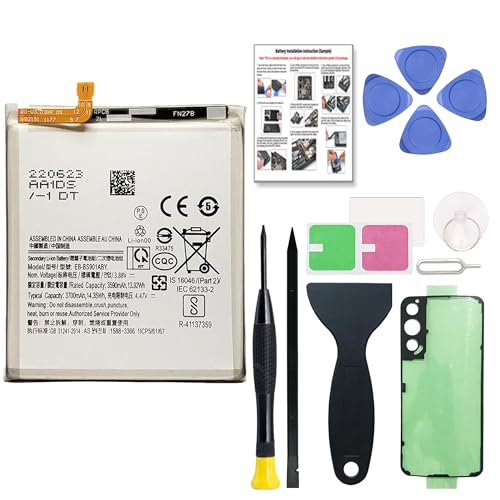
🌿【High Quality Grade A Premium Battery】: This Galaxy S22 Battery uses Grade A+ rated battery cells with CE and ROHS UL certification,ensure last over 1200 charge cycles. This is Perfect Galaxy S22 5G phone EB-BS901ABY replacement battery.
![SHENMZ for Samsung Galaxy S22 5G Battery Replacement, 5200mAh Upgraded EB-BS901ABY Battery Compatible with SM-S901U/U1/B/W with Adhesive Tool Repair Kit [Not Compatible with Galaxy S22 Plus]](https://m.media-amazon.com/images/I/41ElvnnDw5L._SL500_.jpg)
✅【Compatible Model】Developed especially for Samsung Galaxy S22 5G. Compatible with Samsung Galaxy S22 5G Models SM-S908B, SM-S908B/DS, SM-S908U, SM-S908W, SM-S908N, SM-S9080, SM-S908E, SM-S908E/DS.NOT for Other Samsung Model. Please Confirm Your Phone Model From Phone Back Cover to Avoid Wrong Order.

【Compatible Model】It is compatible with Samsung Galaxy S22 Only, Model: S22 5G SM-S901U. Not for S22 Ultra and S22+ Plus. Please double identify and check your phone model matches before purchasing the battery.
Reasons to Replace the Battery
- Decreased Performance: As the battery ages, its capacity declines. This results in shorter usage times and frequent charging.
- Overheating: If your phone becomes excessively hot during normal use, the battery might be failing.
- Swelling: A visibly swollen battery can damage your phone’s internal components. If this occurs, replace the battery immediately.
- Unexpected Shutdowns: Frequent and sudden shutdowns, even with a charged battery, indicate a need for replacement.
- Charging Issues: If your phone takes longer to charge or doesn’t charge at all, it may point to a faulty battery.
Signs That Your Battery Needs Replacement
- Rapid Drain: When a fully charged battery drops significantly within a few hours, it’s time to consider a replacement.
- Inconsistent Notifications: Receiving notifications about your battery being low, even while connected to power, signals a problem.
- Performance Lag: Experiencing sluggishness or app crashes can be linked to battery health issues.
- Battery Health Monitoring: Use built-in features or apps to check battery health percentage. A health percentage below 80% generally indicates a need for replacement.
- Physical Damage: Inspect for any signs of wear. Cracks on the back cover or swelling are red flags.
Keeping these signs and reasons in mind will help you decide if it’s time to consider a battery replacement for your Samsung S22.
How to Replace the Battery in Samsung S22
Replacing the battery in your Samsung S22 can restore its performance. Follow these essential steps for a successful battery replacement.
Recommended Products
![ITMBET [4600mAh] Galaxy S22 Battery, 𝗨𝗽𝗴𝗿𝗮𝗱𝗲𝗱 EB-BS901ABY Replacement Battery for S22 5G SM-S901 SM-S901U with Professional Tool Repair Kit](https://m.media-amazon.com/images/I/41ZZVE+SvIL._SL500_.jpg)
🔋 Premium Quality: Upgrade your smartphone experience with our high-quality 4600mAh 3.85V battery replacement for the Galaxy S22. This exceptional battery will restore your phone’s battery life to like-new performance, allowing you to stay connected longer

☑️【Compatible Model】Developed especially for Samsung Galaxy S22 Plus. Compatible with Samsung Galaxy S22 Plus Model SM-S906U S906B S906W S906N [NOTE: You can find your phone model on phone back over for reference.]

Compatible Phone Model: This battery kit is specifically designed for Samsung Galaxy S22 Plus(with model SM-S906 series), NOT work for Galaxy S22 or S22 Ultra, please double confirm your phone model before purchasing
Tools Required for Battery Replacement
You’ll need the following tools to replace the battery:
- Pentalobe screwdriver: To remove the screws near the charging port.
- Phillips screwdriver: For securing parts within the device.
- Plastic spudger: To safely pry open the device without damage.
- Tweezers: To handle small components and connectors.
- New battery: Ensure it’s compatible with the Samsung S22.
Step-by-Step Replacement Process
- Power off your device: Always start by turning off the Samsung S22.
- Remove the back cover: Use the plastic spudger to gently pry open the back cover. Start at a corner and work your way around.
- Unscrew the battery connector: Locate the screws securing the battery connector. Use the Pentalobe screwdriver to remove them.
- Disconnect the battery: Carefully lift the connector from the motherboard with tweezers or the spudger.
- Remove the old battery: Use the spudger to pry out the battery gently. Avoid applying excessive force.
- Insert the new battery: Place the new battery in the compartment, making sure it fits snugly.
- Reconnect the battery: Attach the battery connector to the motherboard and secure it with the screws.
- Reattach the back cover: Press the back cover into place, ensuring it seals properly.
- Power on the device: Turn on your Samsung S22 and check that everything functions correctly.
By following these steps, you can successfully replace the battery and enhance your device’s performance.
Professional vs. DIY Battery Replacement
Choosing between professional and DIY battery replacement for your Samsung S22 involves weighing various factors. Each option has benefits and drawbacks, and understanding these can help you make an informed decision.
Recommended Products

Designed exclusively for Galaxy S22 variants: SM-S901B, SM-S901B/DS, SM-S901U, SM-S901U1, SM-S901W, SM-S901N, SM-S9010, SM-S901E, SM-S901E/DS. Double-check your device's model (found under Settings > About Phone) to ensure perfect fitment.
Device Compatibility: This replacement battery kit is compatible with Samsung Galaxy S22 (SM-S901 series). Please verify your phone model carefully before placing an order to ensure proper compatibility.

✅【Compatible Model】Developed especially for Samsung Galaxy S22 Ultra 5G. Compatible with Samsung Galaxy S22 Ultra 5G SM-S908U SM-S908U1 EB-BS908ABY, NOT for Other Samsung Model. Please Confirm Your Phone Model From Phone Back Cover to Avoid Wrong Order.
Pros and Cons of Each Option
Professional Battery Replacement
- Expertise: Technicians possess the skills to handle delicate components.
- Quality Parts: Professionals use high-quality replacement batteries to ensure performance.
- Warranty Protection: Many professional services maintain your warranty.
- Time Saving: Repairs can often be completed within the same day.
- Cons: Typically costs more than a DIY approach.
DIY Battery Replacement
- Cost-Effective: You save money by doing it yourself.
- Control: You select your tools and battery type.
- Learning Opportunity: You gain hands-on experience with phone repairs.
- Cons: Risk of voiding warranty and potential for damage if done incorrectly.
- Skill Requirement: You need to be comfortable with small tools and electronics.
Cost Considerations
Evaluating costs involves more than just the price of the battery. Here’s a breakdown:
| Expense Type | DIY Replacement | Professional Replacement |
|---|---|---|
| Battery Cost | $20 – $50 | $50 – $100 |
| Tools & Equipment | $10 – $30 (if not owned) | Included in service fee |
| Labor Costs | None | $30 – $70, depending on service |
| Warranty Implications | May void warranty | May preserve warranty |
DIY replacements can be cheaper, but consider the potential costs of mistakes, such as needing additional repairs. Next, think about your confidence in following instructions or guides. If you’re uncertain, professional services offer reassurance for a bit more money.
Conclusion
Taking care of your Samsung S22’s battery is essential for keeping your device running smoothly. If you notice signs of battery decline like rapid drainage or overheating it’s a good idea to consider a replacement. Whether you choose to tackle the replacement yourself or seek professional help depends on your comfort level and needs.
Whichever route you take you’ll be giving your phone a new lease on life. Keeping your device in top shape means you can enjoy all its features without the frustration of a dying battery. So take a moment to assess your situation and make the choice that’s right for you. Your Samsung S22 will thank you for it!
Frequently Asked Questions
What are common battery issues for Samsung S22 users?
As Samsung S22 devices age, users may experience rapid battery drainage, overheating, and slow charging speeds. These issues arise due to the natural decline of the lithium-ion battery’s health over time.
How long does the Samsung S22 battery typically last?
The Samsung S22 features a 3,700 mAh lithium-ion battery that usually lasts a full day on a single charge under normal usage conditions before showing signs of wear.
When should I replace my Samsung S22 battery?
Consider replacing your Samsung S22 battery if you notice rapid drainage, overheating, unexpected shutdowns, inconsistent battery notifications, or physical damage to the battery.
Can I replace the Samsung S22 battery myself?
Yes, you can perform a DIY battery replacement on your Samsung S22 by purchasing a compatible battery and the necessary tools. However, ensure that you feel confident in your skills to avoid damage.
What tools do I need for a Samsung S22 battery replacement?
You’ll need a pentalobe screwdriver, Phillips screwdriver, plastic spudger, tweezers, and a new compatible battery to replace a Samsung S22 battery.
What are the pros and cons of DIY battery replacement?
DIY replacement is cost-effective and educational but may void the warranty and risk damage if not done properly. Weigh these factors against the benefits of professional services, which offer expertise and quality assurance.
How can I prolong my Samsung S22 battery life?
To extend your Samsung S22 battery life, adjust settings like screen brightness, limit background app usage, and avoid extreme temperatures for better overall performance.
