

Key Takeaways
- Average Battery Lifespan: Samsung watches generally last between 1 to 3 days, depending on the model and usage factors.
- Battery Specifications: Different Samsung watch models have varying battery capacities; for instance, the Galaxy Watch 4 has a capacity of 247 mAh, lasting 1-2 days.
- Key Factors: Screen brightness, app usage, and connectivity features significantly influence battery life, with lower brightness and limited app use enhancing longevity.
- Model Comparison: The Galaxy Fit series excels in efficiency with battery life extending up to 15 days, while other series like the Galaxy Watch Active 2 offer around 1.5 days of use.
- Optimization Tips: Utilizing power-saving modes and managing notifications can help extend your device’s battery life, allowing for longer use between charges.
Ever wondered how long your Samsung watch battery will last? You’re not alone. Many users find themselves checking the battery life more often than they’d like, especially during busy days filled with notifications and fitness tracking.
Understanding battery longevity can help you make the most of your device. In this article, you’ll discover the average lifespan of Samsung watch batteries, factors that affect their performance, and tips to extend their life. With this knowledge, you can keep your watch running smoothly and enjoy all its features without the constant worry of recharging.
Overview Of Samsung Watch Batteries
Samsung watch batteries play a crucial role in ensuring your device runs smoothly throughout the day. Understanding the types of batteries and their specifications helps you manage expectations and optimize performance.
Types Of Samsung Watches
Samsung offers a variety of smartwatch models, each with unique battery characteristics. Popular models include:
- Galaxy Watch Series: Typically equipped with larger batteries, these watches can provide extended usage, often lasting 1-2 days with regular use.
- Galaxy Watch Active Series: These lighter designs emphasize fitness features and may offer shorter battery life, roughly 1-1.5 days depending on usage.
- Galaxy Fit Series: Primarily fitness trackers, these models are designed for efficiency, with batteries lasting up to a week or more.
Each type caters to different user needs, influencing battery longevity based on features and usage patterns.
Battery Specifications
Samsung watches utilize lithium-ion batteries, known for their reliability and efficiency. General specifications include:
| Model | Battery Capacity | Typical Battery Life |
|---|---|---|
| Galaxy Watch 4 | 247 mAh | 1-2 days |
| Galaxy Watch Active 2 | 247 mAh | Up to 1.5 days |
| Galaxy Fit 2 | 159 mAh | Up to 15 days |
These specifications highlight the balance between design, features, and battery life you can expect from different models. For optimal usage, managing settings like screen brightness and app notifications can further enhance battery performance.
Factors Affecting Battery Life
Battery life in Samsung watches depends on several key factors. Understanding these can help you optimize usage and extend time between charges.
Screen Brightness
Screen brightness affects how quickly your watch consumes battery. Lowering the brightness can significantly enhance battery performance. For example, setting brightness to medium instead of high can add hours to daily usage. Adjust your screen brightness based on your environment. Use automatic brightness settings if available to adapt to surrounding light conditions.
App Usage
Regularly using apps drains your battery faster. Notification-heavy apps, like fitness trackers and messaging, consume more power. Close apps running in the background when they aren’t in use. Limit the use of GPS and high-intensity applications, especially during workouts. Reducing app usage not only saves battery life but also optimizes overall device performance.
Connectivity Features
Connectivity settings play a crucial role in battery consumption. Features like Bluetooth, Wi-Fi, and location services need constant power. If you’re not using these features, turn them off to prolong battery life. For example, disable Bluetooth when not needed, and switch off location services unless actively tracking fitness activities. Keeping these settings in check can save a significant amount of battery power throughout the day.
Average Battery Life By Model
Understanding the average battery life for different Samsung watch models helps you set realistic expectations for usage. Below is a breakdown of the battery life you can expect from popular Samsung watch series.
Recommended Products
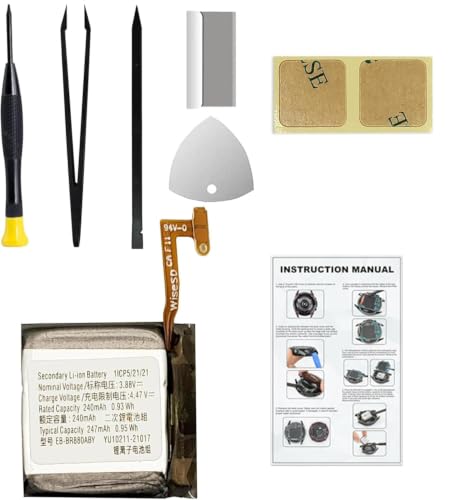
Compatible Smartwatch Model: This battery kit is specifically designed for Samsung Galaxy Watch 4 40mm (with model SM-R860 series) / Watch 4 Classic 42mm (with model SM-R880 series), please double confirm your smartwatch model before purchasing

COMPATIBILITY: The battery model is EB-BR880ABY, it is only compatible with Samsung Galaxy Watch 4 (40 mm), SM-R860 SM-R865 series and Galaxy Watch 4 Classic (42mm) SM-R880 SM-R885, please carefully confirm the model of your smartwatch before purchase.
Samsung Galaxy Watch Series
The Samsung Galaxy Watch Series showcases a range of models with varying battery performances:
- Galaxy Watch 4: You can expect around 40 hours of battery life. Battery drain increases with heavy app usage and features like always-on display.
- Galaxy Watch 4 Classic: This model typically lasts about 48 hours, thanks to its larger battery capacity. Users can extend this by managing settings effectively.
- Galaxy Watch Active 2: Offers approximately 2 days of use, depending on functions like GPS, heart rate tracking, and notifications.
Samsung Gear Series
The Samsung Gear Series includes models known for their efficiency and longevity:
- Gear S3 Frontier: This watch can last up to 3 days with moderate use. Features like GPS and always-on display may reduce battery life.
- Gear Sport: Generally lasts 1-2 days, but heavy use of fitness tracking can lead to quicker depletion.
- Gear Fit 2 Pro: Offers impressive battery life, lasting up to 5 days. Through effective settings management, some users report slightly longer use.
For best results, regularly monitor your watch’s battery performance and adjust your usage habits as needed.
Tips To Extend Battery Life
To maximize your Samsung watch’s battery life, consider implementing several practical tips. These strategies help you enjoy your device longer between charges.
Power Saving Modes
Activate power-saving modes to conserve battery life. On most Samsung watches, you can enable this feature through the settings menu. Power-saving modes reduce screen brightness and limit background activity. By using this mode during critical times, such as on long outings, you extend battery longevity significantly.
Managing Notifications
Managing notifications effectively also boosts battery efficiency. Limit notifications to only the most important apps. Constant notifications can drain battery power quickly. To adjust this, access your watch’s notification settings and deselect unnecessary apps. This way, you minimize the number of alerts and save energy, allowing for longer usage periods.
Implement these tips to enjoy enhanced battery performance, ensuring your Samsung watch stays powered throughout the day.
Conclusion
Understanding your Samsung watch’s battery life can make a big difference in your daily experience. By keeping an eye on factors like screen brightness and app usage you can stretch that battery life further.
It’s all about finding the right balance between features and performance. With a few simple adjustments you can enjoy your watch without the constant worry of recharging.
So take these tips to heart and make the most of your Samsung watch. You’ll find it easier to stay connected and on track throughout your busy days.
Frequently Asked Questions
How long does the battery last on Samsung watches?
The battery life of Samsung watches varies by model. Generally, the Galaxy Watch Series lasts 1-2 days, the Galaxy Watch Active Series provides similar use, while the Galaxy Fit Series can last up to a week or more. For example, the Galaxy Watch 4 offers around 40 hours, and the Galaxy Fit 2 can last up to 5 days.
What factors affect Samsung watch battery life?
Battery life can be influenced by screen brightness, app usage, and connectivity features. Higher screen brightness and frequent use of demanding apps drain the battery faster. Turning off Bluetooth and location services when not needed can also help extend battery life.
How can I extend the battery life of my Samsung watch?
To extend your Samsung watch’s battery life, lower the screen brightness, limit app notifications, and activate power-saving modes. Closing unused apps and managing connectivity settings will also help. Regularly monitor battery performance and adjust usage habits to optimize results.
What are the differences in battery life among Samsung watch models?
Different Samsung watch models have varying battery capacities. For instance, the Galaxy Watch 4 typically lasts around 40 hours, while the Galaxy Watch Active 2 lasts about 2 days. In contrast, the Galaxy Fit 2 can last up to 5 days, showcasing the trade-off between design and battery life.
Should I frequently check my Samsung watch battery status?
Yes, regularly checking your Samsung watch battery status can help you manage its performance better. This ensures you stay informed about battery levels, allowing you to adjust your usage habits as necessary and avoid unexpected shutdowns.
