

Key Takeaways
- The Google Nest Doorbell Wired operates solely on a wired power source and does not contain a battery, ensuring continuous performance.
- It features high-definition video quality, 24/7 streaming, two-way audio, and smart alerts for enhanced home security.
- The doorbell’s sleek design and durable materials allow for easy installation and integration into various home styles.
- Wired power provides advantages over battery-powered options, including reliability, enhanced performance, and no need for regular battery maintenance.
- Installation is straightforward, typically completed in under an hour, making it accessible for most users.
- The Google Nest Doorbell Wired offers seamless integration with other smart home devices, enhancing overall usability and convenience.
Are you considering the Google Nest Doorbell Wired but wondering if it has a battery? You’re not alone. Many people are curious about the power options for smart home devices, especially when it comes to ensuring they stay connected and functional.
Imagine the convenience of answering your door from anywhere, but what happens if your doorbell loses power? This article will clarify whether the Google Nest Doorbell Wired relies on a battery or if it needs a constant power source. By the end, you’ll have a clear understanding of its power needs, helping you make an informed decision for your home security setup.
Overview of Google Nest Doorbell Wired
The Google Nest Doorbell Wired operates on a continuous power supply, eliminating the need for a battery. This setup ensures consistent functionality and reliability for your home security needs.
Key Features
- 24/7 Streaming: Enjoy uninterrupted video streaming of your front door.
- HD Video Quality: Capture clear, high-definition video for better identification.
- Two-Way Audio: Communicate easily with visitors through the built-in microphone and speaker.
- Smart Alerts: Receive notifications for motion and people detection to enhance security.
- Night Vision: The doorbell provides clear images even in low-light conditions.
Design and Build Quality
- Sleek Aesthetic: The design is modern and blends well with various home styles.
- Durable Materials: Built to withstand different weather conditions, ensuring longevity.
- Easy Installation: Designed for straightforward installation with minimal tools required.
- Compact Size: The small footprint allows for easy placement without obstructing your view.
Power Source of Google Nest Doorbell Wired
The Google Nest Doorbell Wired operates solely on a wired power source, eliminating the need for any battery. This consistent power supply allows for continuous operation, ensuring the device remains functional at all times.
Recommended Products

Doorbell chime kit contains: (1) doorbell chime, (1) 16-Volt/30VA transformer and (1) white surface mount lighted push button

Contains everything you need for a basic door chime box setup: (1) doorbell chime, (1) 16V/10VA transformer, and (1) surface mount lighted push button. This will set up your home to be notified for any visitor or incoming delivery.
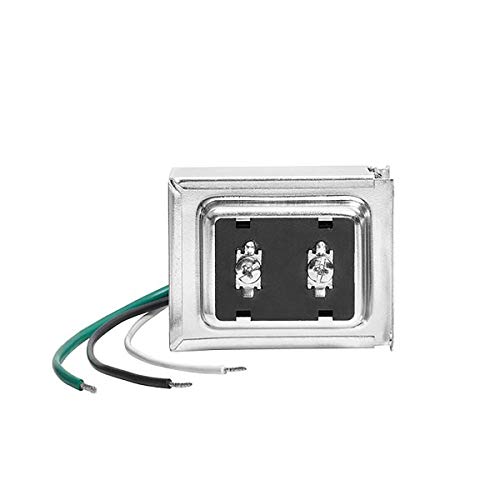
Replace your underpowered doorbell transformer.
Does Google Nest Doorbell Wired Have a Battery?
No, the Google Nest Doorbell Wired does not have a battery. It relies on hardwiring to your existing doorbell wiring or a transformer for power. This setup provides uninterrupted service, which is vital for features like 24/7 streaming and reliable alerts.
Wired vs. Battery-Powered Options
Wired options, like the Google Nest Doorbell Wired, offer several advantages over battery-powered choices, including:
- Continuous Power: You avoid the hassle of recharging or replacing batteries frequently.
- Enhanced Performance: Consistent power supports features such as HD video and smooth two-way audio.
- Reliability: Wired connections reduce the risk of downtime, particularly during critical moments.
Battery-powered options may offer installation flexibility, but they often require periodic maintenance and can lead to potential service interruptions. Evaluate your needs to determine the best solution for your home security system.
User Experience and Performance
The Google Nest Doorbell Wired offers a reliable user experience, thanks to its wired power design. This ensures continuous operation without interruptions, crucial for effective home security.
Installation Process
Installation of the Google Nest Doorbell Wired is straightforward. To begin, you’ll need a compatible doorbell wiring setup, typically 16-24 volts. You’ll follow these steps:
- Turn Off Power: Switch off the power at the circuit breaker to ensure safety.
- Remove Old Doorbell: Detach your existing doorbell unit from the mounting bracket.
- Connect Wires: Attach the provided wires from the Nest Doorbell to your existing wires. Use wire nuts to secure connections.
- Mount the Doorbell: Align the doorbell with the bracket and press it into place. Ensure a snug fit.
- Restore Power: Turn the power back on and test the unit.
This simple process can be completed in under an hour, making it accessible for most users.
Overall Functionality
Performance features of the Google Nest Doorbell Wired enhance its usability. With 24/7 streaming capabilities, high-definition video quality, and reliable smart alerts, you receive real-time notifications about visitors. The two-way audio feature lets you communicate directly with delivery personnel or guests from your smartphone.
Moreover, the night vision functionality ensures visibility in low-light conditions. The integration with other smart home devices adds convenience, allowing you to manage everything from one app. Overall, the seamless performance makes it a valuable addition to your home security setup.
Conclusion
Choosing the Google Nest Doorbell Wired means opting for a reliable and efficient home security solution. With its wired power source you won’t have to worry about battery replacements or downtime. This ensures you get constant monitoring and access to all its impressive features like HD video and two-way audio.
You’ll appreciate the seamless integration with your smart home setup and the sleek design that fits any style. If you’re looking for a dependable doorbell that delivers peace of mind without the hassle of batteries this is a fantastic choice for your home.
Frequently Asked Questions
What power source does the Google Nest Doorbell Wired use?
The Google Nest Doorbell Wired operates exclusively on a wired power source. This means it doesn’t require batteries, ensuring a constant supply of power for reliable functionality.
What are the main features of the Google Nest Doorbell Wired?
Key features include HD video quality, two-way audio communication, 24/7 streaming, smart alerts, and night vision. These features enhance security and improve user experience.
How long does installation of the Google Nest Doorbell Wired take?
Installation can be completed in under an hour. The process involves turning off power, removing the old doorbell, connecting wires, and mounting the new device.
Why choose a wired doorbell over a battery-powered option?
Wired doorbells like the Google Nest Doorbell Wired offer continuous power, enhancing performance and reliability. Battery-powered options may require regular maintenance and replacement.
Is the Google Nest Doorbell Wired easy to integrate with other smart home devices?
Yes, the Google Nest Doorbell Wired seamlessly integrates with various smart home devices, making it a convenient addition to any home security setup.
