

Key Takeaways
- Tools Required: Gather essential tools like a small Phillips screwdriver, plastic opening tool, tweezers, and an anti-static wrist strap for a successful battery replacement.
- Step-by-Step Process: Follow a clear, systematic guide to safely remove the watch back, disconnect the old battery, install the new one, and reassemble the device.
- Troubleshooting Tips: Address common issues such as overheating or battery drainage by checking installation and battery quality, software updates, and managing background apps.
- Safety First: Prioritize safety by powering down the watch, setting up a clean workspace, and wearing protective gear while handling batteries.
- Proper Disposal: Ensure environmentally responsible disposal of old batteries by recycling them according to local regulations to minimize harm.
Is your Samsung watch struggling to keep up with your busy life? A dying battery can be frustrating, especially when you rely on it for notifications and fitness tracking. Instead of rushing to a repair shop, why not tackle this simple task yourself?
Tools Needed For Replacement
Replacing the battery in your Samsung watch requires specific tools to ensure a smooth process. Here’s a list of what you’ll need:
- Small Phillips screwdriver: Use this to remove the back cover of the watch.
- Plastic opening tool: This helps pry the back cover off without causing damage.
- Tweezers: Use these to handle small components and the new battery safely.
- Replacement battery: Ensure this matches your watch model for proper compatibility.
- Anti-static wrist strap: This prevents electrostatic discharge that can harm electronic components.
- Soft cloth: Use this to keep the watch clean and protect its surface during the replacement.
Gather these tools before starting the replacement to avoid interruptions. Familiarize yourself with each tool’s function to make the process efficient.
Recommended Products

【Watch battery replacement kit】-- This watch battery removal kit consists of a watch back case opener, a watch case opening pry, a caseback holder, a five-in-one watch screwdriver handle, and five screwdriver bits (-1.0/ -1.2/ -1.5 /+1.5 /+1.8), a spring bar tool, tweezers, 20PCS 1.5ΦSpring bar (4* 16/18/20/22/24mm) and a cleaning cloth.

【Watch repair tool kit】- JOREST watch repair tool kit contains common tools required for repairing watches, suitable for adjusting and replacing watch straps, opening watch covers, replacing watch batteries, gaskets, etc., and has detailed operations Manual to help you solve watch problems at home and save expensive repair costs.

UPGRADE COMPLETE 155 PCS WATCH REPAIR KIT suit for professional and general use, which can solution for most watch repair requirements
Step-By-Step Guide
Follow this guide for a straightforward Samsung watch battery replacement. Gather your tools and prepare to restore your device’s functionality.
Preparing Your Workspace
Create a clean, well-lit workspace free of distractions. Lay out your tools, including the Phillips screwdriver, plastic opening tool, tweezers, and replacement battery. This setup makes it easy to access everything during the process and prevents losing small parts.
Removing the Watch Back
Use the plastic opening tool to pry the back cover open. Insert the tool into the gap and gently twist to lift the back cover. Be cautious, as you don’t want to damage the watch case or the cover. Once removed, place it in a safe location to avoid scratches.
Disconnecting the Old Battery
Locate the battery connector on the circuit board. Gently lift the connector using your tweezers. Pull straight up to detach the old battery. Make sure to avoid pulling on any wires or other components to prevent damage.
Installing the New Battery
Align your new battery with the connector on the circuit board. Firmly press down to connect it, ensuring it sits securely in place. Double-check that the connectors align properly for optimal performance.
Reassembling the Watch
Carefully place the back cover onto the watch, aligning it with the case. Press it down until it snaps back into place. Make sure it’s secure and there are no gaps. Your Samsung watch is now reassembled and ready for use.
Troubleshooting Common Issues
You might encounter a few common issues after replacing the battery in your Samsung watch. Here’s how to tackle those problems effectively.
Recommended Products

Compatible Smartwatch Model: This battery kit is specifically designed for Samsung Galaxy Watch 5 40mm (with model SM-R900 SM-R905 series), please double confirm your smartwatch model before purchasing

COMPATIBILITY: This battery only fits for Samsung Galaxy Watch 3 45mm (GPS/4G) SM-R840 SM-R845 series, please carefully confirm your phone model before purchase.
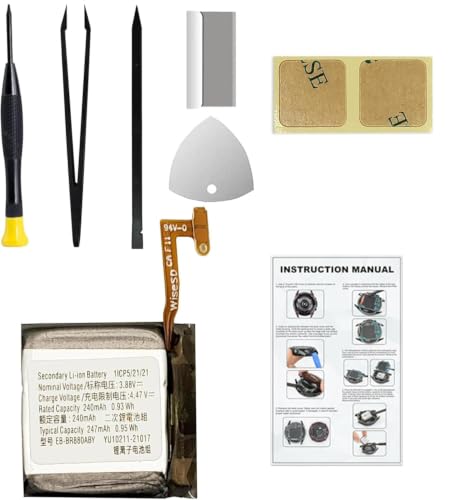
Compatible Smartwatch Model: This battery kit is specifically designed for Samsung Galaxy Watch 4 40mm (with model SM-R860 series) / Watch 4 Classic 42mm (with model SM-R880 series), please double confirm your smartwatch model before purchasing
Overheating Problems
Overheating can happen due to several reasons. If your watch feels hot after battery replacement, check these factors:
- Improper Installation: Verify that the battery is installed correctly. Ensure the connectors fit snugly, and nothing is pinched or misaligned.
- Faulty Battery: Confirm that your replacement battery is genuine and compatible with your watch model. Counterfeit or low-quality batteries often cause overheating.
- Excessive Usage: If you’re using multiple apps, it may strain the battery, causing warmth. Limit usage and monitor performance closely.
If overheating persists, consider rechecking the assembly and installation steps, or try a different battery.
Battery Not Holding Charge
If your watch battery drains quickly, here are possible causes to investigate:
- Old Battery: Replacing with an old or degraded battery can lead to poor performance. Always use a fresh, high-quality replacement.
- Software Issues: Outdated software might affect battery performance. Check for updates and install them as needed.
- Background Apps: Applications running in the background can deplete battery life. Close unnecessary apps to conserve energy.
Performing these troubleshooting steps can help prolong battery life and enhance your watch’s performance.
Safety Precautions
Ensure safety before starting the battery replacement process for your Samsung watch. Follow these precautions to minimize risks.
- Power Down: Turn off your watch completely to prevent any electrical issues during replacement.
- Workspace Setup: Prepare a clean, well-lit area. Remove clutter to avoid losing small parts and tools.
- Wear Protective Gear: Utilize an anti-static wrist strap. This prevents electrostatic discharge, which can damage electronic components.
- Use Proper Tools: Rely on the specified tools. Using inappropriate tools can result in scratches or damage.
- Handle Batteries Carefully: Keep replacement batteries away from metal objects. Short-circuiting a battery can cause overheating or fires.
- Dispose of Old Batteries Properly: Recycle your old battery according to local regulations. Improper disposal can harm the environment.
- Avoid Contact with Water: Keep fluids away from your workspace. Water can damage the watch’s internal components.
Following these safety precautions ensures a smooth battery replacement process, maintaining your device’s integrity.
Conclusion
Replacing the battery in your Samsung watch can feel like a daunting task but with the right tools and a little patience, you can tackle it yourself. You’ll save time and money while gaining a sense of accomplishment.
Remember to follow the steps carefully and take your time during the process. If you run into any issues afterward, don’t hesitate to refer back to the troubleshooting tips. Keeping your watch in top shape will ensure you stay connected and on track with your fitness goals.
Now that you know how to replace the battery, you can enjoy your watch’s features without interruption. Happy tinkering!
Frequently Asked Questions
What tools do I need to replace the battery in my Samsung watch?
To replace the battery in your Samsung watch, you’ll need a small Phillips screwdriver, a plastic opening tool, tweezers, a compatible replacement battery, an anti-static wrist strap, and a soft cloth. Gather these tools before starting to ensure a smooth replacement process.
How do I open the back cover of my Samsung watch?
Use a plastic opening tool to carefully pry open the back cover of your Samsung watch. Insert the tool into the seam, gently wiggle it, and lift the cover without applying excessive force to avoid damage.
What should I do after removing the old battery?
After removing the old battery, align the new battery with the circuit board and gently connect its terminal using tweezers. Ensure it fits snugly before proceeding to reassemble the watch.
How can I troubleshoot my watch if it overheats after a battery replacement?
If your watch overheats, check the installation for accuracy, ensure the replacement battery is genuine, and monitor its usage. Adjust settings or limit features that may be consuming power excessively.
What should I do if my Samsung watch’s battery drains quickly?
If your watch’s battery drains quickly, use a fresh, compatible battery, update the watch’s software, and close any unnecessary background apps to help prolong battery life.
