

Key Takeaways
- Understand Battery Factors: Recognize key factors affecting battery life such as screen brightness, app usage, and network connectivity to optimize your Samsung S10’s performance.
- Adjust Brightness Settings: Dimming your screen and utilizing adaptive brightness or dark mode can significantly extend battery life.
- Manage Background Apps: Regularly close unused apps and enable battery optimization to limit background data usage and conserve power.
- Utilize Battery-Saving Modes: Turn on Power Saving Mode and Adaptive Battery settings to minimize power consumption and prolong usage time.
- Adopt Smart Charging Habits: Keep battery levels between 20% and 80%, use the original charger, and avoid extreme temperatures to maximize battery lifespan.
- Avoid Common Errors: Prevent overcharging, battery draining to 0%, and extensive use while charging to maintain optimal battery health.
Are you tired of your Samsung S10 battery dying just when you need it most? You’re not alone. Many users find themselves constantly searching for a charger or worrying about their phone’s battery life throughout the day.
Understanding Battery Life
Understanding how battery life works can help you maximize the performance of your Samsung S10. Several factors influence battery longevity, and knowing them can guide your usage habits.
Factors Affecting Battery Life
- Screen Brightness: Higher brightness levels consume more power. Dimming your screen can significantly extend battery life.
- App Usage: Apps running in the background drain battery. Close unused apps to minimize this effect.
- Network Connectivity: Using Wi-Fi instead of mobile data boosts battery longevity. Turn off Bluetooth and GPS when not in use.
- Operating System: Software updates often include battery optimization features. Keeping your device updated can improve efficiency.
- Battery Age: Over time, battery capacity decreases. Aged batteries may not hold a charge as well, affecting overall performance.
How Battery Technology Works
The Samsung S10 uses lithium-ion battery technology. This type of battery relies on chemical reactions to store and release energy. Here’s how it works:
- Charging Process: When charging, lithium ions move from the positive electrode to the negative electrode, storing energy.
- Discharging Process: During use, these ions move back, releasing energy to power your device.
- Cycle Life: Each full charge and discharge counts as one cycle. Lithium-ion batteries typically last for 300 to 500 charge cycles before significant capacity loss occurs.
Understanding these aspects helps you make informed choices to enhance your phone’s battery life.
Tips to Extend Battery Life
You can take several simple steps to make your Samsung S10’s battery last longer. Implementing these tips can significantly enhance your daily usage.
Recommended Products

COMPATIBILITY: This battery only fits for Samsung Galaxy S10, SM-G973F, SM-G973U, SM-G973W, SM-G973U1, SM-G9730, SM-G973N, SM-G973X, SCV41, SM-G973C. Please carefully confirm your phone model before purchase.

[FOR COMPATIBLE MODEL] -- Contains the instruction to guide you step by step installation, and we have professional engineers to answer all your questions about the repair process. Please verify your old battery part number and model before purchasing this replacement battery. Compatible with Samsung Galaxy S10+ SM-G975, EB-BG975ABU, EB-BG975ABE, G975A, G975T, G975V, G975P, G975R4 ★NOT FOR Samsung Galaxy S10e/ S10/ Note 10/ Note 10 Plus★

HIGH CAPACITY --- This replacement battery for Samsung Galaxy S10 is 4500mAh high capacity, with more power than original battery.You can use your phone for a longer time!
Adjusting Screen Brightness
- Lower Brightness: Set your screen brightness to a lower level. This change reduces power consumption while still allowing you to see your screen clearly.
- Enable Adaptive Brightness: Use the adaptive brightness feature found in your display settings. This feature adjusts brightness based on surrounding light conditions, optimizing battery life.
- Use Dark Mode: Switch to dark mode if you haven’t already. Using a darker theme can save battery life on AMOLED displays by consuming less power for darker pixels.
Managing Background Apps
- Close Unused Apps: Regularly close apps running in the background. These apps consume battery by using data and processing power, even when you’re not actively using them.
- Restrict Background Data: Limit background data for apps in settings under ‘Apps’. Select apps that don’t need continuous data to function and disable background data to preserve battery.
- Use Battery Optimization: Activate battery optimization features. Go to your settings and find battery options that help manage which apps can run in the background while extending overall battery life.
Implementing these tips can significantly boost your Samsung S10’s battery performance, allowing you to use your device without constantly worrying about charging.
Battery Saving Modes
Utilizing battery-saving modes on your Samsung S10 can significantly extend your device’s battery life. Enable these features to minimize power consumption and manage your device’s performance more effectively.
Recommended Products

* Integrated power switch allows you to turn on/off the battery case quickly. 4-light LED indicator shows the power status of the battery case. And each light represents 25% of the power. NOTE: It does NOT support charge through. If you charge the battery case with the phone installed while plugged in, only the battery case will be charged.

{COMPATIBLE MODELS}:This Replacement battery Compatible with Samsung Galaxy S10 PLUS (Model: SM-G975F G975U G975W G975U1 G9750 G975N ).

【Compatible Model】It is compatible with Samsung Galaxy S10 SM-G973, EB-BG973ABU, EB-BG973ABE, G973A, G973T, G973V, G973P, G973R4. Not for S10 Plus. Please double identify check your phone model matches before purchasing the battery.
Using Power Saving Mode
Power Saving Mode reduces your phone’s background activity, lowering screen brightness and limiting some features. To turn it on:
- Open Settings.
- Tap Battery and Device Care.
- Select Battery.
- Choose Power Saving Mode.
- Toggle the switch to activate.
You can customize settings within this mode, such as limiting app performance or adjusting screen resolution. Engage this mode during critical times, like traveling or when access to a charger isn’t available.
Adaptive Battery Settings
Adaptive Battery optimizes battery usage by learning which apps you use most and limiting those you seldom open. Here’s how to enable it:
- Open Settings.
- Tap Battery and Device Care.
- Select Battery.
- Tap More battery settings.
- Toggle on Adaptive Battery.
This feature automatically restricts power-hungry apps when you’re not using them, extending your battery life without sacrificing performance. It’s especially beneficial for users who install many applications or use their phones frequently.
Implementing these battery-saving modes can make a noticeable difference in your Samsung S10’s battery longevity.
Charging Habits
Adopting the right charging habits can significantly impact your Samsung S10 battery life. Here are some effective strategies to consider.
Recommended Products

[Wide Compatibility]: Android Charger compatible with Samsung Galaxy S10/S10+/S10e/S10 5G/S9 Plus/S9+/S9/S8/S8 Plus/S8+/Note10/Note9/Note8/A70/A52 5G/A51/A50/A42 5G/A32 5G/A13/A12/A02s/S20/S20+/S20 Ultra/S21/S21+/S21 Ultra/S22/S22+/S22 Ultra/Note 20, LG G5/G6/G7/V20/V30/ThinQ Plus and other USB Type C devices
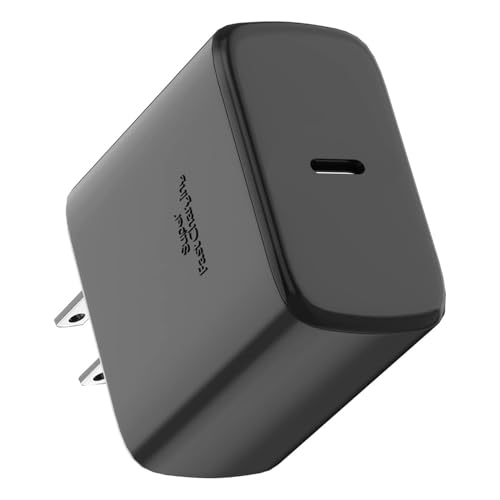
【Fast Charger Samsung2.0】Our 45W USB C Samsung charger uses Programmable Power Supply technology to provide the most efficient charging. Charge your Galaxy S26/S26 Ultra/S26+/S25 Ultra/S25/S25+/S24 Ultra/S24/S24+/S23/S22 Ultra from 0% to 100% in just 50 minutes, faster than other 25W/15W chargers.Super Fast Charging 2.0 max. 45W; PD 3.0 PPS max.
![XNXA for Samsung Galaxy S10 Case Magnetic, [Compatible with Magsafe] 6.1-Inch Slim Fit Heavy Duty Protector Wireless Charging Shockproof Anti-Slip TPU and PC Transparent Protective Phone Cover, Clear](https://m.media-amazon.com/images/I/41oWc8bSsgL._SL500_.jpg)
COMPATIBILITY: Specifically designed for Samsung Galaxy S10 6.1-inch model, ensuring a perfect fit and full access to all ports and features
Best Practices for Charging
- Charge Regularly: Keeping your battery between 20% and 80% extends its lifespan. Avoid letting the battery drop to 0% frequently.
- Use Original Charger: Always use the charger and cable that came with your device. Using third-party chargers can affect battery health.
- Disable Fast Charging: While convenient, fast charging can generate more heat. If you don’t need it, turn off fast charging in your settings.
- Charge Overnight Wisely: If you charge overnight, enable features like “Optimized Charging” to slow down the charge rate as it reaches full capacity.
Avoiding Common Mistakes
- Don’t Overcharge: Unplug your phone once it reaches 100%. Continuous charging can damage lithium-ion batteries over time.
- Avoid Extreme Temperatures: Excessive heat or cold can harm your battery. Avoid charging your phone in direct sunlight or very cold areas.
- Minimize Use While Charging: Doing resource-intensive activities, like gaming or streaming, can create unnecessary strain while charging.
- Don’t Let It Drain Completely: Regularly allowing your battery to drop to 0% can shorten its overall lifespan. Aim to charge before it reaches critically low levels.
By following these charging tips, you can help enhance your Samsung S10’s battery longevity and maintain optimal performance throughout the day.
Conclusion
You’ve got the tools to keep your Samsung S10 running strong throughout the day. By making small adjustments to your settings and habits you can enjoy more time between charges. Remember that every little change adds up to a significant difference.
Embrace the power-saving modes and take charge of your battery management. With a little mindfulness about your usage and charging practices you can keep your phone ready for whatever life throws at you. Enjoy your device without the constant worry of running out of battery. Happy texting and browsing!
Frequently Asked Questions
What causes battery drains in Samsung S10?
Battery drains in the Samsung S10 are often caused by high screen brightness, excessive app usage, poor network connectivity, and outdated software. Older batteries also naturally discharge faster, leading to shorter usage times.
How can I extend the battery life of my Samsung S10?
To extend battery life, lower your screen brightness, enable adaptive brightness, and use dark mode. Additionally, manage background apps by closing unused ones and activate battery optimization features in settings.
What is Power Saving Mode on Samsung S10?
Power Saving Mode on the Samsung S10 reduces background activity, lowers screen brightness, and limits features to conserve battery. It’s perfect for when you need extra battery life in critical situations.
Why is optimized charging important?
Optimized charging helps prolong battery health by keeping the charge between 20% and 80%. It prevents overcharging and ensures that your battery maintains a longer lifespan, especially during overnight charging.
How does lithium-ion battery technology work?
Lithium-ion batteries store energy through chemical reactions that occur during charging and discharging. Understanding this process can help users make better decisions about charging habits to extend battery life.
