

Ever been in the middle of capturing a perfect shot only for your camera battery to die on you? Frustrating, isn’t it? If you’re a Sony A7III user, you’ve probably wondered, “How long does the Sony A7III battery last?” We’ve all been there, needing that extra juice to keep shooting without interruptions.
Imagine being on a picturesque hike or at a special event, and your camera battery gives up on you too soon. That’s where knowing the battery life of your Sony A7III becomes crucial. In this article, we’ll dive into the specifics of how long you can expect your Sony A7III battery to keep you snapping away, ensuring you never miss a moment.
By understanding the battery performance of your Sony A7III, you’ll be equipped to plan your shoots better, avoid unexpected power drains, and make the most of your photography adventures. Let’s unravel the mystery behind the Sony A7III battery life together.
Understanding Sony A7III Battery Life
Have you ever wondered how long your Sony A7III battery will last during a photoshoot? Understanding the battery life of your camera is crucial for planning your photography adventures effectively. Here are some essential insights to help you maximize the Sony A7III battery performance:
- Battery Capacity: The Sony A7III comes with a NP-FZ100 rechargeable battery with a capacity of 2280mAh.
- CIPA Standards: According to CIPA (Camera & Imaging Products Association) standards, the Sony A7III is rated to deliver around 610 shots on a single charge.
- Factors Affecting Battery Life: Various factors can impact your Sony A7III battery life, such as continuous shooting, use of LCD screen, and environmental conditions.
- Battery Saving Tips:
- Use Airplane Mode: Disable unnecessary connectivity features to conserve battery.
- Lower Screen Brightness: Adjust the LCD screen brightness to reduce power consumption.
- Carry Extra Batteries: Always have spare batteries on hand for extended shooting sessions.
- Battery Performance Expectations: Real-world usage may vary, so it’s essential to test your Sony A7III battery in different shooting scenarios to understand its performance.
- Battery Longevity: Proper battery maintenance, such as avoiding extreme temperatures and regular charging cycles, can help prolong the Sony A7III battery lifespan.
Remember, knowing how to manage your Sony A7III battery life effectively can make a significant difference in your photography sessions.
Recommended Products

2-Pack 2280mAh A7iii Batteries: Each K&F Concept NP-FZ100 battery offers a 2280mAh capacity, rated at 7.4V, 16.8Wh, providing long and reliable power for Sony cameras without any memory effect.

3-Pack NP-FZ100 Batteries for More Shooting: 3 pack A7iv batteries rated at 7.4V 2280mAh 16.8Wh, ensure extended power for your camera without memory effect. A perfect battery backup to capture the treasure moments during journey or outdoors.
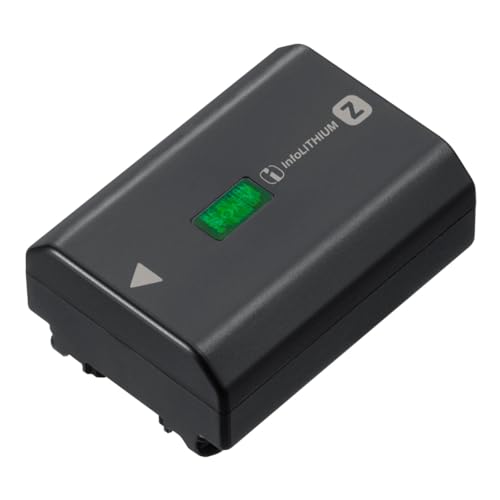
High capacity for long life, approx.2.2 times of the NP-FW50
Factors Affecting Battery Performance
When it comes to maximizing your Sony A7III battery life, there are several key factors to consider:
- Continuous Shooting: Engaging in long periods of continuous shooting can drain your battery faster than shooting in single-shot mode.
- Screen Brightness: Keeping the screen brightness high consumes more power. Adjusting it to optimal levels can help extend battery life.
- Video Recording: Recording videos extensively can significantly impact battery performance. Be mindful of this when planning your shoots.
- Using Wi-Fi: Connecting to Wi-Fi for transferring files or remote shooting can drain the battery quicker. Consider turning off Wi-Fi when not in use.
- Cold Temperatures: Cold weather can affect battery performance. It’s advisable to keep your camera and batteries warm in low temperatures for better efficiency.
To maximize your Sony A7III battery life, understanding these factors and adopting smart practices can help you make the most out of each charge.
Battery Life Expectations in Different Shooting Scenarios
When you’re out capturing unforgettable moments with your Sony A7III, it’s crucial to understand how different shooting scenarios can impact your battery life. Here’s a breakdown:
- Continuous Shooting: Rapidly taking shots can significantly drain your battery. Consider slowing down your pace to conserve power.
- Screen Brightness: A brighter screen consumes more battery. Opt for a moderate brightness level to save energy.
- Video Recording: Recording videos consumes more power than taking photos. Be mindful of your recording time to extend battery life.
- Wi-Fi Usage: Keeping Wi-Fi enabled when not needed can drain your battery unnecessarily. Turn it off when you’re not transferring files.
- Cold Temperatures: Batteries drain faster in cold conditions. Keep your gear warm to maintain optimal performance.
To make the most of your Sony A7III battery life, adjust your shooting habits to suit the situation and ensure you can keep capturing memories without interruptions. Remember, small changes can lead to significant improvements in the longevity of your camera’s battery.
Tips to Extend Sony A7III Battery Life
When it comes to maximizing Sony A7III battery life, implementing a few simple strategies can significantly prolong your shooting sessions. Here are some practical tips to help you get the most out of your camera’s battery:
- Turn off Unused Features: Disable Wi-Fi and Bluetooth when not needed to reduce unnecessary power consumption.
- Monitor Screen Brightness: Lowering the screen brightness can conserve battery life, especially in dimly lit environments.
- Use Power Saving Modes: Activate power-saving modes on your camera to optimize energy usage and extend battery longevity.
- Manage Continuous Shooting: Limit continuous shooting to capture key moments efficiently without draining the battery unnecessarily.
- Keep Batteries Warm: Cold temperatures can impact battery performance, so keep spare batteries in a warm pocket to maintain optimal power levels.
- Optimize Video Recording: Minimize video recording time and avoid leaving the camera running when not actively capturing footage.
By incorporating these practices into your photography routine, you can enhance the longevity of your Sony A7III battery and ensure uninterrupted shooting experiences.
Conclusion
You now have a range of strategies to maximize your Sony A7III battery life. By implementing simple adjustments like turning off unnecessary features, adjusting screen brightness, and utilizing power-saving modes, you can prolong your shooting sessions. Remember to keep your batteries warm in colder conditions and optimize your video recording practices. These small changes can make a significant difference in how long your Sony A7III battery lasts, ensuring you capture those perfect shots without interruptions.
Frequently Asked Questions
How can I extend the battery life of my Sony A7III?
To extend the battery life of your Sony A7III, turn off unused features like Wi-Fi and Bluetooth, monitor screen brightness, use power-saving modes, manage continuous shooting, keep batteries warm in cold temperatures, and optimize video recording. By implementing these practices, you can enhance the longevity of your Sony A7III battery and ensure uninterrupted shooting experiences.
