

Key Takeaways
- Battery Capacity: The Samsung Galaxy Watch 4 features a battery capacity of 247 mAh (40mm) and 361 mAh (44mm), influencing overall usage time.
- Estimated Lifespan: Expect around 40 hours of battery life with regular use, while always-on display mode reduces it to about 30 hours. Power-saving mode can extend it up to 50 hours.
- Charging Efficiency: Full charging takes about 1.5 hours, and a quick 10-minute charge can provide approximately 8 hours of usage.
- Impact of Settings: Managing display brightness and limiting app usage are essential for conserving battery life, especially when running GPS-intensive applications.
- User Insights: Real-world experiences indicate battery life can drop significantly with extensive GPS use or multiple active apps, highlighting the importance of optimizing settings.
- Modes and Usage: Utilizing standard mode for everyday use and switching to power-saving mode during longer periods without charging can help maximize battery performance.
Ever found yourself checking your smartwatch only to realize the battery’s nearly dead? You’re not alone. Many Samsung Galaxy Watch 4 users wonder just how long they can rely on their device before needing a charge.
Overview of Samsung Galaxy Watch 4 Battery
The Samsung Galaxy Watch 4 boasts a battery capacity of 247 mAh for the 40mm model and 361 mAh for the 44mm model. Battery life varies based on usage and settings.
Estimated Battery Life
- Regular Use: Expect around 40 hours with regular use, including notifications, heart rate monitoring, and fitness tracking.
- Always-On Display: Activating the always-on display reduces battery life, typically to about 30 hours.
- Power Saving Mode: Engaging power-saving mode can extend battery life significantly, sometimes up to 50 hours.
Charging Time
- Standard Charging: The Galaxy Watch 4 charges fully in approximately 1.5 hours.
- Quick Charge: Quick charge features provide around 8 hours of use after just 10 minutes of charging.
Usage Recommendations
- Managing Settings: Adjust settings like reducing screen brightness or disabling always-on features to save battery life.
- Using Apps: Running multiple apps can drain the battery faster. Limit active apps during the day.
Real-World Usage Examples
- Daily Activity: For users who exercise with GPS tracking enabled, the battery may last about 30 hours.
- Sleep Tracking: Many users report that sleep tracking overnight, followed by daily activities, allows nearly 48 hours before needing a charge.
Understanding the battery life factors of your Galaxy Watch 4 helps you maximize performance and ensures you’re ready for daily tasks.
Factors Affecting Battery Life
Battery life on the Samsung Galaxy Watch 4 depends on several factors. Understanding these can help you manage your watch’s performance better.
Display Settings
Display settings significantly impact battery life. Adjusting the brightness level lowers power consumption. You can set your watch to use automatic brightness to balance visibility and battery usage. The always-on display feature consumes more power. Turning this off can extend battery life. Consider using a watch face that shows less information, as more complex designs may require increased power.
App Usage
App usage also affects battery longevity. Running multiple apps simultaneously drains the battery faster. Limit the number of active apps running in the background to conserve energy. Frequent use of GPS while exercising can reduce battery life to around 30 hours; however, using apps that monitor health metrics without GPS may help retain power longer. Regularly checking app permissions ensures that only essential apps operate, which can help maximize battery performance.
Battery Performance in Different Modes
The Samsung Galaxy Watch 4 offers various modes that significantly impact battery life. Understanding these modes helps you optimize usage to match your lifestyle.
Recommended Products
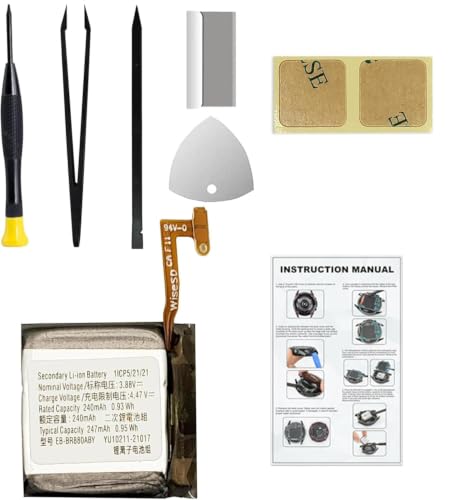
Compatible Smartwatch Model: This battery kit is specifically designed for Samsung Galaxy Watch 4 40mm (with model SM-R860 series) / Watch 4 Classic 42mm (with model SM-R880 series), please double confirm your smartwatch model before purchasing

【Exact Fit Compatibility】 Designed specifically for Samsung Galaxy Watch 4 (40mm SM-R860/SM-R865) and Watch 4 Classic (42mm SM-R880/SM-R885). Matches OEM part number EB-BR880ABY for a seamless drop-in replacement.
Standard Mode
In standard mode, the Galaxy Watch 4 provides a balanced performance suited for everyday use. With typical use, the battery lasts around 40 hours. Functions like notifications, heart rate monitoring, and activity tracking run smoothly without draining the battery excessively. Engaging the always-on display decreases battery life to about 30 hours, making it essential to weigh the benefits against the shorter battery duration. For users prioritizing full functionality, standard mode serves well while keeping battery concerns manageable.
Power Saving Mode
Power saving mode extends battery life significantly, reaching up to 50 hours. This mode disables features like the always-on display and limits background app activity, conserving power for essential functions. Notifications continue to arrive, but less critical features might be turned off. Activating power-saving mode is especially useful during long trips or overnight wear, ensuring you stay connected without frequent recharges. Simply switch to this mode via the settings menu to maximize battery usage whenever needed.
User Experiences and Reviews
Many users share their experiences with the Samsung Galaxy Watch 4’s battery life. Feedback varies based on individual usage patterns, but overall insights can help you understand what to expect.
Positive Feedback
Users often praise the battery life of the Galaxy Watch 4 for its efficiency. Many report getting around 40 hours of use with typical activities such as notifications and heart rate tracking. For those who utilize power-saving mode, experiences show battery life can extend up to 50 hours, particularly beneficial during long trips. The quick charge feature also receives positive comments, as users appreciate gaining around 8 hours of battery life with just 10 minutes of charging.
Criticisms
Some users express concerns about battery longevity, especially when using features like GPS tracking. During intense workouts, GPS can diminish battery life to about 30 hours. Additionally, activating the always-on display often draws significant power, leading to complaints about shorter daily use. The watch’s performance can also fluctuate when multiple apps run simultaneously, with users noticing faster drainage under such conditions. Adjusting settings, such as brightness and app usage, becomes necessary for those wanting to maximize battery life.
Real-world experiences highlight both the strengths and limitations of the Galaxy Watch 4’s battery, offering valuable insights for potential users.
Conclusion
Your Samsung Galaxy Watch 4 can be a reliable companion throughout your day. With some smart adjustments to settings and usage habits you can maximize its battery life. Whether you’re tracking workouts or simply staying connected the watch offers flexibility to suit your lifestyle.
Remember to utilize power-saving modes when needed and keep an eye on your app usage. By being mindful of how you use your watch you’ll find it can last longer than you might expect. Enjoy your Galaxy Watch 4 and all the features it brings to your wrist!
Frequently Asked Questions
How long does the Samsung Galaxy Watch 4 battery last?
The battery life of the Samsung Galaxy Watch 4 varies by model and usage. The 40mm model lasts about 40 hours with regular use, while the 44mm model offers a similar duration. When enabling the always-on display, the battery life drops to around 30 hours. Using power-saving mode can extend it to up to 50 hours.
What are the battery specifications for the Galaxy Watch 4?
The 40mm Galaxy Watch 4 has a battery capacity of 247 mAh, while the 44mm model boasts a larger 361 mAh battery. These specifications influence overall usage time and charging performance.
How long does it take to charge the Galaxy Watch 4?
A full charge for the Galaxy Watch 4 takes approximately 1.5 hours. If you’re in a hurry, the quick charge feature allows for about 8 hours of use with just 10 minutes of charging.
What factors affect the battery life of the Galaxy Watch 4?
Several factors can impact the battery life, including display brightness, the always-on display setting, the number of active apps, and the use of GPS. Reducing screen brightness and limiting active apps can help conserve battery power.
How can I extend the battery life of my Galaxy Watch 4?
To maximize battery life, consider enabling power-saving mode, reducing screen brightness, and turning off the always-on display. Limiting the use of GPS and running fewer apps simultaneously also helps extend battery performance.
What is the user feedback on the Galaxy Watch 4’s battery life?
User feedback on the Galaxy Watch 4’s battery life is mixed. Many users report around 40 hours of usage with typical activities and appreciate the quick charge feature, while some express concerns about battery drain during intense activities like GPS tracking.
