

Ever wondered why your HP laptop seems to be losing its charge faster than you can say “tech trouble”? Picture this: you’re in the middle of an important project, and your laptop suddenly powers off. Frustrating, right? But fear not, because in this article, you’ll discover the key to solving this power predicament – replacing the internal battery in your HP laptop.
Preparing for Battery Replacement
When Preparing for Battery Replacement in your HP laptop, it’s essential to follow these steps to ensure a smooth and successful process:
- Gather your Tools: You’ll need a screwdriver set, an antistatic wrist strap, and a new compatible battery for your HP laptop model.
- Backup Your Data: Before starting the replacement, make sure to back up all your important files to prevent data loss.
- Power Off and Unplug: Turn off your laptop, disconnect all cables, and remove the battery if it’s accessible without disassembly.
- Static Electricity Precautions: To avoid damaging sensitive components, wear an antistatic wrist strap throughout the replacement process.
- Refer to the Manual: Consult your HP laptop’s manual or find a detailed guide online specific to your model for step-by-step instructions.
- Work in a Clean, Well-lit Area: Choose a well-lit, clutter-free workspace to ensure you can easily keep track of screws and small components during disassembly.
- Take Your Time: Patience is key. Rushing through the process can lead to mistakes. Allocate sufficient time to complete the battery replacement without interruptions.
By meticulously preparing for the battery replacement process, you set yourself up for a successful and stress-free experience.
Identifying the Correct Battery Model
When identifying the correct battery model for your HP laptop, it’s essential to ensure compatibility with your device. Here’s how you can easily find the right battery:
- Check your laptop model: Look for the model number on the bottom or side of your laptop. It will help you narrow down the search for the specific battery.
- Visit the HP website: Head to the official HP website and navigate to the support section. Enter your laptop’s model number to access detailed information about compatible batteries.
- Consult the laptop manual: If you have the original manual that came with your laptop, refer to the specifications section. It often includes details about the type of battery required.
- Use online tools: There are online tools available that can help you identify the correct battery for your HP laptop. Simply enter your laptop model, and these tools will provide you with the compatible battery options.
Remember, using the wrong battery can cause damage to your laptop. Taking the time to verify the correct battery model ensures smooth replacement and optimal performance.
Tools Required for the Replacement
When replacing the internal battery in your HP laptop, you’ll need a few essential tools to ensure a smooth process. Here are the tools you’ll need:
Replacement Battery:
- Make sure you have the compatible battery for your specific HP laptop model.
Screwdriver Set:
- A screwdriver set is necessary to remove the screws holding the laptop’s casing in place.
Anti-static Wrist Strap:
- An anti-static wrist strap helps prevent damage to sensitive electronic components by grounding you while handling the laptop’s internals.
Plastic Spudger or Pry Tool:
- A plastic spudger or pry tool is useful for safely disconnecting cables and removing the old battery.
- Have a clean cloth on hand to wipe down any dust or debris inside the laptop before installing the new battery.
| Key Tools | Description |
|---|---|
| Replacement Battery | Ensure compatibility with your laptop model. |
| Screwdriver Set | Needed for removing housing screws. |
| Anti-static Wrist Strap | Prevents damage from static electricity. |
| Plastic Spudger | Safely disconnect cables and remove battery. |
| Clean Cloth | Wipe down internal components. |
Recommended Products

【Real 2600mAh Capacity】Voltage: 14.6V // Capacity: 38Wh 2600mAh // Battery Type: Li-ion // Cells: 4 cells // Condition: 100% Brand NEW hp pavilion 15 replacement battery

Battery Type: Li-ion Voltage: 14.8V Capacity: 2200MAH Color: Black.

This laptop Battery works with HP Pavilion 14 15 Notebook PC series, HP 248 248 G1 340 340 G1 350 350 G1 Series, 728460- 001, 752237-001, 776622-001, 888182064801, 888793070383, F3B96AA, F3B96AA#ABB, HSTNN-IB6R, HSTNN-YB5M, J1V00AA, LA04, LA04041-CL, LA04041DF-CL, LA04DF, TPN-Q129,TPN-Q132
Step-by-step Guide to Replace the Internal Battery
To start the battery replacement process, power off your HP laptop and disconnect the charger. Follow these simple steps to successfully replace the internal battery:
Tools and Preparation
- Gather all the necessary tools: replacement battery, screwdriver set, anti-static wrist strap, and plastic spudger.
- Ensure your workspace is clean and well-lit to prevent losing small screws or components.
Removing the Old Battery
- Use the screwdriver to remove the screws securing the laptop’s back cover.
- Carefully detach any connectors or cables from the old battery using the plastic spudger.
Installing the New Battery
- Place the new battery in the designated slot and reconnect any cables.
- Secure the back cover by tightening the screws in place.
Testing and Final Steps
- Power on your laptop and verify that the new battery is recognized.
- Dispose of the old battery responsibly and keep your workspace tidy.
Troubleshooting Tips
- If your laptop doesn’t turn on after the replacement, double-check all connections before seeking professional help.
- Avoid using excessive force when handling delicate components to prevent damage.
- It’s recommended to calibrate your new battery periodically for optimal performance and longevity.
Remember, with the right tools and a gentle touch, replacing the internal battery in your HP laptop is a manageable task that can extend the life of your device.
Recommended Products

Specifications: 4 Cell, Li-ion battery, Rated at 14.8V 2200mah
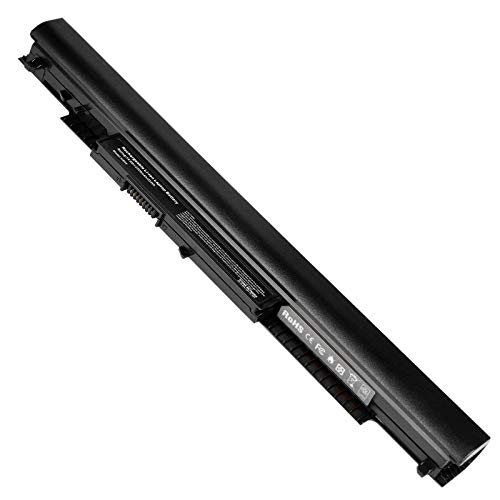
Grade A Cells: 14.8V/2200mAh Cells 4-cell Grade A cells ensure fast charges and low power consumption. Built-in circuit protection ensures both safety and stability. Up to 500 recharge cycles over the life of the battery.
![SML HS04 HS03 Laptop/Notebook New Battery Replacement for HP 807956-001 807957-001 807612-421 807611-221 240 G4 HSTNN-LB6U HSTNN-DB7I HSTNN-LB6V TPN-I119 807611-421 807611-131-[4 Cells/2200mAh/33Wh]](https://m.media-amazon.com/images/I/41JPPHhmaWL._SL500_.jpg)
Perfect Replacement for HP spare 807611-131, 807611-141, 807611-221, 807611-241, 807611-251, 807611-421, 807611-831, 807612-131, 807612-141, 807612-221, 807612-241, 807612-251, 807612-421, 807612-422, 807612-831, 807956-001, 807957-001, 843532-851, 843533-851, HS03 battery, HS03031-CL, HS04 battery, HS04041, HS04041-CL, HSTNN-DB7I, HSTNN-LB6U, HSTNN-LB6V, HSTNN-PB6T, M2Q95AA, M2Q95AA#ABA, N2L85AA, N2L85AA#ABB, TPN-I119, TPN-I120
Testing the New Battery
Once you’ve replaced the internal battery in your HP laptop, it’s crucial to test the new battery to ensure everything is working correctly. Here are some steps you should follow for this process:
- Power On: After installing the new battery, power on your laptop to check if it boots up as expected.
- Charging: Connect your laptop to the power source and verify if the battery is charging properly.
- Battery Life: Monitor the battery life to see if it’s holding a charge and lasting for the expected duration.
| Battery Testing | Data |
|---|---|
| Power On | Yes |
| Charging | Yes |
| Battery Life | Stable |
Testing the new battery is a crucial part of the replacement process to ensure that your HP laptop functions smoothly with the new internal battery.
Conclusion
Now that you’ve replaced the internal battery in your HP laptop, remember to test it thoroughly. Power on your laptop, check for proper boot-up, ensure the battery charges correctly, and monitor its performance. Testing the new battery is crucial to ensure your HP laptop functions smoothly with the replacement. Enjoy your laptop’s renewed power and reliability!
Frequently Asked Questions
Why is testing the new battery in an HP laptop important?
Testing the new battery ensures it functions correctly, charges properly, holds a charge, and lasts as expected. It is crucial for the smooth operation of the HP laptop with the new internal battery.
How can I test the new battery after replacing it in my HP laptop?
Power on the laptop, check if it boots up correctly, ensure the battery charges when connected to power, and monitor its performance over time to confirm its functionality.
What should I do if the new battery in my HP laptop does not perform as expected?
If the new battery does not function correctly, contact the supplier for a replacement or seek assistance from an authorized service center to diagnose and address the issue.
