

Ever found yourself stranded with a dead Mazda car key battery at the worst possible moment? Frustrating, right? But don’t worry, you’re not alone. It’s a common hiccup that can happen to anyone. The good news? You can easily tackle this issue on your own without rushing to a dealership or a mechanic.
Imagine the convenience of swiftly swapping out your Mazda car key battery in a matter of minutes. No more fumbling with an unresponsive key fob or being stuck in a tight spot. With a few simple steps and the right guidance, you’ll be back on the road in no time. In this article, we’ll walk you through the process, empowering you to take control of your car key’s battery life effortlessly.
Gather Necessary Tools
To change your Mazda car key battery, you’ll need a few essential tools. Here’s what you’ll need:
- New CR2025 battery: Ensure it’s the right model for your Mazda car key.
- Small flathead screwdriver: For opening the key fob.
- Precision tweezers: Handy for safely handling the small battery.
- Clean cloth: To keep your hands and the key fob clean during the process.
Make sure you have these tools ready before you start changing your Mazda car key battery.
Locate the Battery Compartment
When changing the battery of your Mazda car key, the first step is to locate the battery compartment.
- Find the small notch on the side or bottom of your key fob.
- Insert a small flathead screwdriver into the notch.
- Gently twist the screwdriver to pop open the key fob casing.
Once you have successfully opened the casing, you’ll be able to easily access the battery compartment inside.
Remove the Old Battery
When changing your Mazda car key battery, the first step is removing the old battery to make way for the new one. Follow these straightforward steps to complete this task effectively:
- Locate the Battery: If you haven’t already found the battery compartment, it’s typically situated inside the key fob casing. Look for a small metal plate that holds the battery in place.
- Release the Old Battery: Use the precision tweezers to carefully lift the old battery out of its slot. Ensure you handle it gently to avoid damaging the key fob.
- Dispose of the Old Battery Properly: Remember to dispose of the old battery responsibly. Check with your local waste management facility for recycling options.
- Inspect the Battery Compartment: Before installing the new battery, take a moment to inspect the battery compartment for any dust or debris. Clean it with a dry cloth if necessary.
By following these steps, you’ll be one step closer to successfully replacing your Mazda car key battery.
Recommended Products

**To confirm compatibility please use the picture guide located in the product images**
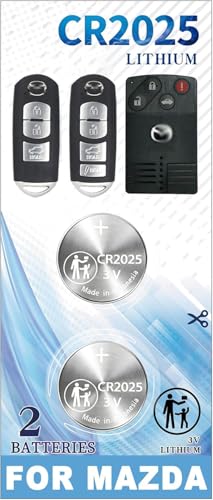
[Please check the second product image to confirm compatibility]- Installation Videos + Tools Included
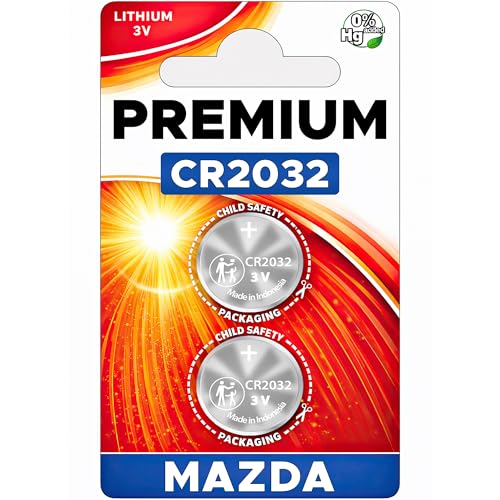
Elite USA Batteries Replacement are compatible with Mazda smart key fobs; models (has buttons on the side of the fob): for CX-5, CX-30, Mazda3, CX-9, Mazda6, CX-50, CX-90, CX-3, MX-5 Miata, CX-70, MX-30 EV. Also compatible with 2001-2011 Mazda Tribute, 1999-2009 Mazda B-Series Truck, and 1998-2002 Mazda 626.
Install the New Battery
When it comes to installing the new battery for your Mazda car key, it’s essential to ensure the replacement battery is the correct type. Here’s a straightforward guide to get you through this final step smoothly:
- Insert the new battery: Slide the new battery into the compartment, making sure it’s in the correct position.
- Check the orientation: Ensure the positive and negative sides of the battery align with the markings in the battery compartment.
- Securing the battery: Gently press the new battery down to ensure it’s securely in place.
Data
| Description | Data |
|---|---|
| Battery Type | CR2025 |
| Battery Orientation | Positive side up |
| Battery Replacement | Every 1-2 years |
Test the Key Fob
So, you’ve installed the new CR2025 battery in your Mazda car key! The next step is to test if everything is working as it should. Here’s how you can do it:
- Step 1: Stand close to your Mazda car.
- Step 2: Press the Lock or Unlock button on the key fob.
- Step 3: Check if the car responds by locking or unlocking.
- Step 4: Test the trunk release button if your key fob has that function.
- Step 5: Ensure the buttons respond smoothly without any delay.
Remember, testing the key fob after changing the battery is crucial to ensure it functions correctly. If there are any issues, double-check the battery installation and the cleanliness of the key fob contacts.
Conclusion
That’s it! You’ve successfully changed the battery in your Mazda car key following the simple steps outlined in this article. Remember to use a CR2025 battery, insert it correctly, and test the key fob to ensure it’s working smoothly. By replacing the battery every 1-2 years, you’ll maintain optimal performance. If you encounter any issues, double-check the battery installation and the cleanliness of the key fob contacts. Keep your key fob in top condition by following these easy steps. Happy driving!
Frequently Asked Questions
Q: What type of battery should I use for my Mazda car key?
A: You should use the CR2025 battery for your Mazda car key to ensure compatibility and optimal performance.
Q: How do I insert the new battery into my Mazda car key?
A: Align the positive and negative sides of the CR2025 battery with the markings in the compartment and securely press it down.
Q: How often should I replace the battery in my Mazda car key?
A: It is recommended to replace the battery in your Mazda car key every 1-2 years for best results.
Q: How can I test if my Mazda car key is working properly after changing the battery?
A: Test the key fob by pressing the buttons to ensure they respond smoothly without any delay, indicating proper functionality.
