

Ever found yourself locked out of your car because of a dead key fob battery? Frustrating, right? But fret not, as we’ve got your back! In this article, we’ll walk you through the simple steps of changing the batteries in your Nissan key fob.
Imagine being in a rush, only to realize that your key fob isn’t working. It’s a situation we’ve all been in, and it always seems to happen at the most inconvenient times. But with our easy-to-follow guide, you’ll be equipped to tackle this issue like a pro in no time.
Step 1: Gather Necessary Tools
To start changing the batteries in your Nissan key fob, you’ll first need to gather some essential tools. Here’s what you’ll need:
- New batteries (make sure they are compatible with your specific Nissan key fob model)
- Small flat-headed screwdriver or a coin for opening the fob
- Tweezers for handling the batteries
- A soft cloth to protect the fob from scratches
- A steady surface to work on, like a table or desk
With these tools in hand, you’re all set to begin the battery replacement process.
Recommended Products
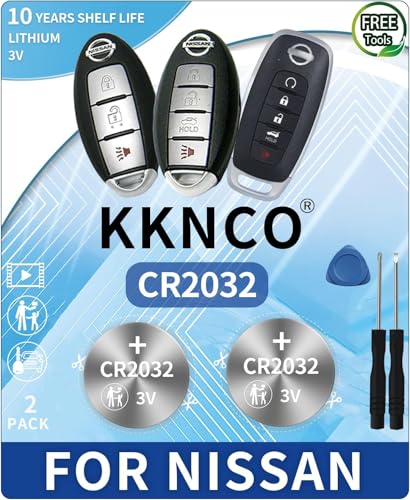
PACKAGE INCLUDED : Two (2) CR2032 Remote Fob Batteries and Opening/Pry Tools , Five item bundle (total 5pcs) , PLEASE NOTE: Keyless entry remote fob not included. Original Battery as Provided by Nissan Manufacturer

**Please confirm compatibility using the fitment guide located in the product images** This battery will not fit unless your key fob matches one of the examples provided.

PERFECT FIT FOR NISSAN KEY FOBS - Wide range of Nissan models, Rogue, Altima, Sentra, Versa, Pathfinder, Murano, Rogue Sport, Maxima, Kicks, Titan, Frontier, Armada, Leaf, Juke, Quest, Titan XD, Rogue Select, 370Z, GT-R, 400Z, Ariya, Z and Inifiniti.
Step 2: Locate the Battery Compartment
When changing the batteries in your Nissan key fob, the next step is to locate the battery compartment. This compartment is where the old batteries are housed and where you will install the new ones.
- Look for a small indentation or slot on the key fob. This is typically where the compartment is located.
- Use the small flat-headed screwdriver or a coin to gently pry open the key fob. Be careful not to apply too much pressure to avoid damaging the fob.
- Once the key fob is open, you’ll see the inner components where the batteries are situated.
Step 3: Remove the Old Battery
To remove the old battery, you’ll need to gently lift the batteries out of their housing. Make sure to note the orientation of the batteries before removing them, so you can place the new ones correctly.
- Avoid using excessive force when removing the old batteries.
- Check for any corrosion in the battery compartment that may need cleaning before installing new batteries.
- Dispose of old batteries properly to prevent environmental harm.
Keep following the steps to ensure a smooth battery replacement process.
Step 4: Insert the New Battery
It’s time to insert the new battery into your Nissan key fob. Here’s how you can do it:
- Position the New Battery: Carefully place the fresh battery into the compartment with the correct orientation.
- Securely Fit: Make sure the battery fits snugly and securely in place.
- Avoid Damage: Handle the battery with care to prevent any damage to its surface.
| Important Note |
|---|
| Always use the correct type and size of battery as recommended by the manufacturer to ensure optimal performance. |
Recommended Products

COMPATIBLE WITH AIRTAG & KEY FOBS: Works with Apple AirTag, all major car key fobs (Toyota, Honda, BMW, Ford, Chevrolet, Lexus), fitness trackers, glucose monitors, tire pressure sensors, and any CR2032 / 3V lithium coin battery device.

Key Fob Battery Replacement is compatible with Nissan smart key fobs; models: Rogue, Altima, Sentra, Versa, Pathfinder, Murano, Rogue Sport, Maxima, Kicks, Titan, Frontier, Armada, Leaf, Juke, Quest, Titan XD, Rogue Select, 370Z, GT-R, 400Z, Ariya, and Z, and Infiniti.

NOTE: Your Key Fob must take CR2032 Battery for compatibility.
Step 5: Test the Key Fob
Now that you’ve replaced the battery in your Nissan key fob, it’s time to ensure everything is working as it should. Follow these simple steps to test the key fob:
- Step 1: Stand near your Nissan vehicle.
- Step 2: Press the buttons on the key fob to verify that it locks and unlocks the car doors.
- Step 3: Check if the key fob’s remote start and panic functions work correctly.
Recommended Products

Compatible Vehicles: Part Number: 285E3-5AA3D FCC ID: KR5S180144014. Replacement for 2015 - 2020 Nissan. For full complete list, please check our product description

Complete key fob with electronics and a battery

Compatible Vehicles: Part Number: 285E3-5AA3D FCC ID: KR5S180144014. Replacement for 2015 - 2020 Nissan. For full complete list, please check our product description
Troubleshooting Tips
If your key fob doesn’t seem to be functioning properly after replacing the battery, try the following:
- Check Battery Placement: Make sure the new battery is correctly inserted with the right polarity.
- Re-Insert the Battery: Take out the battery, reposition it, and test the key fob again.
- Contact Support: If the key fob still isn’t working, reach out to Nissan customer support for further assistance.
Testing the Range
For optimal performance, test the key fob’s range as well. Here’s how:
- Step 1: Move farther away from your vehicle while testing the key fob.
- Step 2: Check the range by pressing the buttons at various distances from the car.
| Effective Range |
|---|
| Within 33 feet (10 meters) |
Conclusion
That’s it! You’ve successfully replaced the batteries in your Nissan key fob. Remember to test the key fob functions to ensure everything is working smoothly. If you encounter any issues, double-check the battery placement and try re-inserting it. If problems persist, don’t hesitate to reach out to Nissan customer support for assistance. Lastly, test the key fob’s range by pressing the buttons at different distances from your vehicle. Your key fob is now ready to keep you connected to your car hassle-free. Happy driving!
Frequently Asked Questions
How do I test my Nissan key fob after changing the battery?
After changing the battery, test your Nissan key fob by ensuring it locks and unlocks the car doors. Check the remote start and panic functions too. If any issues arise, try repositioning the battery, re-inserting it, or contacting Nissan customer support for further assistance.
Why is it important to test the key fob’s range?
It is crucial to test the key fob’s range by moving away from the vehicle and pressing the buttons at varying distances. This ensures that the key fob performs optimally and has adequate signal strength for remote operations.
