

Key Takeaways
- Portable Charging Solutions: Power banks are an essential item for charging Android devices on the go; choose one with adequate capacity for multiple charges.
- USB Connectivity: Using a computer or other devices’ USB ports is a convenient alternative for charging your Android phone, although it may be slower than a wall charger.
- Solar Charging: Solar chargers are eco-friendly and perfect for outdoor settings, providing a reliable way to harness sunlight for device charging.
- Wireless Charging: If your Android device supports it, wireless charging offers a hassle-free method to power up without needing cables.
- Emergency Methods: Options like hand crank chargers or battery sharing with other devices can be lifesavers in situations without access to regular charging methods.
- Check Compatibility: Always ensure the charging method you choose is compatible with your device to avoid potential damage while enhancing charging efficiency.
Have you ever found yourself with a dead Android phone and no charger in sight? It’s a frustrating situation that many of us face, especially when we’re on the go. Whether you’re at work, traveling, or simply forgot your charger at home, running out of battery can feel like a crisis.
But don’t worry, there are several clever ways to power up your device without the traditional charger. This article will explore practical methods to charge your Android battery in a pinch. You’ll discover easy tips and tricks that could save your day and keep you connected when you need it most. Ready to learn how?
Different Methods To Charge Android Battery Without Charger
1. Use a Power Bank
Power banks offer a portable solution for charging your Android device. Choose a power bank with sufficient capacity, like 10,000 to 20,000 mAh, to recharge your phone multiple times. Connect your phone’s charging cable to the power bank, and it’ll start charging immediately.
2. USB Connection to a Computer
You can charge your Android phone by connecting it to a computer via USB cable. Ensure the computer is powered on. This method provides a slower charge, but it helps in an emergency. Just plug your phone into a USB port, and the charging process begins.
3. Wireless Charging
If your Android device supports wireless charging, use a compatible wireless charger. Place your phone on the charging pad, and it’ll start charging without any cables. This method works best if you carry a portable wireless charger.
4. Solar Charger
Solar chargers harness sunlight to recharge your devices. Look for a compact and lightweight solar charger. Set it outside in direct sunlight, connect your phone to it, and let the sun work its magic. This method may take longer based on sunlight conditions.
5. Use a Car Charger
If you’re on the road, a car charger provides an excellent solution. Plug the car charger into your vehicle’s power outlet and connect your phone. Depending on the car’s power, this method charges your device relatively quickly.
6. Battery Share Feature
Certain Android phones offer a battery share feature that allows you to use your phone’s battery to charge another device. Access this feature in your settings, turn it on, and connect a compatible phone or accessory via a USB cable.
7. Hand Crank Charger
Hand crank chargers use manual power to generate electricity. By cranking the device, you can provide energy to your phone. This method may take more effort but works in a pinch without relying on external power sources.
8. Charging via Other Electronic Devices
If you have portable electronics like tablets or other smartphones, use their USB ports to charge your Android device. Connect your phone using a compatible cable and tap into their battery.
9. Use a Flashlight Charging Feature
Certain Android devices come with a flashlight feature that can help. Turn on the flashlight, and it might slightly drain the battery. While it won’t charge your phone, using this feature consumes less energy than other applications, prolonging your current battery life.
Try these methods to keep your Android charged when your usual charger isn’t available. Each method comes with its own steps, making it easier to select one that suits your situation best.
Using A Power Bank
Power banks serve as a portable solution for charging your Android device when you lack a traditional charger. Carrying one ensures you stay connected wherever you go.
Recommended Products
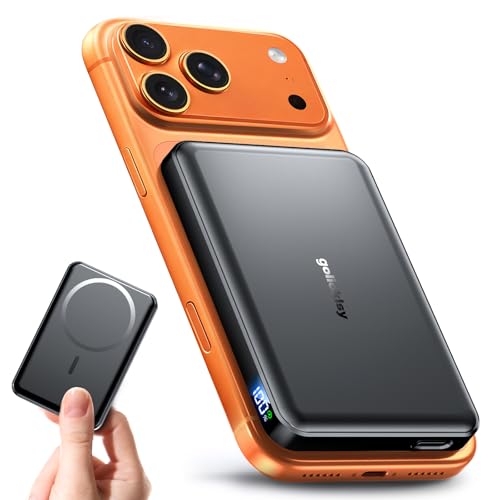
𝐖𝐡𝐲 𝐂𝐡𝐨𝐨𝐬𝐞 𝐓𝐡𝐢𝐬 𝐌𝐚𝐠𝐧𝐞𝐭𝐢𝐜 𝐏𝐨𝐰𝐞𝐫 𝐁𝐚𝐧𝐤? It packs an upgraded 10000mAh capacity, 20W fast charging, and a tiny body all in one. Unlike bulky chargers, it won’t block your iPhone’s rear camera. The strong magnetic grip holds your phone firmly – no slipping, no wobble. Works with iPhone 17/16/15/14/13/12 series, giving you 1.8~2.5 full charges. When used with a magnetic phone case, it also supports fast wireless charging for Samsung Galaxy S26/S25/S25 Ultra, Huawei Mate 70/Pura 80 Pro and most Android phones, no need to remove the case.

Dust/Water Resistant Charging Brick: Our portable power bank is rated IP67 for dust and water resistance when port cover is securely closed

Speedy 30W Charging: Experience cutting-edge 30W fast charging technology—twice as fast as 5V/3A chargers. Boost an iPhone 16 Pro Max to 50% in just 27 minutes, compared to an hour with traditional power banks.
Advantages Of Power Banks
- Portability: Power banks fit easily into bags or pockets. You can take them anywhere, making them ideal for travel or daily use.
- Multiple Charges: Many power banks offer enough capacity for several full charges. This extends your phone’s usability without access to an outlet.
- Fast Charging Options: Some power banks support quick charge technology. This feature allows you to power up your device more rapidly.
- Multiple Ports: Certain models include multiple USB ports. This lets you charge more than one device simultaneously.
Choosing The Right Power Bank
- Capacity: Look for power banks with a higher mAh (milliampere-hour) rating for multiple charges. For instance, a 10,000 mAh power bank might provide two to three full charges for most Android phones.
- Output Power: Check the output power, measured in amps. A 2.1A output can charge your device faster than a 1A output.
- Size and Weight: Ensure the power bank is lightweight and compact for easy transport. Balance portability with battery capacity.
- Features: Consider additional features such as LED indicators, built-in cables, or waterproof designs. These can enhance usability.
- Brand Reputation: Opt for devices from reputable brands. Research customer reviews to confirm reliability and performance.
Selecting the right power bank makes it easier to charge your Android device on the go. This handy tool keeps your phone ready for use whenever you need it.
Charging Via USB Ports
You can recharge your Android device using USB ports found on various devices, which is convenient when a charger isn’t accessible. Here’s how to effectively utilize these options.
Recommended Products

【Wide Compatibility 】:Type C Charger for Samsung Galaxy S26 Ultra S26+ S26,S25 S24 S23 S23+ S23 Ultra,S22 S22+ S22 Ultra, A17 A16 A36 A15 A14 5G,A13 A33 A53 A54 A10e A15 A35 A55 A25 A11 A12 A20e A20 A20s A21 A21s A30 A30s A31 A32 A40 A41 A42 A50 A50s A51 A52 A70 A72 A80 A90/A71 5g/S20 FE/Galaxy S21+ 5G/S21 Ultra 5G/S20 FE 5g/S20 5G/S20 Plus 5G/ S8 S9 S10 Plus S10e/Note 9 10/Note 20 Ultra/Z Fold 6 5 4 3 2/Z Flip 6 5 4 3 2;Google Pixel 9 8 7 Pro 6 6 Pro 6a 5a 5/4XL/4/3XL/3/2XL.

Durable Design: Reinforced nylon exterior and a robust core ensure this cable withstands up to 5,000 bends, outlasting other brands

Universal Compatibility: Compatible with most PS4 Controller, Android smartphones, Alexa Echo Dot(2nd Generation), Bose SoundLink Color I II, MPS3, Kindle fire tablet and many other devices with a Micro USB Port, compatible with Samsung, Nexus, HTC, Motorola, Nokia, LG, Sony, OnePlus, Blackberry, PS4/PS4 Slim/ PS4 Pro Controller, Kindle Fire 7 Tablet, PS Vita, GPS devices, Bluetooth speakers, wireless keyboards, MP3 players, cameras, camcorders, handheld games consoles, e-readers, printers
Using Computer USB Ports
Connecting your Android phone to a computer via USB port provides a simple charging solution. Just follow these steps:
- Locate a Computer: Find a nearby computer or laptop.
- Connect the Cable: Use your phone’s charging cable and plug one end into the phone and the other into an available USB port on the computer.
- Check Charging Status: Once connected, check your phone’s battery icon. It should indicate charging. Note that charging might be slower compared to a wall charger, especially if the computer is in sleep mode.
When using a computer, avoid using USB hubs since they might not provide sufficient power. Instead, plug your phone directly into the computer.
Using Other Devices’ USB Ports
You can also charge your Android device using USB ports on other gadgets. Here’s how:
- Find Compatible Devices: Look for devices with USB output ports, such as gaming consoles, some televisions, or portable chargers.
- Connect the Cable: Similar to the computer method, plug one end of the charging cable into your phone and the other into the USB port of the device you’re using.
- Monitor Charging: Ensure that the device is powered on, as some require this for charging to occur. Check your phone periodically to see the charging status.
Using other devices can be less efficient but may work in a tight spot. Always use high-quality cables to prevent potential damage to your phone or the device you’re using.
Utilizing Solar Chargers
Solar chargers provide a reliable way to charge your Android device without needing a traditional charger. They harness sunlight to generate power, making them perfect for outdoor activities or emergencies.
Benefits Of Solar Chargers
- Environmentally Friendly: Solar chargers use renewable energy, reducing your carbon footprint.
- Portability: Many solar chargers are lightweight and compact, easy for travel or outdoor use.
- Self-Sufficiency: With solar energy, you don’t rely on grid electricity or outlets.
- Versatile Use: Solar chargers can power other devices, such as tablets or portable speakers.
- Durability: Many solar models are designed to withstand various environmental conditions.
Best Solar Chargers For Android Devices
- Anker PowerPort Solar Lite: Lightweight and compact, it offers dual USB ports for simultaneous charging.
- RAVPower 24W Solar Charger: Features three USB ports and is highly efficient, ideal for multiple devices.
- Nekteck 21W Solar Charger: Known for its fast charging capabilities; it includes a built-in smart IC technology.
- BigBlue 28W Solar Charger: Provides high efficiency, with digital ammeter for monitoring charging speed.
- X-Dragon 20W Solar Charger: Offers foldable design and multiple ports, making it suitable for camping trips.
Utilizing solar chargers can significantly boost your device’s charging options, ensuring you’re never cut off from connectivity when you need it most.
Alternative Methods
Discover various alternative methods to charge your Android battery when a charger isn’t available. These options offer flexibility and reliability for keeping your device powered.
Using Hand Crank Chargers
Hand crank chargers become reliable tools when you’re in a pinch. These devices feature a dynamo that converts your manual effort into electrical energy. Simply turn the crank to generate power. Most hand crank chargers provide enough output to sustain basic phone functions or provide a small charge.
Popular models include the Eton BoostTurbine 2000 and the K-Tor Pocket Socket, both portable enough to carry in a bag. While charging takes effort and time, these devices serve well in emergencies or outdoor explorations where conventional power sources are scarce.
Exploring Wireless Charging Options
Wireless charging provides a convenient method for powering your Android device when a cable isn’t handy. If your phone supports wireless charging, you can use compatible wireless chargers. Simply place your device on the charging pad, and it begins charging automatically.
Several wireless charger brands, like Anker and Belkin, offer reliable options. Keep in mind that positioning the phone correctly on the pad is crucial for optimal charging speeds. Check if your device supports Qi standards, as most wireless chargers follow this protocol.
Some friends or family members may have Qi-enabled devices, like smartphones or charging pads, so ask to borrow theirs if needed. This option eliminates the hassles of tangled cords and different charging ports, making it an effective solution in a crunch.
Conclusion
Finding yourself with a dead Android phone can be a real hassle but you don’t have to panic. With these alternative charging methods at your fingertips you can keep your device powered up even when a traditional charger isn’t around.
Whether you opt for a power bank a USB connection or even a solar charger there’s always a way to stay connected. Remember to explore all the options available to you and choose what fits your lifestyle best.
By being resourceful and prepared you’ll never have to worry about losing touch when it matters most. Keep these tips handy and enjoy the peace of mind that comes with knowing you can charge your phone anytime anywhere.
Frequently Asked Questions
What should I do if my Android phone is dead and I don’t have a charger?
If your Android phone is dead and you can’t find a charger, try using a power bank, USB port on a computer, or a car charger. You can also look for a wireless charging pad if your phone supports it. Alternatively, consider using a hand crank charger or solar charger to revive your device.
How do power banks work for charging Android devices?
Power banks are portable batteries that store energy. Simply connect your Android phone to the power bank with a USB cable. They come in various capacities and can charge multiple devices at once, making them ideal for travel or emergencies.
Can I charge my phone using a computer?
Yes, you can charge your phone using a computer’s USB port. Just connect your device with a USB cable. However, charging may be slower compared to using a wall charger, so it’s best for emergencies rather than regular use.
What are the benefits of using solar chargers?
Solar chargers harness sunlight to power devices, making them eco-friendly and portable. They are self-sufficient, can charge multiple devices, and are durable for outdoor conditions, offering a great alternative when you’re away from traditional chargers.
How do hand crank chargers work?
Hand crank chargers convert manual energy into electricity. You generate power by turning a crank, allowing you to charge your phone even in emergency situations. Popular models are compact and can sustain basic phone functions effectively.
Is wireless charging a good alternative for my Android phone?
Yes, if your phone supports wireless charging, it’s a convenient way to charge without cables. Just place your device on a compatible charging pad. Brands like Anker and Belkin offer reliable options, but ensure your phone is Qi compatible for optimal charging.
