

Key Takeaways
- Use a Fast Charger: To significantly reduce charging time, always opt for a compatible fast charger with higher wattage, such as 18W or more, as opposed to standard chargers.
- Cable Quality Matters: Invest in high-quality charging cables, as thicker and well-made cables can facilitate higher current flow, enhancing charging speed.
- Optimize Device Settings: Disable background processes and features like Wi-Fi, Bluetooth, and location services during charging to minimize battery drain and speed up the charging process.
- Maintain Battery Health: Regularly check your battery’s health; consider replacing it if it’s degraded to ensure optimal charging performance.
- Control Temperature: Charge your Android device within the optimal temperature range of 32°F to 95°F to avoid slowing down the charging speed.
- Utilize Airplane Mode: Enabling airplane mode while charging can significantly enhance charging speed by reducing power consumption from background activities.
Ever find yourself in a rush, only to realize your Android phone’s battery is nearly dead? You’re not alone. Many people face that frustrating moment when they need their device charged but don’t have the time to wait.
The good news is there are simple tricks you can use to speed up the charging process. With a few adjustments and tips, you can make your battery charge faster and get back to your day without missing a beat. This article will guide you through effective methods to boost your charging speed, so you can spend less time tethered to an outlet and more time enjoying your device.
Understanding Battery Charging Speeds
Charging speed depends on a variety of factors. Knowing these can help you optimize your device’s charging performance.
Factors Affecting Charging Times
- Charger Type: Different chargers offer varying output levels. Standard chargers typically provide 5W, while fast chargers can deliver 18W or more. Using a compatible fast charger significantly reduces charging time.
- Cable Quality: The quality of your charging cable plays a role. High-quality, thicker cables support higher current flows. Low-quality or damaged cables may slow down charging.
- Device Settings: Background processes and applications drain battery life. Turning off features like Bluetooth, Wi-Fi, and location services during charging can help speed up the process.
- Battery Health: An aging battery loses its ability to charge quickly. Regularly check your battery health in your device settings. A degraded battery may require replacement for optimal performance.
- Temperature: Charging in extreme temperatures can impact speed. Ideally, keep your phone between 32°F and 95°F (0°C to 35°C) while charging.
Common Myths About Battery Charging
- Myth: Charging overnight damages the battery.
Fact: Modern devices have built-in management systems that prevent overcharging. It’s generally safe to charge overnight. - Myth: You must let your battery drain completely before charging.
Fact: Lithium-ion batteries perform better when charged frequently. Draining them too low can actually harm battery life. - Myth: Expensive chargers are always better.
Fact: While some high-quality chargers are worth the cost, many affordable options work just as well. Always check specifications to ensure compatibility. - Myth: Using your phone while charging is harmful.
Fact: While it may generate heat, using your phone during charging doesn’t cause significant damage. However, it can slow down charging speed. - Myth: You need to charge to 100% for battery longevity.
Fact: Regularly charging your battery to 100% isn’t necessary. Keeping it between 20% and 80% can extend its lifespan.
Tips To Make Your Battery Charge Faster
You can implement several effective strategies to speed up your Android battery charging.
Recommended Products

Safeguard Protection - USB c Android chargers comes with premium built-in safeguards and intelligent IC identification technology to prevent against short circuit, over-current, over-voltage, over-heating and over-charging. It can intelligently recognize the battery type and status, will automatically stop charging when fully charged for a safety charging and long lifespan
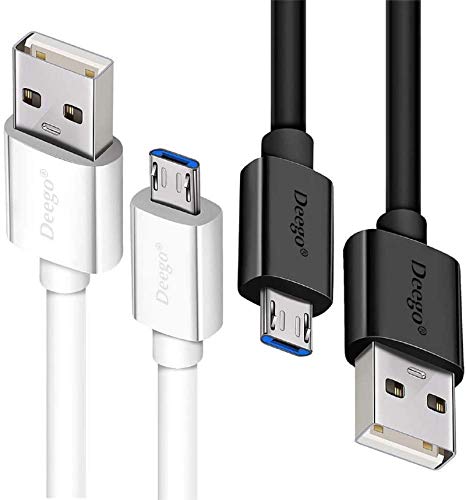
UNIVERSAL COMPATIBILITY: Extra long micro USB cable compatible with Samsung Galaxy S7/S7 Edge/S6/S6 Edge/S5/S4/Note 5/4, Samsung Tablets/Tab, PS4 controller/Dual Shock 4/Xbox One Controller, Windows Phones, LG G4/G4 Stylus/G3/G3 Stylus/K40/K30/Tribute Empire, Huawei Honor 7X/6X, Motorola, Google Nexus, Blackberry Aurora/DTEK50/Leap/Z3/Z30/Z10, wireless keyboards, bluetooth speakers, HP, Camera, printers, E-readers; Supports most Android cell phone and Android devices

Universal Compatibility: Compatible with most PS4 Controller, Android smartphones, Alexa Echo Dot(2nd Generation), Bose SoundLink Color I II, MPS3, Kindle fire tablet and many other devices with a Micro USB Port, compatible with Samsung, Nexus, HTC, Motorola, Nokia, LG, Sony, OnePlus, Blackberry, PS4/PS4 Slim/ PS4 Pro Controller, Kindle Fire 7 Tablet, PS Vita, GPS devices, Bluetooth speakers, wireless keyboards, MP3 players, cameras, camcorders, handheld games consoles, e-readers, printers
Use The Right Charger
Using the appropriate charger makes a significant difference. Opt for a charger that matches your device’s specifications for voltage and amperage. Many manufacturers provide fast chargers designed to deliver higher current quickly. For example, using a charger with 2.4A output rather than a standard 1A charger can halve your charging time. Always check for compatibility to ensure safe charging.
Enable Airplane Mode
Enabling airplane mode significantly enhances charging speed. Airplane mode halts background processes like Wi-Fi, Bluetooth, and mobile data, reducing power consumption. To activate it, swipe down from the top of your screen and tap the airplane icon. You’ll notice your device charges faster while in this mode, making it a simple yet effective solution.
Reduce Screen Brightness
Lowering your screen brightness or turning it off entirely helps charge your battery faster. The display consumes a considerable amount of power. You can decrease brightness through the quick settings menu or the display settings in your phone. For optimal charging, set the brightness to the lowest level or switch the screen off while charging.
Advanced Techniques For Faster Charging
These advanced techniques ensure you charge your Android device as quickly as possible.
Use A Fast Charging Adapter
Use a compatible fast charging adapter for optimal speed. Fast chargers can deliver higher amperage, significantly reducing charging time. Look for chargers that support Quick Charge or USB Power Delivery. Always check your device’s specifications to confirm compatibility with fast charging standards.
Optimize Background App Activity
Optimize background app activity for improved charging efficiency. Close unnecessary applications running in the background. Access recent apps and swipe them away to stop resource consumption. This action frees up processor resources and helps your device charge faster. Additionally, consider enabling battery saver mode, which further limits background activity and conserves power.
Conclusion
By following these tips you can make your Android battery charge faster and get back to what matters most in no time. Remember to choose the right charger and cable for your device and optimize settings to minimize power consumption.
With a little effort you can enhance your charging experience and keep your phone ready for anything. So next time you’re in a rush remember these strategies and enjoy a quicker charge. Your battery will thank you!
Frequently Asked Questions
What factors affect the charging speed of my Android phone?
Charging speed depends on the charger type, cable quality, device settings, battery health, and temperature. Using a fast charger and high-quality cables can significantly reduce charging time. Additionally, minimizing background usage and maintaining an optimal temperature can enhance charging performance.
Can I leave my Android phone charging overnight?
Yes, modern Android devices can safely charge overnight. They are designed to stop charging once they reach 100%, preventing overcharging, which can damage the battery.
Does using my phone while charging slow down the process?
Using your phone while charging can slow down the charging speed, but it won’t cause significant harm to the battery. To charge faster, it’s best to minimize usage during charging.
What is the optimal battery charge level for my phone?
Maintaining your battery charge between 20% and 80% is ideal for extending its lifespan. This range helps reduce stress on the battery and promotes longevity.
How can I maximize charging speed when I’m in a hurry?
To speed up charging, use a compatible fast charger, enable airplane mode, reduce screen brightness, and close unnecessary apps. These actions help minimize power consumption and improve charging efficiency.
Are cheap chargers effective for fast charging?
Yes, affordable chargers can be effective for fast charging as long as they meet your device’s specifications for voltage and amperage. Ensure that the charger is reputable to avoid safety risks.
What is the benefit of using battery saver mode while charging?
Enabling battery saver mode helps limit background activities and reduces power consumption, which can lead to a faster charging experience for your Android device.
