

Key Takeaways
- DIY vs. Professional Replacement: You can replace the battery in your Samsung watch yourself with the right tools, but consider professional services for guaranteed quality and warranty protection.
- Model Compatibility: Familiarize yourself with the specific battery type and compatibility for your Samsung watch model to ensure proper functionality.
- Battery Life Factors: Display brightness, app usage, and connectivity settings directly affect your watch’s battery life; managing these can extend usage time.
- Common Issues: Be aware of common battery problems such as rapid drain, charging issues, and overheating, and know how to troubleshoot them effectively.
- Maintenance Tips: Regular adjustments like lowering brightness, managing notifications, and updating software can significantly improve the battery lifespan of your Samsung watch.
Is your Samsung watch running low on battery, leaving you wondering if you can replace it yourself? You’re not alone. Many people face the frustration of a dying battery in their favorite wearable, and it can feel like a hassle to figure out your options.
This article will guide you through the process of replacing the battery in your Samsung watch, whether you choose to tackle it yourself or seek professional help. You’ll discover the steps involved, the tools you’ll need, and tips to make the process smoother. By the end, you’ll feel more confident about keeping your watch powered up and ready to go.
Overview of Samsung Watches
Samsung watches combine functionality and style, serving as reliable companions for managing daily tasks and monitoring health metrics. These smartwatches offer various models, including the Galaxy Watch series, Galaxy Fit series, and Galaxy Watch Active series. Each model features unique designs and functions tailored to different user preferences and lifestyles.
Key Features
- Fitness Tracking: Most Samsung watches include heart rate monitors, step counters, and sleep tracking features. These tools help you maintain an active and healthy lifestyle.
- Smart Notifications: Notifications from your smartphone sync seamlessly with your watch. You can receive texts, calls, and app alerts right on your wrist.
- Customization Options: Personalization comes through interchangeable watch bands, customizable watch faces, and downloadable apps. You can tailor your watch to reflect your style.
Battery Life
Battery longevity varies by model. Generally, Samsung watches last from one to two days on a single charge. Usage patterns, such as enabled features and notifications, significantly impact battery performance.
Replacement Considerations
- Self-Repair vs. Professional Help: You can replace the battery yourself with the right tools, but professional services are available for those uncomfortable with DIY repairs.
- Battery Type: Most Samsung watches use lithium-ion batteries. Familiarize yourself with your specific model’s battery specifications for optimal compatibility.
Understanding these aspects enhances your experience with Samsung watches. Whether for fitness tracking, smart notifications, or personal style, these devices offer innovative solutions for various everyday needs.
Battery Life in Samsung Watches
Samsung watches provide excellent functionality, but battery life can vary significantly. Understanding how to maximize and maintain your watch’s battery extends its life and keeps it functioning well.
Factors Affecting Battery Life
Several factors can impact the battery life of your Samsung watch:
- Display Brightness: Higher brightness settings increase power consumption. Lowering brightness helps extend battery life.
- Apps and Features: Using fitness tracking, GPS, and notifications consumes more battery. Turn off unnecessary apps or features for better longevity.
- Connection Settings: Bluetooth and Wi-Fi connectivity can drain the battery. Disable these settings when they’re not in use.
- Watch Faces: Animated or colorful watch faces use more power. Opt for simpler designs or static faces to conserve energy.
- Environmental Conditions: Extreme temperatures can affect battery performance. Keep your watch within the recommended temperature range (32°F to 104°F or 0°C to 40°C).
Common Battery Issues
You might encounter a few common battery issues with your Samsung watch:
- Rapid Drain: A fast-depleting battery can indicate software issues, outdated apps, or faulty hardware. Restart your watch to resolve temporary glitches.
- Charging Problems: If your watch isn’t charging, check the charger and its connections. Ensure the charging surface is clean and free from debris.
- Overheating: A warm watch can signal excessive usage or background processes. Limit the number of active apps and features to reduce temperature.
- Swollen Battery: A swollen battery presents a safety risk. If you notice this, stop using the watch immediately and seek professional help for battery replacement.
By recognizing these factors and issues, you can better manage your Samsung watch’s battery life and enhance its usability.
Can You Replace Battery in Samsung Watch?
Yes, you can replace the battery in your Samsung watch. Options exist for both DIY enthusiasts and those preferring professional help.
Recommended Products

COMPATIBILITY: The battery model is EB-BR880ABY, it is only compatible with Samsung Galaxy Watch 4 (40 mm), SM-R860 SM-R865 series and Galaxy Watch 4 Classic (42mm) SM-R880 SM-R885, please carefully confirm the model of your smartwatch before purchase.

Deluxe Watch Repair Kit: It's convenient to repair your watch with Ohuhu watch case opener tool kit, which includes 1 adjustable watch case opener, 1 watch case holder, 1 watch case opening knife, 1 watch case opening pry bar, 1 5-in-1 screwdriver, 1 tweezers, 1 cleaning cloth, 1 spring bar tool, 10 case back protective films and 64 watch seal rings. This kit is ideal for battery replacement, gasket replacement, movement replacement, daily maintenance, etc.
DIY Replacement vs. Professional Service
- DIY Replacement: This option allows you to save money and learn more about your device. It’s suitable if you feel confident with tools and gadgets. Look for replacement kits online, which often include batteries and necessary tools.
- Professional Service: Opting for professional service ensures proper installation and may come with a warranty. This choice suits those uncomfortable with disassembly or wanting to maintain the watch’s integrity.
Step-by-Step Guide for Replacement
- Gather Tools: Secure a screwdriver set, plastic opening tools, and a replacement battery specific to your watch model.
- Power Off the Watch: Ensure your watch is powered off to prevent damage during the replacement.
- Open the Back Case: Use the plastic opening tool to carefully remove the back cover. Start at a corner and work around the edge.
- Disconnect the Battery: Locate the battery connector and gently disconnect it from the mainboard.
- Replace the Battery: Remove the old battery and insert the new one, ensuring it sits flush and secure.
- Reconnect the Battery: Firmly attach the battery connector back to the mainboard.
- Reassemble the Watch: Snap the back cover back into place, ensuring it fits snugly.
- Power On and Test: Turn on your watch and verify the battery is functioning properly.
By following these steps, you can successfully replace the battery in your Samsung watch and extend its lifespan.
Tips for Maintaining Battery Life
Maintaining battery life in your Samsung watch extends its usability and performance. Here are essential tips:
Recommended Products

COMPATIBILITY: This battery only fits for Samsung Galaxy Watch 3 45mm (GPS/4G) SM-R840 SM-R845 series, please carefully confirm your phone model before purchase.

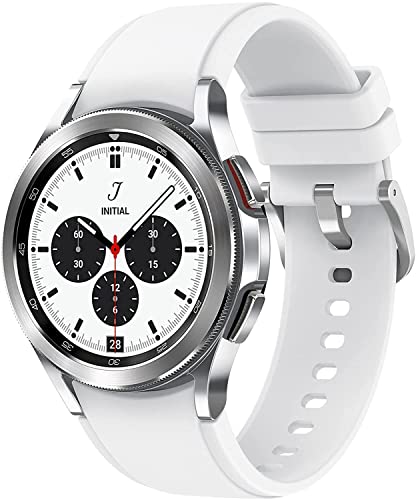
BODY COMPOSITION ANALYSIS: Galaxy Watch4 Classic is the first smartwatch to off body composition data right on your wrist, On your own schedule, now you can get readings on body fat, skeletal muscle, body water, basal metabolic rate, and Body Mass Index
Adjust Display Settings
- Lower brightness to conserve power.
- Enable auto-brightness for optimal adjustment to lighting conditions.
Manage Notifications
- Limit notifications from non-essential apps.
- Use Do Not Disturb mode to minimize interruptions during the day.
Control App Usage
- Close unused apps running in the background.
- Uninstall apps you don’t frequently use.
Optimize Connection Settings
- Turn off Bluetooth or Wi-Fi when not in use.
- Use Airplane mode in low-connectivity areas.
Select Minimalist Watch Faces
- Choose simple watch faces with fewer animations or colors.
- Avoid live wallpapers that drain battery faster.
Update Software Regularly
- Keep your watch’s software updated for improved performance and battery efficiency.
- Check for updates in the Samsung Wearable app.
Limit Health Tracking
- Adjust settings on continuous health monitoring features.
- Turn off GPS tracking when it’s not needed.
Store Efficiently
- Remove the watch from direct sunlight and heat sources to avoid overheating.
- Allow the watch to cool before charging if it feels warm.
By following these tips, you can enhance your Samsung watch’s battery life significantly.
Conclusion
Taking care of your Samsung watch’s battery can keep it running smoothly for years to come. Whether you choose to tackle the replacement yourself or seek professional help, knowing your options makes all the difference.
By following the right steps and using the necessary tools, you can enjoy a refreshed battery and all the features your watch has to offer. Plus with a few simple maintenance tips, you can extend your battery life even further.
So go ahead and give your watch the care it deserves. You’ll be glad you did when it keeps you connected and on track every day.
Frequently Asked Questions
How do I know if my Samsung watch battery needs replacement?
If your Samsung watch frequently runs out of charge or takes longer to charge than usual, it may need a battery replacement. Look for signs like rapid battery drain, overheating, or a swollen battery.
Can I replace the battery of my Samsung watch myself?
Yes, you can replace the battery yourself if you’re comfortable with DIY projects. Gather the necessary tools and follow a detailed step-by-step guide to ensure safe installation.
What tools do I need for a DIY Samsung watch battery replacement?
You typically need a precision screwdriver, a plastic prying tool, tweezers, and a new compatible battery. Make sure to check your specific watch model for any additional tools required.
Is professional battery replacement better than DIY?
If you’re unsure about the DIY approach or lack the necessary tools, seeking professional help is recommended. Professionals ensure proper installation and maintain your watch’s integrity.
How can I extend my Samsung watch’s battery life?
To extend battery life, adjust display brightness, limit app usage, manage notifications, and use minimalist watch faces. Regular software updates and efficient storage away from heat can also help.
What affects the battery life of Samsung watches?
Battery life can be affected by factors like display brightness, app usage, connection settings (like Bluetooth), watch faces, and environmental conditions. Monitoring these can optimize performance.
What are common battery issues in Samsung watches?
Common issues include rapid battery drain, charging problems, overheating, and swollen batteries. Addressing these issues promptly can help maintain the watch’s functionality.
How long does Samsung watch battery typically last on a charge?
Samsung watch batteries typically last one to two days on a single charge, depending on usage and model. Regularly optimizing settings can help extend this duration.
Are Samsung watch batteries interchangeable between models?
No, Samsung watch batteries are not universally interchangeable. Each model may have specific battery specifications, so be sure to purchase the correct battery for your watch model.
Where can I purchase a replacement battery for my Samsung watch?
You can buy replacement batteries online through authorized retailers or in-store at electronics and watch repair shops. Ensure you select the correct battery model for compatibility.
