

Key Takeaways
- Typical Battery Life: The Samsung Watch 4 generally lasts around 40 hours under moderate usage, which includes basic features like fitness tracking, notifications, and app activity.
- Key Influencing Factors: Battery longevity is affected by display brightness, the always-on display feature, Bluetooth connectivity, app usage, and workout tracking frequency.
- Practical Battery Saving Tips: Adjust screen timeout, disable unnecessary features, utilize battery saver mode, and limit app notifications to extend battery life.
- Comparison with Competitors: The Samsung Watch 4 outperforms several competitors like the Apple Watch Series 7, which lasts only about 18 hours, making it a solid choice for users needing reliability.
- Optimize Settings for Longevity: Lowering display brightness and managing connectivity while keeping software updated can further enhance battery performance.
- Daily Management: Be mindful of usage patterns and adjust settings based on activity levels to ensure the watch stays charged throughout the day.
Wondering how long your Samsung Watch 4 will keep running before it needs a recharge? You’re not alone. Many users find themselves checking their watch’s battery life, especially during busy days when every moment counts.
Imagine you’re out for a long day of work or adventure, and suddenly your watch dies. That can be frustrating, right? In this article, you’ll discover what affects the battery life of your Samsung Watch 4 and how to maximize it. By the end, you’ll have practical tips to help you get the most out of your smartwatch, ensuring it stays powered when you need it most.
Overview Of Samsung Watch 4 Battery Life
Samsung Watch 4 offers varied battery life, dependent on specific usage and settings. Typically, you can expect around 40 hours of operation from a full charge. This estimate assumes moderate usage, including fitness tracking, notifications, and occasional app usage.
Factors Affecting Battery Life
- Display Brightness: Higher brightness settings drain the battery faster. Lowering the brightness can extend usage time.
- Always-On Display: This feature keeps the watch face active, which consumes more power. Disabling it can significantly conserve battery life.
- Bluetooth Connection: Keeping Bluetooth on for syncing with your smartphone is essential but can affect battery duration. Disconnecting when not in use helps preserve energy.
- Workout Tracking: Continuous tracking during workouts uses more battery. For less intensive activities, consider reducing tracking frequency.
- Apps and Notifications: More apps installed mean more notifications, which can deplete battery life quickly. Limiting notifications keeps the battery healthier.
Battery Saving Tips
- Adjust Screen Timeout: Set the display to turn off quicker during periods of inactivity.
- Disable Unused Features: Turn off features like GPS if not required. Disable heart rate monitoring during rest periods or light activities.
- Use Battery Saver Mode: Activate this mode to extend battery life when needed. It limits background processes and notifications.
- Regular Updates: Keep your software up to date. Updates might include optimizations that improve battery performance.
For daily use, while the Samsung Watch 4’s battery serves well, understanding its dynamics helps you manage expectations. Adopting these tips ensures longevity, allowing the watch to serve you better throughout your busy days.
Factors Affecting Battery Longevity
Several factors influence the battery life of your Samsung Watch 4. Understanding these elements helps you maximize performance throughout your day.
Usage Patterns
Usage patterns significantly impact battery life. Frequent app usage, constant notifications, and intensive tracking activities drain energy quickly. For instance, engaging in workout tracking for an hour can consume a substantial portion of the battery. Similarly, heavy application use or constant screen interactions will reduce overall battery performance. Consider your daily activities and moderate usage where possible to extend battery life.
Settings and Features
Settings and features play a crucial role in your watch’s battery longevity. Adjusting display brightness lowers power consumption. The always-on display feature increases energy use, so disabling it can help. Bluetooth connectivity, when consistently active, drains the battery. Limit connections to necessary devices. Also, reducing the number of notifications and disabling unused features can conserve power. Enabling battery saver mode during low battery periods helps prolong the life until you can recharge.
By being mindful of usage patterns and tweaking settings, you can enhance the battery performance of your Samsung Watch 4.
Real-World Battery Performance
The Samsung Watch 4’s battery performance varies based on how you use the watch. Understanding your usage patterns helps you manage battery life effectively.
Recommended Products

【Exact Fit Compatibility】 Designed specifically for Samsung Galaxy Watch 4 (40mm SM-R860/SM-R865) and Watch 4 Classic (42mm SM-R880/SM-R885). Matches OEM part number EB-BR880ABY for a seamless drop-in replacement.
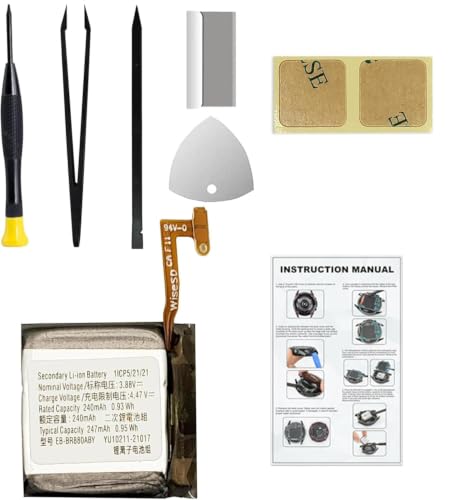
Compatible Smartwatch Model: This battery kit is specifically designed for Samsung Galaxy Watch 4 40mm (with model SM-R860 series) / Watch 4 Classic 42mm (with model SM-R880 series), please double confirm your smartwatch model before purchasing
Regular Usage Scenarios
In everyday situations, the Samsung Watch 4 typically lasts about 40 hours. Regular activities like fitness tracking and checking notifications contribute to this timeframe.
For instance, if you engage in a daily workout while receiving notifications from your phone, expect the battery to drain more slowly than during heavier usage. Adjusting your settings can enhance this experience:
- Lower display brightness.
- Disable the always-on display feature.
- Limit the number of apps connected via Bluetooth.
These steps can extend the battery life and keep your watch functional throughout your day.
Intensive Usage Scenarios
Intensive usage can dramatically reduce battery life. Activities like streaming music, using GPS for long workouts, or frequently interacting with numerous apps can deplete the battery within 24 hours.
During intense workouts or if you’re using features like heart rate monitoring continuously, consider these strategies:
- Activate battery saver mode when the battery drops below 20%.
- Turn off unused features like Wi-Fi and mobile data.
- Reduce the frequency of notifications.
By implementing these measures, you’ll maximize battery performance during demanding scenarios and ensure your watch stays charged longer.
Comparison With Other Smartwatches
When considering the Samsung Watch 4, it’s useful to compare its battery life against other popular smartwatches on the market. This comparison highlights how it performs in a crowded field.
Recommended Products

30-Day Battery Life, No Daily Charging: Enjoy up to 30 days of typical use and an extended 100-day standby on a single fast charge—no more daily charging hassles. Perfect for travel, work, and busy schedules so you stay powered longer with total confidence

This product is Brand New and super fresh

【110+ Sports Modes & Waterproof】This fitness tracker supports over 110 popular sports modes, from yoga to swimming, with a 3ATM water-resistant design for reliable performance in wet conditions.
Competitors’ Battery Life
- Apple Watch Series 7: Generally lasts up to 18 hours. Heavy use, like GPS tracking and streaming music, can cut this down significantly, often requiring daily charging.
- Fitbit Sense: Offers up to 6 days of battery life with standard use. Its battery endurance makes it ideal for users who prefer longer intervals between charges.
- Garmin Venu 2: Lasts about 11 days in smartwatch mode and up to 8 hours with GPS active. This longevity is appealing to fitness enthusiasts who track longer workouts.
- Amazfit GTR 3: Promises up to 21 days, depending on usage. Its impressive battery life is advantageous for those who want a reliable smartwatch without frequent charging.
Value for Users
Understanding the battery life of the Samsung Watch 4 in relation to its competitors helps clarify its value. Notably, several factors enhance its overall user experience:
- Moderate Usage Advantage: While the Samsung Watch 4 typically lasts around 40 hours with moderate use, this can accommodate varied lifestyles, from fitness tracking to receiving notifications.
- Recent Updates: The Samsung Watch 4 benefits from software updates that can enhance battery management, keeping it competitive against other choices.
- Fitness Features: This smartwatch includes several fitness functionalities that sometimes draw more power but can be optimized to balance performance and battery life.
- User Control: You can extend your battery life effectively by adjusting settings, similar to competitors that depend heavily on user preferences.
By looking at competitors, you gain insight into how the Samsung Watch 4 fits your needs. Understanding these nuances helps you make informed decisions about which device suits your lifestyle best.
Tips To Extend Battery Life
To maximize your Samsung Watch 4’s battery performance, consider the following tips:
Recommended Products

COMPATIBILITY: The battery model is EB-BR880ABY, it is only compatible with Samsung Galaxy Watch 4 (40 mm), SM-R860 SM-R865 series and Galaxy Watch 4 Classic (42mm) SM-R880 SM-R885, please carefully confirm the model of your smartwatch before purchase.
![DRECHAS [450mAh] Battery for Samsung Galaxy Watch 4 Classic EB-BR890ABY SM-R890 SM-R895 (46mm)/Galaxy Watch 4 SM-R870 SM-R875 SM-R875U (44mm) with Repair Tool Kits](https://m.media-amazon.com/images/I/31XIj1AKLeL._SL500_.jpg)
✅【Compatible Model】Replacement battery compatible with Samsung Galaxy Watch 4 Classic EB-BR890ABY SM-R890 SM-R895 (46mm)/Galaxy Watch 4 SM-R870 SM-R875 SM-R875U (44mm). Before purchasing this battery, please make sure that the your watch model number matches!

Compatible Smartwatch Model: This battery kit is specifically designed for Samsung Galaxy Watch 4 44mm (with model SM-R870 series) and Watch 4 Classic 46mm (with model SM-R890 series), please double confirm your smartwatch model before purchasing
Adjust Display Settings
- Lower the display brightness to conserve energy.
- Reduce the screen timeout duration, allowing the display to turn off quickly when not in use.
- Switch off the always-on display feature to prevent unnecessary power drain.
Manage Connectivity
- Disable Bluetooth when not needed to minimize battery usage.
- Turn off NFC if you’re not using Samsung Pay or similar contactless features.
- Limit Wi-Fi connections to only necessary ones.
Optimize App Usage
- Monitor and limit background app activity to reduce energy consumption.
- Delete or disable unused apps to prevent them from running in the background.
- Control app notifications to avoid draining your battery with constant alerts.
Enable Battery Saver Mode
- Activate battery saver mode during low battery situations to extend usage.
- Customize battery saver settings to prioritize essential features and notifications.
Keep Software Updated
- Regularly update your watch software to ensure optimal performance and battery efficiency.
- Check for updates in the Samsung Wearable app to keep your device running smoothly.
Limit Workout Tracking
- Use workout tracking features only during necessary exercise sessions.
- Stop workout tracking manually when finished to avoid continuous energy use.
Charge Wisely
- Use the original charging accessories for optimal charging speed and safety.
- Avoid letting the battery fully discharge regularly, as this can impact long-term performance.
Implementing these strategies can significantly extend the battery life of your Samsung Watch 4, ensuring it lasts throughout your busy days.
Conclusion
Your Samsung Watch 4 can be a reliable companion throughout your busy days if you manage its battery wisely. By understanding how different features and usage patterns affect battery life you can make adjustments that suit your lifestyle.
It’s all about finding that balance between functionality and longevity. With a few simple tweaks like reducing display brightness or limiting notifications you can keep your watch running longer. Remember that every little change can make a difference in extending that precious battery life.
So go ahead and enjoy your Samsung Watch 4 to the fullest while keeping it powered up for whatever the day brings!
Frequently Asked Questions
How long does the battery last on the Samsung Watch 4?
The Samsung Watch 4 typically lasts around 40 hours with moderate usage, which includes fitness tracking, notifications, and app interactions. However, intensive usage can reduce battery life significantly.
What factors affect the battery life of the Samsung Watch 4?
Battery life is influenced by factors such as display brightness, the always-on display feature, Bluetooth connectivity, active workout tracking, and the number of apps and notifications in use.
How can I maximize the battery performance of my Samsung Watch 4?
To maximize battery performance, adjust display settings (like lowering brightness), disable unused features, limit notifications, use battery saver mode when needed, and keep the software updated.
What happens to battery life with intensive usage on the Samsung Watch 4?
During heavy usage, such as streaming music or using GPS, battery life can drop below 24 hours. It’s crucial to moderate usage for better longevity.
How does the Samsung Watch 4 compare to other smartwatches in terms of battery life?
The Samsung Watch 4 offers competitive battery life against popular models, including the Apple Watch Series 7 and Fitbit Sense. Software updates have enhanced its performance, making it a solid choice for users.
What are some tips for charging the Samsung Watch 4 wisely?
Charge your Samsung Watch 4 when the battery falls below 20% and use authorized chargers to maintain battery health. Avoid charging it overnight to prevent overcharging issues.
