

Key Takeaways
- Battery Capacity: The Samsung Galaxy S9 is equipped with a 3,000 mAh battery, supporting typical daily usage without frequent recharges.
- Real-World Performance: Users can expect about 10 to 12 hours of web browsing, approximately 8 hours of video streaming, and around 6 hours for gaming under normal conditions.
- Key Factors Affecting Battery Life: Screen brightness, app usage, and network connectivity significantly impact battery performance; reducing brightness and limiting background activity can help conserve power.
- Comparison with Peers: The Galaxy S9’s battery life is competitive against similar smartphones, performing well in web browsing and video streaming compared to models like the iPhone X and Google Pixel 3.
- Battery Optimization Tips: To extend battery life, adjustments like lowering screen brightness, disabling background data, and enabling power-saving features are recommended.
- Charging Options: The Galaxy S9 supports fast charging, reaching 50% in about 30 minutes, along with a convenient wireless charging option.
Ever found yourself scrambling for a charger when your Samsung Galaxy S9 is running low? You’re not alone. Many users wonder just how long their device can keep going before needing a recharge. With its sleek design and powerful features, knowing the battery life can make a big difference in your daily routine.
Overview of Samsung Galaxy S9 Battery
The Samsung Galaxy S9 features a 3,000 mAh battery. This capacity supports daily use, enabling you to enjoy multimedia, gaming, and communication without frequent charging.
Typical battery life varies based on your usage. For general tasks like web browsing, social media, and email, you can expect around 10 to 12 hours of use. Streaming videos may reduce battery life to approximately 8 hours, while gaming can result in around 6 hours.
Battery performance can also depend on specific settings. Adjusting brightness, closing unused apps, and limiting background data can extend battery longevity. Utilizing power-saving mode helps conserve energy during critical times, ensuring your device lasts longer.
Samsung provides fast charging options, allowing you to recharge your Galaxy S9 from 0% to 50% in about 30 minutes. Wireless charging is also available, offering a convenient charging method without cables.
By monitoring your usage habits and optimizing settings, you can improve your Galaxy S9 battery life to match your daily routine.
Recommended Products

【Why Don't Sell Increased Capacity Battery 】- Because most of the so-called upgraded batteries on the market are exaggerated, the actual use time does not increase much, but the price is expensive. Our battery capacity and voltage is 100% same as your original s9 battery, it is a real 3000mAh can be perfectly compatible with the motherboard of your phone, and will not damage the hardware and reduce the service life of phone, true to providing long-lasting battery life.

[PLS CONFIRM DEVICE MODEL] -- Contains the instruction to guide you step by step installation. Please verify your old battery part number and model before purchasing this replacement battery. Compatible with Samsung Galaxy S9 SM-G960, SM-G960A, SM-G960T, SM-G960P, SM-G960V, SM-G960R4, SM-G960F, SM-G960U, EB-BG960ABA, EB-BG960ABE. NOT FOR Samsung Galaxy S9 Plus.

♗【HIGH QUALITY GRADE A PREMIUM BATTERY】:This Upgraded Galaxy S9 battery battery uses Grade A+ rated battery cells with CE and ROHS certification,ensure last over 1200 charge cycles. Multiple-protection for safer operation for both user and devices,build-in microchip to prevent over-charging,over-discharging and over-heating.
Factors Affecting Battery Life
Battery life on the Samsung Galaxy S9 depends on several factors. Understanding these will help you maximize your usage.
Recommended Products
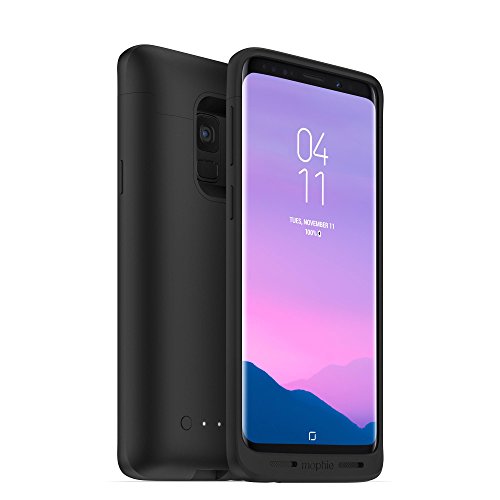
The Juice Pack made for Samsung Galaxy S9 Features a 2, 070Mah battery that can deliver enough power to extend the life of your phone up to a total of 29 hours

【Compatible Model】:S9 Plus Replacement Battery compatible with models :for Samsung Galaxy S9 Plus SM-G965 G965V G965A G965T G965P G965R4 G960F

Screen Usage
Screen brightness and usage time significantly affect battery life. Higher brightness levels drain the battery more quickly. Reducing brightness or using adaptive brightness can help extend usage. The screen’s size, resolution, and active time contribute to overall consumption. For example, keeping your screen on for long periods without engaging in tasks leads to faster battery depletion.
App Usage
Running multiple apps simultaneously consumes more battery. Some apps, especially games and streaming services, demand significant power. Regularly check your background apps and limit high-consumption activities. Close apps not in use. Apps that continuously update in the background can also drain power. You can adjust the settings to limit background data and notifications to conserve battery.
Network Connectivity
Network connectivity plays a key role in battery performance. Using mobile data consumes more battery compared to Wi-Fi. Poor network signals can increase battery drain, as the device works harder to maintain a connection. Switching to Wi-Fi when available and disabling location services when not needed helps save power. Airplane mode can be useful in low-signal areas to preserve battery life.
Battery Life in Real-World Usage
You might wonder how the Samsung Galaxy S9’s battery performs during everyday tasks. Understanding real-world battery life helps you gauge its reliability for your needs.
Typical Daily Usage Scenarios
In typical daily scenarios, the Galaxy S9’s 3,000 mAh battery offers different endurance levels:
- Casual browsing: Expect around 10 to 12 hours for web browsing and light social media use.
- Video streaming: For streaming services like Netflix or YouTube, anticipate about 8 hours of uninterrupted viewing.
- Gaming: Engaging in graphics-intensive gaming sessions reduces battery life to approximately 6 hours.
- Mixed usage: Balancing tasks, such as texting, calls, and browsing, may yield around 9 hours, depending on activity intensity.
Adjusting settings like brightness and updating apps can further extend battery life. You can enhance your experience by using power-saving options.
Comparison with Other Smartphones
When compared to other smartphones, the Galaxy S9 generally holds its own. Here’s a comparison table of battery performance:
| Smartphone | Battery Capacity | Web Browsing | Video Streaming | Gaming |
|---|---|---|---|---|
| Galaxy S9 | 3,000 mAh | 10-12 hours | ~8 hours | ~6 hours |
| iPhone X | 2,716 mAh | 9-11 hours | ~8 hours | ~5 hours |
| Google Pixel 3 | 2,915 mAh | ~8-10 hours | 7 hours | ~4 hours |
| OnePlus 6T | 3,700 mAh | 11-13 hours | ~9 hours | ~7 hours |
The Galaxy S9 performs comparably, with strengths in web browsing and moderate video streaming. It’s essential to evaluate your usage patterns to find the best fit for your lifestyle.
By knowing its real-world battery performance, you can better plan your day and ensure your Galaxy S9 stays functional when you need it most.
Tips to Extend Battery Life
Extend your Galaxy S9 battery life with a few adjustments and features designed to optimize power efficiency.
Recommended Products

【Compatible Model】 It is compatible with Samsung Galaxy S9 SM-G960, SM-G960A, SM-G960T, SM-G960P, SM-G960V, SM-G960R4, SM-G960F, SM-G960U, EB-BG960ABA, EB-BG960ABE. Not for Galaxy S9+ Plus. Please double identify check your phone model matches before purchasing the battery.

【Precise Compatibility, Perfect Fit】Please confirm your device model before placing an order. This product is a replacement battery for the [EB-BG960ABE] model, specifically designed for the [Galaxy S9] model, ensuring a perfect fit with the original device and restoring your phone's vitality.

【COMPATIBLE MODELS】Compatible with Samsung Galaxy S9 only. Battery Model: EB-BG960ABE.Fits for SM-G960U, SM-G960U1, SM-G960F, SM-G960W, SM-G9600, SM-G960N series. NOT compatible with Galaxy S9 Plus or any other Galaxy models.Please double check your phone model before purchasing the battery.
Settings to Adjust
- Lower Screen Brightness: Reduce the brightness to save power. Adaptive brightness adjusts automatically based on your environment.
- Limit Background Data: Restrict background data for apps. Go to Settings > Connections > Data usage > Mobile data usage, then select apps to limit background activity.
- Turn Off Always-On Display: Disable this feature unless needed. Go to Settings > Lock screen > Always On Display and select “Off.”
- Reduce Screen Timeout: Set a shorter screen timeout. Navigate to Settings > Display > Screen timeout and choose a lower duration.
- Disable Unnecessary Features: Turn off Bluetooth, NFC, and Location Services when not in use. Access these settings quickly from the notification shade.
Battery-Saving Features
- Power Saving Mode: Activate this mode for significant power savings. Find it in Settings > Battery > Power saving mode. This limits background apps and reduces performance.
- App Power Management: Use this feature to put apps to sleep when not in use. Access it via Settings > Battery > App power management. Choose “Put unused apps to sleep” for better battery conservation.
- Battery Usage Monitoring: Monitor battery usage by app. Go to Settings > Battery > Battery usage to see which apps consume the most power. Uninstall or limit those that drain your battery quickly.
- Adaptive Battery: Enable Adaptive Battery to optimize battery life based on usage patterns. Find this option under Settings > Battery, then toggle on “Adaptive Battery.”
Conclusion
The Samsung Galaxy S9 is designed to keep up with your daily needs without constantly searching for a charger. By understanding how your usage patterns affect battery life you can make simple adjustments to get the most out of your device.
Whether you’re streaming videos or browsing the web there are plenty of ways to extend that battery life. Don’t forget to take advantage of the power-saving features and optimize your settings to fit your lifestyle. With a little effort you can enjoy your Galaxy S9 fully charged and ready for whatever your day brings.
Frequently Asked Questions
How long does the Galaxy S9 battery last on a full charge?
The Samsung Galaxy S9 typically lasts around 10 to 12 hours for general tasks, 8 hours for video streaming, and about 6 hours of gaming. Actual battery life may vary based on usage intensity and settings.
What factors affect the battery life of Galaxy S9?
Battery life is influenced by screen usage, app consumption, and network connectivity. High screen brightness, running multiple apps, and using mobile data over Wi-Fi can drain the battery faster.
What can I do to improve the battery life of my Galaxy S9?
To enhance battery life, lower screen brightness, limit background data, use power-saving modes, and disable unnecessary features like Bluetooth and NFC. Monitoring app usage can also help.
Does the Galaxy S9 support fast charging?
Yes, the Galaxy S9 supports fast charging, allowing it to recharge from 0% to 50% in about 30 minutes, making it convenient for quick power boosts.
How can I check my battery usage on the Galaxy S9?
You can monitor your battery usage by going to Settings > Battery. This section provides insights into which apps are consuming the most power and helps you manage your battery settings.
