

Key Takeaways
- Understand Battery Types: ASUS laptops primarily use lithium-ion and lithium-polymer batteries, each with varying costs and lifespans (typically 2-4 years).
- Recognize Replacement Signs: Key indicators for battery replacement include shortened battery life, overheating, physical damage, charging issues, and frequent power loss.
- Cost Factors: The cost of replacing an ASUS laptop battery can range from $30 to $220, depending on the battery type, capacity, and whether you choose DIY or professional service.
- DIY vs. Professional: DIY replacement can save money (totaling $40 to $150), while professional services ensure convenience but may cost between $80 and $220.
- Source Quality Batteries: Purchase replacement batteries from authorized ASUS retailers or reputable third-party providers to ensure compatibility and performance.
Is your Asus laptop struggling to hold a charge? You’re not alone. Many users face this issue as their devices age, leading to the question: how much does it really cost to replace that battery?
Overview of ASUS Laptop Batteries
ASUS laptop batteries vary in type and specifications, affecting their performance and lifespan. Understanding these differences helps you make informed decisions about battery replacement.
Types of ASUS Laptop Batteries
- Lithium-Ion Batteries
Lithium-ion batteries are the most common type used in ASUS laptops. They provide high energy density, lightweight design, and good longevity. These batteries typically last 2-4 years, depending on usage and care.
- Lithium-Polymer Batteries
Lithium-polymer batteries offer a flexible design and lower weight. They hold similar performance benefits as lithium-ion batteries but usually come in thinner, more compact forms. Their lifespan also ranges from 2-4 years.
- Integrated Batteries
Some ASUS models feature integrated batteries that can’t be easily removed. Replacing these requires professional assistance or specific tools. Check your model’s manual to see if this type affects your replacement options.
Signs You Need a Replacement
- Shortened Battery Life
If your battery only holds a charge for a couple of hours after full charging, consider replacement. Noticeable decreases in operating time indicate diminished battery health.
- Overheating
Frequent overheating while charging or using your laptop signals a failing battery. High temperatures can damage internal components, so consider replacing the battery promptly.
- Swelling or Physical Damage
Look for signs of swelling, cracks, or physical damage. A swollen battery risks rupturing or leaking, which poses safety hazards. Replace it immediately if you notice this issue.
- Charging Issues
If your laptop doesn’t charge despite using different adapters, it may be a battery issue. Test with another charger. If the problem persists, replacement may be necessary.
- Frequent Power Loss
Unexpected shutdowns often indicate battery failure. If the laptop powers off even when the battery appears charged, consider replacing the battery for reliable operation.
Factors Affecting Battery Replacement Cost
Several factors impact the cost of replacing an Asus laptop battery. Understanding these elements helps you budget effectively for this repair.
Recommended Products
![Fancy Buying C21N1347 Laptop Battery Replacement for Asus X555 X555L X555LA X555LD X555LN A555L K555L Y583LD W519LD K555LD K555LA R556L VM590L Series 2ICP4/63/134 [7.6V/5000mAh/38Wh]](https://m.media-amazon.com/images/I/41FLA47zuaL._SL500_.jpg)
♣Battery type: Li-ploymer Voltage: 7.6 V(Compatible with 7.4V) Capacity: 5000mAh/38Wh Cell:3Cells

Battery Model : B31N1912 Voltage: 11.55V Capacity: 42Wh Li-ion polymer Battery
Battery Type and Capacity
Battery type significantly affects replacement costs. Asus laptops use different batteries, including lithium-ion and lithium-polymer. Lithium-ion batteries, commonly found in many models, often range from $30 to $100. Conversely, lithium-polymer batteries, which might offer better performance, can cost $50 to $120.
Battery capacity also matters. Higher capacity batteries, which provide longer usage times, typically cost more. For example, a battery with a capacity of 4000mAh may cost more than one with 2500mAh. Always check the specifications of your device to ensure compatibility when selecting a replacement.
Service Fees and Warranty Considerations
Service fees can influence the total cost of battery replacement. If you opt for a professional technician, expect labor costs to range from $30 to $100. Some service centers charge additional fees for diagnostic tests.
Warranty status also plays a role in costs. If your laptop is still under warranty, battery replacement may be covered, minimizing or eliminating your out-of-pocket expenses. Always verify warranty coverage before proceeding with repairs to potentially save money.
Average Cost to Replace ASUS Laptop Battery
Replacing the battery in your ASUS laptop involves understanding different cost factors associated with DIY and professional options. Knowing these costs helps you choose the most suitable replacement method.
Recommended Products

Battery Type: Polymer. Voltage: 11.55V Capacity: 42Wh ; Cells: 3-cell; Color: Black, Packages includes: 1x B31N1912 battery , with auxiliary installation tool and user manual.
DIY Replacement Costs
DIY battery replacement for ASUS laptops can be cost-effective. Lithium-ion batteries typically range from $30 to $100, while lithium-polymer batteries fall between $50 and $120. Here are some key components of DIY replacement costs:
- Battery Purchase: You pay directly for the battery, which varies by type and capacity.
- Tools: You might need basic tools like screwdrivers or a prying tool, possibly adding another $10 to $30 to your costs.
- Guides: Online tutorial videos and guides are often free, providing step-by-step help for the replacement process.
Considering these aspects, your total DIY costs can vary from $40 to $150, depending on specific requirements.
Professional Replacement Costs
Opting for professional battery replacement involves higher costs but ensures a hassle-free process. Professional service fees usually add between $30 and $100 to the battery cost. Here’s a breakdown of professional replacement costs:
- Battery Cost: Expect to spend $30 to $120 for the battery, similar to DIY prices.
- Labor Fees: Professional labor typically costs around $50 to $100, depending on the service center’s rates and complexity of the replacement.
- Warranty Check: If your laptop is under warranty, authorized service centers may cover the replacement cost, saving you significant money.
For professional replacement, you might face total expenses ranging from $80 to $220. Understanding both DIY and professional options helps you make an informed decision based on your budget and comfort level with technical work.
Where to Purchase Replacement Batteries
When you need a replacement battery for your Asus laptop, several options are available. It’s crucial to choose a reliable source to ensure quality and compatibility.
Recommended Products
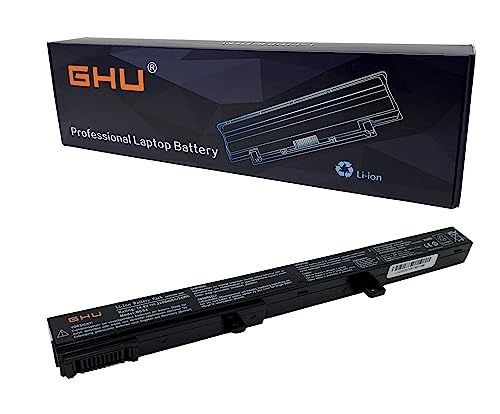
Premium 33Wh Battery: Experience long-lasting power with the x551mav battery, a31n1519 battery. Our asus battery a31n1319 is a high-quality asus battery x551mav that provides your device with the power it needs for optimal performance.
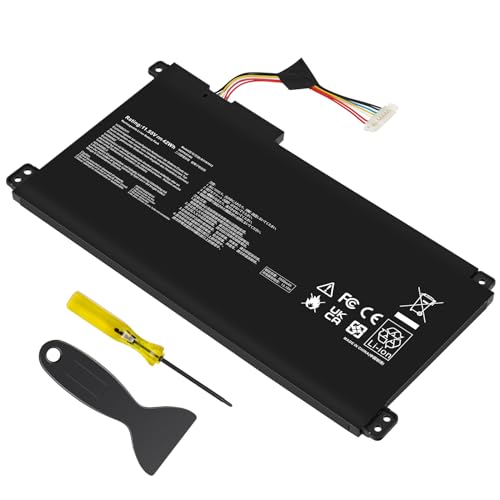
【Capacity】42Wh/3550MAH Cell: 3-Cell Voltage: 11.55V Battery type: Li-ion

COMPATIBLE P/N : C21N1818-1, 0B200-03280800, 2ICP7/54/83
Authorized ASUS Retailers
Authorized ASUS retailers offer original replacement batteries specifically designed for your laptop model. These batteries meet ASUS’s quality standards, providing optimal performance. You can find authorized retailers at ASUS’s official website or through their support channels. Examples include major electronics stores and ASUS’s own online store. Prices typically align with suggested retail values, providing peace of mind. You can also check if they offer in-store assistance or installation services.
Third-Party Providers
Third-party providers offer a range of replacement batteries at various price points. While these options are often more affordable, it’s vital to ensure compatibility with your specific Asus laptop model. Look for trusted websites or local computer shops that specialize in laptop parts. Customer reviews and ratings can help gauge quality. Ensure the batteries come with warranties or return policies to safeguard your purchase. Examples of reputable third-party brands include Anker and iFixit. Be cautious of extremely low-priced options, as they may not deliver reliable performance.
Conclusion
Replacing your Asus laptop battery doesn’t have to break the bank. By understanding the types of batteries available and the factors that influence costs you can make a more informed choice. Whether you opt for a DIY approach or decide to go with a professional service it’s all about finding what fits your budget and comfort level.
Don’t forget to check your warranty status as it could save you some money. With the right information and resources you can keep your laptop running smoothly for years to come. Happy computing!
Frequently Asked Questions
What are the common signs that an Asus laptop battery needs replacement?
A dying Asus laptop battery exhibits several signs, including significantly shortened battery life, overheating during use, physical damage like swelling, problems charging, and frequent power losses. If you notice any of these issues, it may be time to consider replacing your battery.
How much does it cost to replace an Asus laptop battery?
The cost of replacing an Asus laptop battery varies by type. Lithium-ion batteries typically range from $30 to $100, while lithium-polymer batteries can cost $50 to $120. Additional service fees for professional replacements may add $30 to $100 to the total expense.
Can I replace my Asus laptop battery myself?
Yes, you can replace your Asus laptop battery yourself, which can be cost-effective. Total DIY costs generally range from $40 to $150, depending on battery type and any necessary tools. Make sure to follow reliable online guides for a successful replacement.
Where can I purchase replacement batteries for my Asus laptop?
You can purchase replacement batteries from authorized ASUS retailers for genuine options or third-party providers for budget-friendly choices. When selecting third-party batteries, ensure they are from reputable brands and check for warranties or return policies.
How long do Asus laptop batteries typically last?
Asus laptop batteries usually last between 2 to 4 years, depending on usage and care. Over time, their capacity diminishes, leading to potential performance issues like shortened usage times and charging problems.
