

Key Takeaways
- Understand Battery Life Factors: The Samsung Watch 4’s battery life can range from 24 to 36 hours and is influenced by settings like display brightness, app usage, and GPS functionality.
- Optimize Display Settings: Lowering display brightness and disabling the always-on display feature can significantly extend battery life.
- Limit Notifications and Background Activity: Control which apps send notifications and limit background activity to conserve power and enhance battery efficiency.
- Utilize Power Saving Features: Activate the battery saver mode and monitor battery usage regularly to identify and manage power-hungry apps.
- Practice Smart Charging: Always use the official charger for your Samsung Watch 4, avoid overcharging, and maintain a regular charging schedule to protect battery health.
- Keep Software Updated: Regularly update the device software to benefit from battery optimization improvements and overall performance enhancements.
Ever found yourself checking your Samsung Watch 4 only to see that dreaded low battery warning? You’re not alone. Many users struggle with keeping their smartwatches powered throughout the day, especially with all the features they offer.
Understanding Battery Life on Samsung Watch 4
Battery life on the Samsung Watch 4 varies based on usage and settings. You’ll typically see 24 to 36 hours of operation with standard use. Factors like display brightness, notifications, and app usage greatly influence battery consumption.
Key Factors Affecting Battery Life
- Display Brightness: Higher brightness consumes more power. Adjust the settings to a lower level for better longevity.
- Always-On Display: The always-on feature drains the battery quickly. Disable it unless necessary.
- Notifications: Frequent notifications from apps can affect battery life. Limit notifications to essential apps.
- GPS Usage: Using GPS for workouts or tracking drains the battery faster. Limit GPS use or switch to a more battery-efficient mode when possible.
- Widgets: Multiple active widgets can reduce battery life. Review and remove unnecessary widgets from the home screen.
Battery Management Tips
- Battery Saver Mode: Activate battery saver mode when your watch needs extra life. This can extend battery life significantly.
- App Management: Uninstall unused apps. Less clutter translates to better performance and battery efficiency.
- Software Updates: Keep your watch updated. Updates often include battery optimization enhancements.
- Power Off Hours: Turn off the watch during periods of inactivity. This saves energy for when you need it most.
- Charge Smartly: Use the official charger. Non-certified chargers can harm the battery health.
These practices help you make the most of your Samsung Watch 4’s battery life, ensuring it lasts throughout your day.
Tips to Maximize Battery Life
Maximizing the battery life of your Samsung Watch 4 helps maintain its functionality throughout your day. Here are some effective strategies to enhance your watch’s performance.
Recommended Products
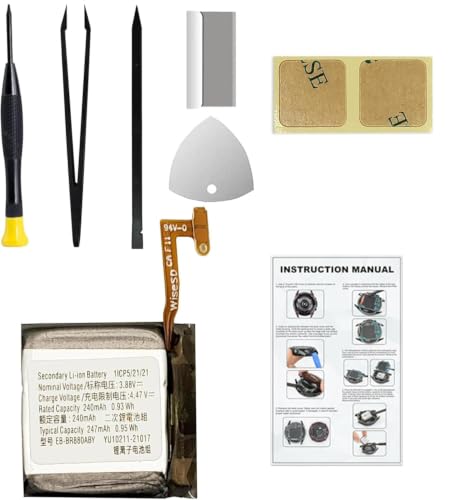
Compatible Smartwatch Model: This battery kit is specifically designed for Samsung Galaxy Watch 4 40mm (with model SM-R860 series) / Watch 4 Classic 42mm (with model SM-R880 series), please double confirm your smartwatch model before purchasing

COMPATIBILITY: The battery model is EB-BR880ABY, it is only compatible with Samsung Galaxy Watch 4 (40 mm), SM-R860 SM-R865 series and Galaxy Watch 4 Classic (42mm) SM-R880 SM-R885, please carefully confirm the model of your smartwatch before purchase.
Adjust Screen Brightness
Lowering screen brightness reduces battery drain. To adjust brightness:
- Swipe down from the top of the watch face.
- Tap the brightness icon.
- Select a lower brightness level or enable Automatic Brightness to let the watch adjust based on lighting conditions.
This adjustment decreases power consumption significantly, especially in darker environments.
Enable Power Saving Mode
Activating Power Saving Mode extends battery life by limiting certain functions. To enable this mode:
- Open the Settings app on your watch.
- Scroll down and select Battery.
- Tap on Power Saving Mode and toggle the switch to activate it.
While in this mode, performance may be reduced, but essential functions remain accessible. It’s a great option during low battery alerts.
Limit Background App Activity
Reducing background app activity helps conserve battery. To limit this:
- Open the Settings app.
- Go to Apps.
- Select the apps you want to limit.
- Choose Settings for each app and toggle off Background Activity.
Disabling unnecessary background processes keeps your watch focused on active tasks, prolonging battery life throughout the day.
Charging Best Practices
Charging your Samsung Watch 4 efficiently can significantly improve its battery life. Implementing optimal charging practices can help maintain your smartwatch’s performance.
Recommended Products


👉2-Pack Convenient Spare Charger: Comes with 2 chargers in one pack, which can be used in various ways. Long, lightweight and compact enough fit in travel, home and office, such as night stand, desk, end table, car, camper and motorhome etc. You can carry it in your bag at any time in case you forget an extra charger

Proven Compatibility: Compatible with Samsung Galaxy Watch Ultra 47mm (SM-L705U)┃Watch 7 40mm (SM-L300NZ)┃Watch 7 44mm (SM-L310NZ)┃Watch FE 40mm (SM-R861)┃Watch 6 40mm(SM-R930)┃Watch 6 44mm (SM-R940)┃Watch 6 Classic 43mm (SM-R950)┃Watch 6 Classic 47mm (SM-R960)┃Watch 5 Pro 45mm (SM-R920)┃Watch 5 40mm (SM-R900)┃Watch 5 44mm (SM-R910)┃Watch 4 40mm (SM-R860)┃Watch 4 44mm (SM-R870)┃Watch 4 Classic 42mm (SM-R880)┃Watch 4 Classic 46mm (SM-R890)┃Watch 3 41mm (SM-R850)┃Watch 3 45mm (SM-R840)┃Active 2 40mm (SM-R830)┃Active 2 44mm (SM-R820)┃Active 1 40mm (SM-R500). Not for Galaxy watch (released in 2018) and Gear S2/S3/S4
Use the Right Charger
Using the official charger specifically designed for the Samsung Watch 4 ensures that the device charges safely and effectively. Third-party chargers may not provide the correct voltage or current, which can lead to slower charging or even damage. Always check that the charger matches your watch’s specifications for best results.
Avoid Overcharging
Overcharging your Samsung Watch 4 can harm the battery’s longevity. Charge it until it reaches 100%, then disconnect it to prevent excessive heat and strain on the battery. Utilize a charging schedule that allows you to monitor the charging process, keeping it charged for only as long as necessary. Consider charging during times you’re not using the watch, like at night, but be mindful of unplugging it promptly.
Monitoring Battery Usage
Monitoring battery usage helps you understand which features and apps drain your Samsung Watch 4’s battery life. You can make informed choices to enhance its longevity.
Recommended Products

【Exact Fit Compatibility】 Designed specifically for Samsung Galaxy Watch 4 (40mm SM-R860/SM-R865) and Watch 4 Classic (42mm SM-R880/SM-R885). Matches OEM part number EB-BR880ABY for a seamless drop-in replacement.

Compatible Smartwatch Model: This battery kit is specifically designed for Samsung Galaxy Watch 4 44mm (with model SM-R870 series) and Watch 4 Classic 46mm (with model SM-R890 series), please double confirm your smartwatch model before purchasing

Rotating Bezel Navigation: Physical rotating bezel allows precise and intuitive control of apps and menus.
Accessing Battery Settings
Access battery settings to gain insights into your watch’s performance. Go to the Settings app and tap on Battery. Here, you’ll see a breakdown of battery usage by apps and features. Adjust settings based on your observations. For instance, if GPS or notifications take up a lot of battery, consider limiting their use or adjusting their frequency.
Identifying Power-Hungry Apps
Identifying power-hungry apps aids in managing battery life. In the battery settings, look for apps that consume a significant portion of the battery. Common culprits include fitness tracking apps, streaming services, and apps with frequent notifications. If you find apps that significantly drain your battery, consider updating them, limiting background activity, or uninstalling them altogether. Reducing usage of these apps can lead to noticeable improvements in battery longevity.
Conclusion
By following these simple tips you can significantly extend the battery life of your Samsung Watch 4. Remember to keep an eye on your settings and adjust them to fit your needs. A little tweaking here and there can make a big difference in how long your watch lasts throughout the day.
Make it a habit to monitor your usage and identify which features you truly need. With a bit of awareness and the right practices you can enjoy all the amazing features of your watch without constantly worrying about recharging. Happy watching!
Frequently Asked Questions
What is the average battery life of the Samsung Watch 4?
The Samsung Watch 4 typically offers a battery life of 24 to 36 hours under standard usage. Various factors such as display settings, app usage, and notifications can affect how long the battery lasts.
How can I extend the battery life of my Samsung Watch 4?
To extend your Samsung Watch 4’s battery life, consider lowering the screen brightness, enabling Power Saving Mode, limiting notifications, and managing app usage. Regularly checking your battery settings can also help identify which features drain the battery the most.
Is it safe to use third-party chargers for Samsung Watch 4?
It is not recommended to use third-party chargers for your Samsung Watch 4. Official chargers are designed to provide the correct voltage and current, ensuring safe and effective charging, while third-party options may cause damage.
How often should I charge my Samsung Watch 4?
It’s best to charge your Samsung Watch 4 until it reaches 100% and then disconnect it to avoid overcharging. Implementing a charging schedule, like charging it during inactive hours, can help maintain battery health.
What features consume the most battery on the Samsung Watch 4?
Features like GPS, high display brightness, and constant notifications typically consume the most battery on the Samsung Watch 4. Monitoring battery usage through settings can help identify and manage these power-hungry features.
How can I manage notifications to save battery life?
To save battery on your Samsung Watch 4, limit the number of notifications you receive. Turn off non-essential notifications and customize which apps can send alerts to reduce battery consumption.
What should I do if my Samsung Watch 4 is draining battery quickly?
If your Samsung Watch 4 is draining battery quickly, check your battery settings to identify the apps consuming the most power. You may need to update those apps, limit their background activity, or uninstall them to improve battery life.
