

Key Takeaways
- Extend Battery Lifespan: Protecting your Samsung battery through best practices can significantly prolong its lifespan, typically around 2-3 years for lithium-ion batteries.
- Optimize Device Settings: Adjust settings like screen brightness, battery saver mode, and background data to enhance battery life and overall device performance.
- Avoid Extreme Temperatures: Keep your device away from extreme heat and cold, as these conditions can negatively impact battery health and performance.
- Use Original Charging Accessories: Always use Samsung-approved chargers and cables to ensure compatibility and avoid damage caused by third-party products.
- Monitor Battery Health: Regularly check your battery’s health using built-in tools or third-party applications to identify issues and optimize performance.
- Practice Safe Charging: Avoid overnight charging or activate adaptive charging features to prevent overcharging and maintain battery longevity.
Have you ever found yourself scrambling for a charger, wishing your Samsung battery lasted just a bit longer? You’re not alone. Many people face the frustration of a dwindling battery life, especially when they rely on their devices for everything from work to staying connected with loved ones.
Importance Of Protecting Samsung Battery
Protecting your Samsung battery is crucial for maintaining device performance and longevity. A well-cared-for battery ensures that you enjoy reliable power for your daily tasks, minimizing frustrations when your device runs low. Below are key reasons why you should prioritize battery protection:
Extended Battery Lifespan
Taking steps to protect your battery can significantly extend its lifespan. Lithium-ion batteries typically last around 2 to 3 years. By following best practices, you can maximize this duration.
Consistent Performance
A healthy battery provides consistent performance. It keeps your device running smoothly, allowing you to engage in work or entertainment without interruptions. Inconsistent battery performance may lead to unexpected shutdowns or slow charging times.
Improved Safety
A damaged or poorly maintained battery poses safety risks. Swelling, overheating, or leaks can occur if attention isn’t paid to battery health. Proper care minimizes these risks and ensures safe device usage.
Cost Efficiency
Replacing a drained or damaged battery can get costly. By protecting your current battery, you reduce the chance of needing replacements, saving you money in the long run. Investing in battery care pays off financially.
Sustainability
Protecting your battery contributes to environmental sustainability. Fewer batteries disposed of means less electronic waste. Caring for your device’s battery is a step towards eco-friendliness.
Implementing simple practices to safeguard your Samsung battery reaps significant benefits. From longer lifespans to improved device safety, understanding the importance of battery protection shapes a better user experience.
Tips For Extending Battery Lifespan
Extending your Samsung battery’s lifespan is essential for maximizing device performance. Implementing a few simple strategies can help you achieve better longevity.
Optimize Device Settings
Adjusting settings can significantly impact battery life. Here are some key adjustments:
- Reduce Screen Brightness: Lower the brightness or enable adaptive brightness to save energy.
- Enable Battery Saver Mode: Activate this mode to limit background processes and notifications, prolonging usage time.
- Limit Background Data: Turn off background data for apps not in use. This helps conserve battery power.
- Disable Unused Features: Turn off Wi-Fi, Bluetooth, and location services when not needed to minimize power drain.
- Close Unused Apps: Regularly check for and close apps running in the background that you’re not using.
Avoid Extreme Temperatures
Extreme heat and cold can harm your Samsung battery. Follow these tips:
- Keep Your Device Cool: Avoid leaving your phone in areas with high temperatures, such as a car on a hot day. High temperatures cause the battery to deteriorate faster.
- Prevent Exposure to Cold: Don’t expose your device to freezing temperatures for extended periods. Cold weather can affect battery capacity and performance.
- Use Cases Wisely: Opt for cases that allow heat to dissipate. Some bulky cases can trap heat, impacting battery health.
Implementing these strategies helps protect and extend your Samsung battery’s lifespan, ensuring better performance and longevity for your device.
Best Charging Practices
Following best charging practices can significantly enhance your Samsung battery’s longevity and efficiency. Implementing the right habits not only protects your battery but also improves the overall performance of your device.
Use Original Charging Accessories
Using original Samsung charging accessories ensures compatibility and optimal charging speed. Third-party chargers might not meet the same safety standards, which can lead to battery damage. Always check that your charger and cable are approved by Samsung, as this minimizes risks and promotes effective charging.
Avoid Overnight Charging
Avoiding overnight charging helps prevent battery overcharging. When you charge overnight, your device may remain plugged in after reaching full capacity. This can lead to battery stress and heat accumulation. If you need to charge overnight, consider activating the “Adaptive Charge” setting if available. This feature helps manage charging cycles, turning off power once the battery is full.
Monitoring Battery Health
Monitoring battery health keeps your Samsung device performing optimally. Regularly checking your battery’s status helps you identify issues before they escalate. Here’s how to effectively oversee your battery health.
Recommended Products

Product Type -Wearable Computer

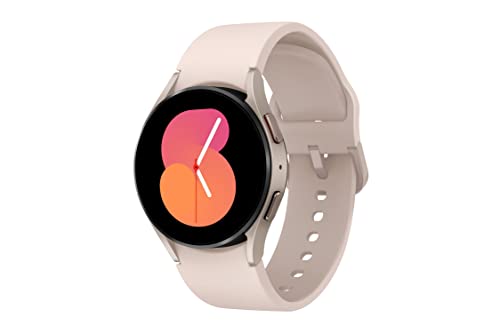
ADVANCED SLEEP COACHING: Manage your overall sleep quality with an advanced sleep tracker that detects and analyzes sleep stages while you rest; Plus, Advanced Sleep Coaching helps you develop better sleep habits by analyzing your sleep patterns.Supported Application:Fitness Tracker,Blood Pressure Monitor,Multisport Tracker,Time Display,GPS. Connectivity technology:Bluetooth. Wireless comm standard:Bluetooth,802_11_AGNAC
Using Built-In Tools
Samsung devices come equipped with built-in battery health tools. You can access these features easily:
- Open Settings: Navigate to the device’s settings menu.
- Select Battery and Device Care: Tap on “Battery and Device Care.”
- Choose Battery: From there, select “Battery” to view usage stats.
- Check Battery Health: Look for “Battery Health” options that provide insight into overall performance and capacity.
Using this tool allows you to see how your apps affect battery performance and manage resources better.
Third-Party Applications
Third-party applications can provide additional monitoring capabilities. Consider these popular options:
- AccuBattery: This app offers insights on battery usage over time, helping optimize charging habits.
- GSam Battery Monitor: It provides detailed stats about battery consumption from various apps, allowing you to identify power-hungry apps.
- Battery Guru: It gives notifications about battery performance and tips for optimization.
These applications offer further analysis, enabling you to take informed steps toward maintaining your battery health.
Conclusion
Taking care of your Samsung battery is key to enjoying a seamless experience with your device. By adopting simple habits like optimizing settings and using the right charging accessories, you can keep your battery healthy for longer.
Remember to monitor your battery’s health regularly and make adjustments as needed. With a little effort, you’ll not only extend your battery’s lifespan but also enhance your device’s overall performance.
So go ahead and implement these tips to make the most out of your Samsung device. Your battery will thank you!
Frequently Asked Questions
Why does my Samsung device battery drain quickly?
A quick battery drain can be caused by high screen brightness, too many background apps, or unused features. Optimizing your device settings can help extend battery life.
How can I extend the lifespan of my Samsung battery?
You can prolong battery lifespan by reducing screen brightness, using battery saver mode, limiting background data, and avoiding extreme temperatures for your device.
What are the best charging practices for Samsung batteries?
Always use original Samsung chargers, avoid overnight charging, and consider using the “Adaptive Charge” setting to manage charging cycles and prevent overcharging.
How can I monitor my Samsung battery health?
Navigate to “Battery and Device Care” in your settings to check battery health. You can also use third-party apps like AccuBattery and GSam Battery Monitor for deeper insights.
Why is battery protection important for my Samsung device?
Protecting your battery helps ensure consistent performance, extends its lifespan, improves safety, saves costs, and supports environmental sustainability.
