

Key Takeaways
- Samsung Galaxy A10e Overview: The Galaxy A10e is a budget-friendly smartphone with a 3000 mAh battery, providing all-day usage and decent camera capabilities for everyday tasks.
- Essential Tools for Battery Removal: Required tools for a successful battery removal include a small Phillips screwdriver, a plastic pry tool, tweezers, and a small container to organize screws.
- Safety Precautions: Always power off your device before beginning, wear safety gloves, and avoid using metal tools to prevent electrical issues and component damage.
- Step-by-Step Battery Removal: Follow a clear sequence: power off the device, remove the back cover, disconnect the battery connector, and gently take out the battery.
- Replacement Tips: Select a compatible replacement battery, prepare a clean workspace, and carefully handle all components during the replacement process.
- Responsible Disposal: After replacing the battery, responsibly recycle the old battery through designated programs to minimize environmental impact.
Have you ever found yourself needing to replace the battery in your Samsung Galaxy A10e but weren’t sure where to start? You’re not alone! Many users face this challenge, especially when their phone starts showing signs of wear.
Overview of Samsung Galaxy A10e
Samsung Galaxy A10e is a budget-friendly smartphone that combines essential features with a sleek design. With a 5.83-inch HD+ display, it offers a clear and vibrant viewing experience. The device has a 3000 mAh battery that supports all-day use, making it suitable for everyday tasks.
You’ll find it equipped with an 8 MP rear camera and a 5 MP front-facing camera. This provides options for capturing moments with decent quality, whether it’s for selfies or quick shots. The phone runs on Android 9.0 Pie, allowing access to a variety of apps and functionalities.
The Galaxy A10e features 32 GB of internal storage, expandable via microSD, accommodating your growing library of photos and apps. Additionally, the phone’s lightweight design and ergonomic shape ensure comfortable handling, perfect for long periods of use.
Common concerns among users often include battery life and performance as the device ages. Understanding how to maintain and, if necessary, replace the battery can extend its usability and enhance performance. This overview gives you a solid foundation for working with your Samsung Galaxy A10e.
Tools Needed for Battery Removal
To remove the battery from your Samsung Galaxy A10e, specific tools are essential for a smooth process. Having the right items on hand simplifies the task and ensures you don’t damage your device.
Recommended Products

Compatible Phone Model: This battery kit is specifically designed for Samsung Galaxy A10e (with model SM-A102 series) / A20e (with model SM-A202 series), please double confirm your phone model before purchasing
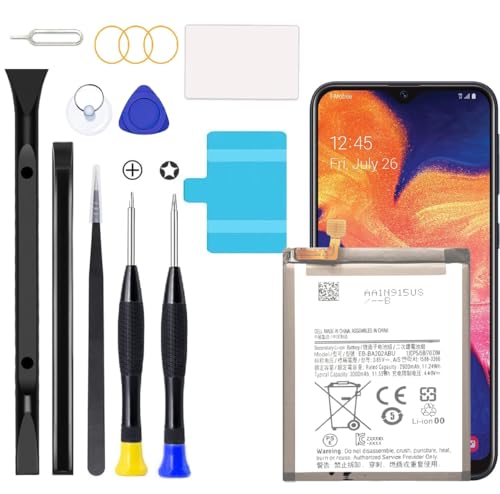
Compatible Models: This A10e Battery For SM-A102U/A20e SM-A202F/DS/A20e Dual SIM SM-A202F EB-BA202ABU

Compatibility: This battery replacement kit is exclusively designed for Samsung Galaxy A20E A10E (Model: SM-A202F SM-A102U SM-A102W SM-A102). Incompatible with other phone models. Before purchase, please verify that your device's model number matches one from the list above. To locate your model number, navigate to: Settings > About Phone > Model name.
Recommended Tools
- Screwdriver Set: A small Phillips screwdriver helps remove screws that secure the back cover.
- Plastic Pry Tool: This tool aids in lifting the back cover without scratching the phone’s surface.
- Tweezers: These assist in handling small components and safely disconnecting battery connectors.
- Small Container: Keep screws and small parts organized to prevent loss during the process.
Safety Precautions
- Power Off the Device: Always turn off your Galaxy A10e before starting the battery removal to prevent any electrical issues.
- Wear Safety Gloves: Using gloves protects against possible sharp edges and helps maintain cleanliness.
- Avoid Metal Tools: Using non-metal tools reduces the risk of accidental short circuits or damage to battery components.
- Keep Workspace Clear: Ensure you have ample space to work, minimizing the risk of dropping parts or tools.
Gather these tools and follow the safety measures to make your battery removal process efficient and safe.
Step-by-Step Guide to Removing the Battery
Follow these steps to safely remove the battery from your Samsung Galaxy A10e.
Power Off the Device
- Hold down the power button until the power menu appears.
- Tap “Power Off” to turn off the device completely.
- Ensure the screen goes dark before proceeding.
Remove the Back Cover
- Use a plastic pry tool to gently lift the back cover.
- Start at one corner and work your way around.
- Be careful not to crack the cover, as it may break with excessive force.
Disconnect the Battery Connector
- Locate the battery connector on the motherboard.
- Use tweezers to pull the connector straight out of its socket.
- Avoid twisting or pulling too hard to prevent damage.
Take Out the Battery
- Grip the battery firmly at the bottom.
- Pull it straight up and out of the compartment.
- Dispose of or store the battery securely, depending on your needs.
Tips for Replacing the Battery
Choose the Right Battery
Select a compatible replacement battery for your Samsung Galaxy A10e. Opt for branded batteries or verified third-party batteries to ensure safety and performance.
Prepare Your Workspace
Create a clean, spacious area for your battery replacement. Ensure you have good lighting to make handling small parts easier.
Gather Additional Tools
Consider having a suction cup handy. This tool can help lift the back cover without causing damage, especially if adhesive is present.
Handle With Care
Avoid touching the battery connector directly with metal objects. Use plastic tools to prevent short circuits and protect your device.
Follow Replacement Steps Accurately
Adhere closely to the step-by-step instructions for removal and replacement. Each step ensures you don’t inadvertently damage any components.
Inspect for Damage
Before inserting the new battery, inspect the battery compartment and connectors. Check for dust, debris, or physical damage.
Secure Connections Firmly
Ensure all connections are tight after replacing the battery. Loose connections can lead to charging issues or battery problems.
Test Functionality
After replacing the battery, power on your device to test if it functions correctly. Check charging, battery life indicators, and other performance metrics.
Recycle the Old Battery
Dispose of the old battery responsibly. Look for designated recycling programs or drop-off points to minimize environmental impact.
Conclusion
Replacing the battery in your Samsung Galaxy A10e doesn’t have to be a daunting task. With the right tools and a bit of patience you can give your device a new lease on life. Remember to follow the steps carefully and prioritize safety throughout the process.
Once you’ve successfully swapped out the old battery for a fresh one you’ll notice improved performance and battery life. Plus it’s a great way to save money instead of buying a new phone. Enjoy your newly revitalized Galaxy A10e and make the most of its features for years to come!
Frequently Asked Questions
How do I know if my Samsung Galaxy A10e battery needs to be replaced?
If your Galaxy A10e frequently drains quickly, experiences unexpected shutdowns, or fails to charge despite using a working charger, these could be signs that the battery needs replacing. Additionally, physical deformities of the battery, like bulging, are clear indicators of failure.
What tools do I need to replace my Samsung Galaxy A10e battery?
You will need a small Phillips screwdriver, a plastic pry tool, tweezers, and a small container to organize screws. These tools will help you safely disassemble the device to access the battery.
Are there safety precautions to take when replacing the battery?
Yes, always power off your device before starting. Wear safety gloves, avoid using metal tools, and maintain a clean workspace. This will help prevent damage to your device and ensure your safety during the process.
How do I remove the battery from my Samsung Galaxy A10e?
Start by powering off your device and removing the back cover. Disconnect the battery connector from the motherboard, then carefully grip and lift the battery out. Dispose of or store the old battery properly.
What should I look for in a replacement battery for my Galaxy A10e?
Choose a battery that is compatible with the Samsung Galaxy A10e. Ensure it is from a reputable brand to guarantee quality and safety. Check specifications like capacity (mAh) to match performance expectations.
How can I test my Galaxy A10e after replacing the battery?
After replacing the battery, power on your device to see if it charges and holds a charge properly. Check all functionalities such as camera, connectivity, and screen responsiveness to ensure everything works as expected.
What should I do with the old battery after replacement?
Recycle the old battery responsibly to minimize environmental impact. Many electronic stores or recycling centers accept used batteries, ensuring they are disposed of properly and safely.
