

Key Takeaways
- Battery Replacement Feasibility: You can replace the Samsung Note 8 battery, either through professional services or by following a DIY approach.
- Identifying Battery Issues: Watch for signs of battery wear, such as rapid drainage, incomplete charging, and unexpected shutdowns, to determine if a replacement is necessary.
- Essential Tools for DIY: If opting for DIY, gather essential tools: heat gun, suction handle, plastic opening tools, screwdriver set, and a high-quality replacement battery.
- Risks of DIY Replacement: DIY battery replacement can void warranties and lead to potential damage if not done correctly; ensure you’re comfortable with technical tasks before proceeding.
- Benefits of Professional Service: Utilizing certified repair centers provides expertise, quality assurance, and often preserves your device’s warranty while ensuring safe and efficient battery replacement.
- Safety Precautions: Always power off your device, use appropriate tools, and follow safety guidelines, including proper battery disposal, to minimize risks during the replacement process.
Is your Samsung Note 8 struggling to hold a charge? You’re not alone. Many users face battery issues as their devices age, leaving them frustrated and searching for solutions. The good news is that you might be able to replace the battery yourself, saving time and money.
Overview of Samsung Note 8 Battery
The Samsung Note 8 is powered by a non-removable lithium-ion battery that offers a capacity of 3300 mAh. This battery delivers a reasonable balance of performance and longevity for most users. Over time, a battery naturally loses its ability to hold a charge due to normal wear and tear.
Consider the symptoms of a failing battery. You might notice your device draining faster, not charging fully, or exhibiting unexpected shutdowns even with a sufficient charge. Recognizing these signs early can guide you toward a potential battery replacement.
Battery Replacement Options
Replacing the Note 8 battery isn’t as straightforward as swapping out a removable battery from older models. However, you have options:
- Professional Service: Taking your device to a certified repair center ensures proper handling and quality assurance. Technicians use specialized tools to safely access and replace the battery.
- DIY Replacement: If you opt for a do-it-yourself (DIY) approach, ensure you have the right tools, such as a heat gun, a suction handle, and a plastic opening tool. It’s crucial to follow a detailed guide or video tutorial for proper steps and safety measures.
Tools Required for DIY Replacement
If you choose to replace the battery yourself, gather these essential tools:
- Heat Gun: Helps soften the adhesive holding the battery in place.
- Suction Handle: Assists in lifting the screen without damaging it.
- Plastic Opening Tools: Prevents scratches and protects internal components.
- Screwdriver Set: Necessary for removing screws and accessing the battery.
Points to Consider
Before proceeding with a battery replacement, assess a few factors:
- Warranty Status: Opening your device may void any existing warranty.
- Battery Quality: Use only high-quality replacement batteries from reputable sources.
- Skill Level: If you’re not comfortable with technical tasks, stick with professional services.
Following these guidelines can help you make an informed decision about whether to replace your Samsung Note 8 battery yourself or seek professional help.
Reasons for Replacing the Battery
Replacing the battery in your Samsung Note 8 can greatly improve its performance and lifespan. Several factors contribute to the need for a battery replacement.
Recommended Products

{COMPATIBLE MODELS}:This Replacement battery Compatible with Samsung Galaxy Note 8 (Model: SM-N950 N950T N950A N950P N950V N950R4 N950F).

❤【HIGH QUALITY GRADE A PREMIUM BATTERY】:This Upgraded Galaxy Note 8 Battery uses Grade A+ rated battery cells with CE and ROHS UL UKCA certification,ensure last over 1200 charge cycles. Multiple-protection for safer operation for both user and devices,build-in microchip to prevent over-charging,over-discharging and over-heating.
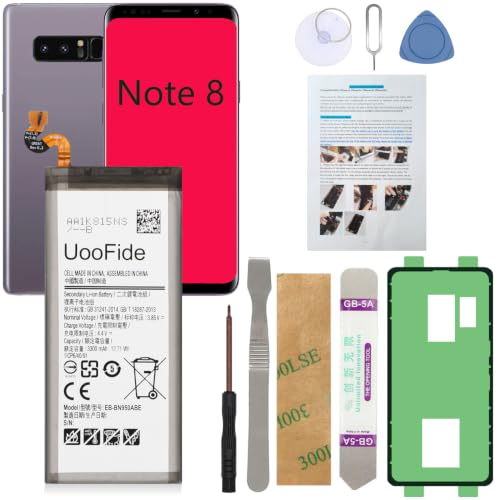
【Latest IC Chip Smart Power Housekeeper 】- Use the latest cost-effective smart IC chip on the market now which same as the original Galaxy Note 8 battery, combined with the latest science and technology at the same time, so that the battery has an exclusive smart power housekeeper which can intelligently control and distribute the power, maximize power conversion rate. Longer power life without bothering about running out of power and shut down some apps all the time.
Signs of Battery Wear and Tear
Recognizing the signs of battery wear is crucial. Common indicators include:
- Rapid Drainage: If your phone discharges quickly during normal use, it suggests a weakening battery.
- Incomplete Charging: You plug in your device, but it doesn’t reach 100% charge or takes longer than expected to charge.
- Unexpected Shutdowns: Your phone turns off suddenly, even with a charged battery.
- Overheating: Excessive heat during charging or while in use often points to battery issues.
Observing these symptoms signals that it’s time to consider a replacement.
Importance of Battery Replacement
Replacing a worn battery can restore your phone’s functionality. This process maintains performance and enhances daily usability. Benefits include:
- Extended Device Life: A fresh battery can significantly prolong your smartphone’s lifespan, reducing the need for a full device upgrade.
- Improved Performance: A new battery enhances speed, enabling smoother multitasking and faster app launches.
- Consistent Connectivity: You stay connected longer, minimizing interruptions in calls and messages.
Timely replacement prevents further damage to your device and ensures it meets your daily demands.
Can You Replace the Battery in a Samsung Note 8?
You can replace the battery in a Samsung Note 8, but it’s important to consider your options. The process involves some risks, especially if you choose the DIY method. Here’s what you need to know before deciding.
DIY Battery Replacement
If you prefer a hands-on approach, a DIY battery replacement is possible. Here are the steps and tools you’ll need:
- Gather Tools: Get a heat gun, suction handle, plastic opening tools, and a screwdriver set. These are essential for opening your device safely.
- Power Off the Device: Turn off your Samsung Note 8 completely to avoid any electrical issues during the replacement.
- Heat the Edges: Use the heat gun to slightly warm the edges of the phone. This helps soften the adhesive holding the back glass in place.
- Remove the Back Cover: Use the suction handle to lift the back cover gently, and insert plastic opening tools to loosen it around the edges. Take your time to avoid breaking the glass.
- Disconnect the Battery: Once the cover is off, locate the battery connector. Carefully disconnect it using the plastic tools.
- Replace the Battery: Remove the old battery and replace it with a new one. Make sure the new battery is compatible with the Samsung Note 8.
- Reassemble the Device: After connecting the new battery, place the back cover on and press it into place. Allow some time for the adhesive to set.
Consider the risks. DIY replacements void warranties and can cause damage if not done correctly.
Professional Replacement Services
Choosing professional replacement services is a safer route for many users. Here’s what to expect:
- Expertise: Technicians have the skills and tools to handle the battery replacement efficiently and safely. They minimize risks of damage.
- Warranty Protection: Using professional services often keeps your warranty intact, as manufacturers support authorized repairs.
- Quality Assurance: Professionals typically use high-quality batteries, reducing the likelihood of future issues.
- Quick Turnaround: Many service centers offer same-day repairs, so you can get your phone back promptly.
Research local service options and compare prices. Look for nearby repair shops with positive reviews.
You can weigh the benefits of DIY versus professional services based on your comfort level and budget.
Steps for Battery Replacement
Replacing the battery in your Samsung Note 8 involves careful steps. Follow these instructions to ensure a successful process.
Required Tools and Materials
Gather the following tools and materials before starting:
- Heat Gun: For softening adhesive on the back cover.
- Suction Handle: Helps lift the back cover safely.
- Plastic Opening Tools: Useful for prying open the device.
- Screwdriver Set: Ensure you have a Phillips screwdriver and a specialized tool for the internal screws.
- New Battery: Purchase a high-quality replacement compatible with the Note 8.
- Tweezers: To handle small components.
Detailed Instructions
- Power Off the Device: Always switch off your phone completely to avoid any electrical issues.
- Heat the Edges: Use the heat gun on the edges of the back cover for about 30 seconds. This softens the adhesive, making it easier to remove.
- Remove the Back Cover: Attach the suction handle near the edge and gently pull while inserting a plastic opening tool to pry the cover off. Work slowly to avoid breaking the glass.
- Disconnect the Battery: Locate the battery connector and remove the screws holding the bracket in place. Use the screwdriver to remove them, then carefully lift the connector off.
- Replace the Battery: Remove the old battery by gently prying it out. Place the new battery in its position and reconnect the battery connector.
- Reassemble the Device: Replace the bracket and screws for the battery connector. Carefully align the back cover and press it down firmly, ensuring it adheres properly.
- Power On the Phone: Switch on your device to ensure the new battery is functioning correctly.
By following these detailed steps, you can successfully replace the battery in your Samsung Note 8 and restore its performance.
Safety Precautions
When replacing the battery in your Samsung Note 8, safety must be a priority. Take the following precautions to minimize risks:
- Power Off Your Device
Ensure the phone is completely powered off before starting the process. This prevents short circuits and electrical shocks.
- Use the Right Tools
Gather all necessary tools, such as a heat gun, suction handle, plastic opening tools, and screwdriver set. Using incorrect tools can lead to damage.
- Work in a Well-Ventilated Area
Perform the replacement in a space with good airflow. This eliminates unnecessary fumes from the battery and adhesive materials.
- Check the Battery for Damage
Inspect the new battery for any visible damage, like dents or bulges. A damaged battery can pose a safety hazard.
- Avoid Using Metal Tools Near the Battery
Stick to plastic opening tools. Metal tools can puncture the battery, causing it to rupture or catch fire.
- Be Careful of Static Electricity
Ground yourself before handling internal components. Static electricity can damage sensitive parts of the device.
- Keep a Fire Extinguisher Nearby
Always have a fire extinguisher within reach when working with lithium-ion batteries. This adds an extra layer of safety.
- Dispose of Old Batteries Properly
Don’t throw the old battery in regular trash. Take it to a designated recycling center. Proper disposal prevents environmental harm.
By following these safety precautions, you can carry out the battery replacement process with confidence and reduce potential risks.
Conclusion
Replacing the battery in your Samsung Note 8 can breathe new life into your device. Whether you choose to tackle it yourself or seek professional help, knowing your options can make the process smoother and less stressful.
Keep an eye on those battery symptoms and don’t hesitate to act when you notice them. A timely battery replacement not only enhances your phone’s performance but also ensures it stays reliable for your daily needs.
Whichever route you take, prioritize safety and enjoy the benefits of a refreshed battery. Your Note 8 deserves it!
Frequently Asked Questions
What are the signs of a failing Samsung Note 8 battery?
A failing Samsung Note 8 battery may show signs like faster battery drainage, incomplete charging, unexpected shutdowns, and overheating. If you notice these symptoms, it’s time to consider a replacement.
Can I replace the Samsung Note 8 battery myself?
Yes, you can replace the Samsung Note 8 battery yourself if you’re comfortable with DIY tasks. However, it requires specific tools and precautions. Ensure to weigh your skill level and potential risks before proceeding.
What tools do I need for a DIY battery replacement?
For a DIY battery replacement, you will need a heat gun, suction handle, plastic opening tools, and a screwdriver set. These tools will help you safely open the device and replace the battery.
Should I go for professional battery replacement services?
Opting for professional services ensures expert handling, quality assurance, and potential warranty protection. It’s a good choice if you’re unsure about doing it yourself or want a quicker solution.
How can I ensure safety during battery replacement?
To ensure safety, power off your device fully, use appropriate tools, work in a well-ventilated area, check for visible damage on the new battery, and avoid using metal tools near the battery. Follow these precautions closely.
