

Key Takeaways
- Battery Life Estimates: The Samsung Watch 3 typically lasts around 2 days with standard use, but this can drop to about 10 hours during heavy activities like GPS tracking.
- Impact of Usage: Battery performance is heavily influenced by user habits; casual notification checks conserve battery, while intensive fitness tracking drains it quickly.
- Adjustable Settings: Tweaking settings such as screen brightness and disabling always-on display can significantly extend battery life.
- Charging Convenience: The watch fully charges in approximately 2 hours using a magnetic wireless charging dock, making it easy to keep it powered.
- User Comparisons: Compared to competitors, the Samsung Watch 3 offers a solid performance for casual users, though it may not compete with models like Garmin in heavy workout scenarios.
- Real-World Adaptation: Users are encouraged to adapt their charging habits and settings based on activity level to ensure optimal battery performance throughout the day.
Ever wondered how long your Samsung Watch 3 can keep up with your busy lifestyle? You’re not alone. Many users find themselves checking battery life throughout the day, especially when they’re relying on it for fitness tracking or notifications.
Imagine you’re out for a run or heading to a meeting, and suddenly your watch dies. That’s frustrating! This article will break down the battery life of the Samsung Watch 3, giving you real insights into what you can expect. You’ll discover tips to maximize its longevity and ensure it’s always ready when you need it.
Overview of Samsung Watch 3
The Samsung Watch 3 combines functionality with style, offering a range of features tailored for fitness enthusiasts and daily users alike. It features a vibrant 1.4-inch Super AMOLED display, providing sharp visuals even in bright sunlight. You can customize watch faces and receive notifications straight from your smartphone.
Battery life varies based on usage. For standard use, it lasts about 2 days. Engaging in workout tracking and using GPS significantly drains the battery, reducing it to around 10 hours under heavy usage. Voice and LTE features can also impact longevity.
Key Features
- Fitness Tracking: The watch tracks various activities, including running, cycling, and swimming.
- Health Monitoring: It provides heart rate monitoring, blood oxygen measurements, and sleep tracking.
- Smart Notifications: Receive calls, messages, and app alerts on your wrist.
Battery Tips
To extend your battery life:
- Manage Settings: Reduce screen brightness and limit always-on display usage.
- Smart Modes: Use battery-saving modes when necessary to prolong usage.
- App Management: Limit background app activity and notifications.
Understanding these features and implementing the tips can enhance your Samsung Watch 3 experience.
Battery Specifications
Samsung Watch 3 features a well-balanced battery designed for performance and longevity. Understand the details below to maximize your watch’s battery life.
Recommended Products

Wireless Fast Charging - A must-have for Galaxy fans! This Aeinidi 3-in-1 wireless charger for Samsung features an AI intelligent charging chip and includes a QC3.0 adapter for efficient, stable power delivery. It provides reliable, cooler, and more consistent charging for compatible Galaxy phones, Galaxy Watch, and Buds. Designed for everyday use to keep your Samsung devices powered and ready. (Note: Samsung phones require a magnetic case, as built-in magnets are not included.)

FAST CHARGE WITH LATEST Qi2 TECHNOLOGY: Easy magnetic alignment delivers up to 25W wireless charging for Galaxy, Pixel, and other Qi2-compatible Android devices–optimized for fast, efficient power with secure magnetic connection and reliable performance.*
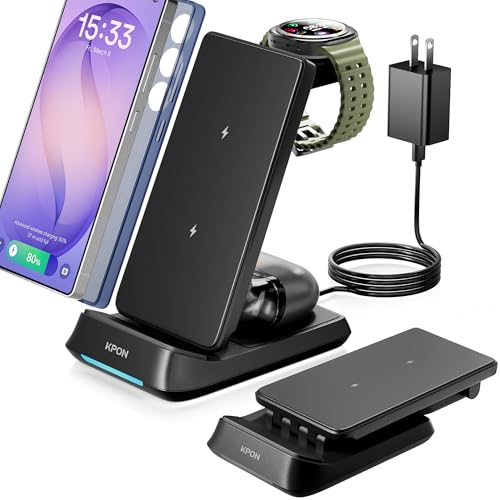
【3in1 Wireless Charging Station】This versatile charging solution for Samsung devices, simplifies your charging routine, allowing you to power up your phone, smartwatch, and earbuds all at once. It's suitable for Samsung galaxy S26 ultra/S26-20/S10/Note20/Note20 ultra/Note10+/Z fold6/5/4/3/2/Fold Series; Samsung Galaxy Watch/Galaxy Earbuds.
Capacity and Type
The Samsung Watch 3 comes equipped with a 247 mAh lithium-ion battery. This type provides a solid mix of fast charging and decent lifespan. Under standard usage, you can expect the battery to last around 2 days. Heavy use, such as GPS tracking and workout modes, can reduce this to about 10 hours. Managing settings affects battery life significantly, so be aware of how you interact with the watch.
Charging Options
Charging the Samsung Watch 3 is straightforward and convenient. It includes a wireless charging dock that uses a magnetic connection. Simply align the watch’s back with the dock to initiate charging. The watch fully charges in approximately 2 hours. To maintain optimal battery health, charge the watch when it drops below 20%. Remember to use official Samsung chargers for the best performance and safety.
Factors Affecting Battery Life
Several factors influence the battery life of the Samsung Watch 3. Understanding these can help you optimize usage and extend functionality.
Usage Patterns
Your daily activities impact battery performance. For instance, using features like GPS or heart rate monitoring during workouts drains the battery faster. Engaging in heavy tracking can reduce battery life to around 10 hours. Conversely, casual use, such as checking notifications or monitoring basic fitness activities, may stretch battery life to about 2 days.
Settings Adjustments
Adjusting your watch settings can significantly enhance battery longevity. Here are some effective changes to consider:
- Turn Off Always-On Display: Disabling this feature saves power by allowing the display to turn off when not in use.
- Limit Notifications: Reducing the number of apps that send notifications minimizes the watch’s activity and conserves battery.
- Use Battery Saver Mode: Activate this mode during low battery situations. It disables non-essential features but maintains essential functions.
- Dim Display Brightness: Lowering brightness not only improves battery performance but also makes the display easier to view in bright environments.
Implementing these adjustments can lead to a noticeable improvement in the overall battery performance of your Samsung Watch 3.
Real-World Battery Performance
Understanding how the Samsung Watch 3 performs in everyday scenarios helps manage expectations regarding battery life.
Typical Daily Usage
In typical daily use, the Samsung Watch 3 lasts around 2 days on a single charge. You can expect this duration with moderate activity, such as checking notifications, tracking steps, and occasional heart rate monitoring. For example, if you wear the watch to work, receive notifications throughout the day, and engage in a 30-minute workout, you’ll likely see performance aligned with this average. To maximize battery life, adjust settings, such as reducing notifications and disabling features like always-on display.
Battery Life under Different Conditions
Battery performance changes significantly based on how you use the watch. Here’s a breakdown of its life under various conditions:
| Use Case | Estimated Battery Life |
|---|---|
| Standard Usage | 2 days |
| GPS Active (Workout) | 10 hours |
| Sleep Tracking | 2 days |
| Always-On Display Enabled | 1.5 days |
For heavy activities, like using GPS for long runs, the battery can drain in about 10 hours. If you frequently engage in these activities, consider planning charging sessions accordingly. To get the most out of your battery, consider using power-saving modes during long activities or turning off unused features. Adapting your habits to how you use the watch significantly impacts its performance.
Comparison with Other Smartwatches
When comparing the Samsung Watch 3’s battery life to other smartwatches, you’ll notice important differences. The following table highlights key competitors and their battery performance.
| Smartwatch | Battery Life (Standard Use) | Battery Life (Heavy Use) |
|---|---|---|
| Samsung Watch 3 | Approximately 2 days | About 10 hours |
| Apple Watch Series 6 | Up to 18 hours | Around 7 hours |
| Fitbit Versa 3 | About 6 days | Approximately 3 days |
| Garmin Forerunner 245 | Up to 7 days | 24 hours with GPS |
| Fossil Gen 5 | Around 24 hours | About 12 hours |
Key Differences
- Battery Capacity: Each smartwatch has a different battery capacity and technology. The Samsung Watch 3’s 247 mAh battery supports varied usage effectively, yet pales in comparison to the Fitbit Versa 3 or Garmin Forerunner 245.
- Standard vs. Heavy Use: The Samsung Watch 3 performs well for casual users, but heavy activity, such as constant GPS and heart rate monitoring, significantly shortens its life. In contrast, Garmin models excel during intense workouts.
- Charging Speed: The Samsung Watch 3 features rapid charging, reaching full capacity in about 2 hours. Other models may take longer, impacting your readiness for daily use.
User Experience
Borrowing insights from actual users helps further contextualize battery life. Many Samsung Watch 3 users report satisfaction with the 2-day lifespan under moderate activity. However, for those who engage heavily in fitness tracking, planning charges becomes essential. Alternatively, if you prefer streamlined notifications and minimal activity tracking, the battery life remains solid.
Conclusion
Battery life varies significantly from one smartwatch to another. Considering your personal usage, the Samsung Watch 3 offers a balanced experience, particularly for users not reliant on constant GPS or heavy fitness tracking. Understanding these metrics helps you make informed decisions about charging practices and usage settings for optimal performance.
Conclusion
The Samsung Watch 3 offers a solid balance of style and functionality but understanding its battery life is key to getting the most out of it. With moderate use you can enjoy around 2 days of battery life but remember that intensive activities like GPS tracking can drain it quickly.
By managing your settings and being mindful of how you use your watch you can extend its lifespan and avoid the frustration of a dead battery at crucial moments. Whether you’re tracking workouts or simply checking notifications staying proactive about charging will keep your watch ready for anything. Enjoy your Samsung Watch 3 and the convenience it brings to your daily routine!
Frequently Asked Questions
What is the battery life of the Samsung Watch 3?
The Samsung Watch 3 typically lasts about 2 days under standard usage. However, during intense activities that utilize GPS and heart rate monitoring, the battery can drain significantly, lasting only about 10 hours.
How can I extend the battery life of my Samsung Watch 3?
To extend your Samsung Watch 3’s battery life, manage settings by turning off the always-on display, limiting notifications, using battery saver mode, and dimming display brightness. These adjustments can help improve overall performance.
How long does it take to charge the Samsung Watch 3?
The Samsung Watch 3 charges quickly, taking approximately 2 hours to reach a full charge using its wireless dock. This rapid charging capability is one of its convenient features.
What factors affect the battery life of the Samsung Watch 3?
The battery life of the Samsung Watch 3 is affected by daily usage patterns, including the use of features like GPS, heart rate monitoring, and the always-on display. Heavier activities will consume more battery quickly.
How do I maintain the battery health of my Samsung Watch 3?
To maintain battery health, charge the Samsung Watch 3 when the battery level drops below 20% and use official Samsung chargers. Avoid letting the battery fully drain frequently to extend its lifespan.
How does the Samsung Watch 3 compare to other smartwatches in battery performance?
Compared to competitors like the Fitbit Versa 3 and Garmin Forerunner 245, the Samsung Watch 3 has decent battery life for moderate use but falls short during heavy activities. Consider your fitness tracking needs when choosing a smartwatch.
