

Key Takeaways
- Understanding the Galaxy S8 Battery: The Samsung Galaxy S8 features a non-removable 3000 mAh lithium-ion battery, offering fast charging and an average battery life of up to 24 hours.
- Tools Required for Battery Removal: Essential tools include a precision screwdriver, plastic pry tool, tweezers, and a suction cup tool, while optional tools like a heat gun can assist in easier removal.
- Follow a Step-by-Step Process: Before starting, power off the device, then carefully remove the back cover, disconnect the battery, and finally lift it out, all while working in a clean environment.
- Safety Precautions: Always handle the battery gently, avoid overheating, and use the right tools to prevent damage to your device and ensure personal safety.
- Proper Disposal and Storage: If replacing the battery, dispose of the old battery responsibly and store the new battery in a cool, dry place away from direct sunlight.
Have you ever found yourself in a situation where your Samsung Galaxy S8 just won’t turn on? Maybe it’s acting up or not charging properly, and you think it’s time to take a closer look at the battery. You’re not alone—many people face this issue and wonder how to get that stubborn battery out safely.
In this article, you’ll learn the step-by-step process to remove the battery from your Galaxy S8. Whether you’re looking to replace it or just troubleshoot, knowing how to do this can save you time and frustration. We’ll keep it simple and straightforward, so you can get back to using your phone in no time.
Overview of Samsung Galaxy S8 Battery
The Samsung Galaxy S8 uses a non-removable lithium-ion battery with a capacity of 3000 mAh. This design provides efficient power management and performance.
Battery Features
- Capacity: The 3000 mAh battery ensures all-day use for most users.
- Fast Charging: Supports both wired and wireless fast charging. You can charge it to around 50% in about 30 minutes with a compatible charger.
- Battery Life: Average usage can last up to 24 hours. Heavy use, including gaming or streaming, may reduce this duration.
Common Battery Issues
- Battery Drain: Rapid battery drain can occur due to apps running in the background. You can check battery usage in your settings.
- Charging Problems: Issues with charging might involve the cable or charging port. Inspect the port and try a different charger if necessary.
- Battery Swelling: If you notice a bulge in the device, it’s essential to stop using it immediately and seek professional help.
Safety Precautions
- Avoid Heating: Overheating can damage the battery. Keep your phone out of hot environments.
- Use Official Chargers: Using unauthorized chargers may affect battery performance. Stick to Samsung-certified accessories.
Understanding these battery characteristics and issues can help you manage your Samsung Galaxy S8 effectively. If you face any problems, removing the battery may become necessary for troubleshooting or replacement.
Tools Needed for Battery Removal
Removing the battery from your Samsung Galaxy S8 requires specific tools. Having the right equipment ensures a safe and effective process.
Essential Tools
- Screwdriver Set: A precision screwdriver set, particularly a small Phillips-head screwdriver, is necessary for removing screws from the phone’s back cover.
- Plastic Pry Tool: Use a plastic pry tool to gently detach the back cover without damaging it. Avoid metal tools to prevent scratches.
- Tweezers: Tweezers help in handling small screws and connectors, making the process easier.
- Suction Cup Tool: A suction cup tool assists in lifting the back cover, especially if it’s tightly sealed.
- Anti-Static Wrist Strap: Wearing an anti-static wrist strap reduces the risk of damaging components due to static electricity.
Optional Accessories
- Heat Gun or Hair Dryer: Applying gentle heat, either from a heat gun or hair dryer, loosens adhesive on the back cover for easier removal.
- Magnetic Mat: A magnetic mat keeps screws organized, preventing misplacement during the battery removal process.
- Gloves: Soft gloves can help protect your hands from sharp edges while handling the phone’s components.
- Flashlight: A flashlight provides better visibility when working with small parts inside the device.
Equipping yourself with these tools ensures a smoother battery removal experience for your Samsung Galaxy S8.
Step-by-Step Guide on How to Get Battery Out of Samsung Galaxy S8
Follow this step-by-step guide to safely remove the battery from your Samsung Galaxy S8.
Recommended Products
![SHENMZ Galaxy S8 Battery, [Upgraded] 6000mAh High Capacity Li-Polymer EB-BG950ABE Replacement Battery for Samsung Galaxy S8 SM-G950 G950V G950A G950T G950P G950R4 with Screwdriver Tool Kit](https://m.media-amazon.com/images/I/41iHvHenpnL._SL500_.jpg)
❤【COMPATIBLE MODELS】:EB-BG950ABE Battery Suitable for all Galaxy S8 Battery variants:SM-G950, G950V (Verizon), G950A (AT&T), G950T (T-Mobile), G950P (Sprint), G950R4 ( US Cellular ),SM-G950F and etc.(Not compatible with Galaxy S8 active).
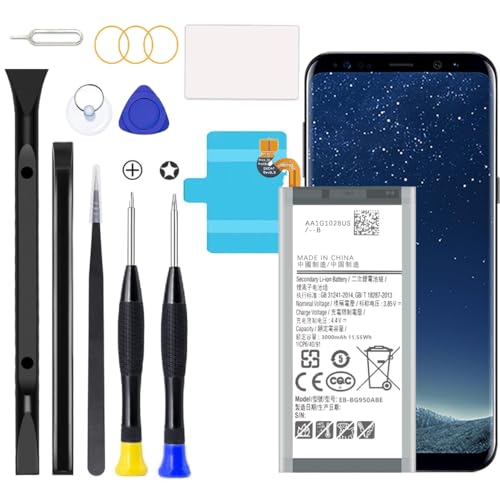
Compatible with all Galaxy S8 Battery variants:SM-G950, G950V (Verizon), G950A (AT&T), G950T (T-Mobile), G950P (Sprint), G950R4 ( US Cellular ),SM-G950F and etc.
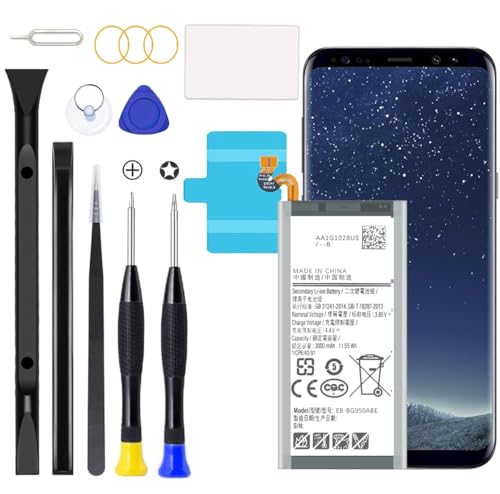
Compatible with Samsung Galaxy S8 Plus (Model: SM-G955 G955V G955A G955T G955P G955R4 G955F)
Prepare Your Device
- Power Off: Before starting, power off your Galaxy S8 to prevent any electrical damage.
- Gather Tools: Ensure you have the following tools ready: a precision screwdriver set, a plastic pry tool, tweezers, and a suction cup tool.
- Work Environment: Choose a clean, flat, and well-lit workspace to minimize the risk of losing small parts.
Remove the Back Cover
- Heat Application: Use a heat gun or hair dryer on low heat to soften the adhesive around the back cover. Keep it at a safe distance to avoid overheating.
- Suction Cup Placement: Attach the suction cup tool near the bottom of the back cover, ensuring a secure hold.
- Pry Open: Gently pull the suction cup while sliding the plastic pry tool into the gap you created. Work your way around the edges to lift the cover off.
Disconnect the Battery
- Locate the Battery Connector: Once the back cover is removed, locate the battery connector, which is usually covered by a small piece of tape or insulation.
- Use a Plastic Pry Tool: Carefully pry up the battery connector using a plastic pry tool. Avoid using metal tools to prevent shorting the circuit.
- Remove Any Tape: If there’s any tape securing the connector, gently pull it away to expose the connection fully.
Remove the Battery
- Lift the Battery: Use the plastic pry tool or tweezers to gently lift the battery from its compartment.
- Avoid Force: Apply minimal force. If the battery feels stuck, check for any adhesive or connectors that might still be attached.
- Complete Removal: Once free, remove the battery completely from your device.
With these steps, you’ve successfully removed the battery from your Samsung Galaxy S8.
Tips for Handling the Battery
- Power Off the Device: Always power off your Samsung Galaxy S8 before attempting to remove the battery. This prevents any short circuits or electrical issues during the process.
- Work in a Clean Environment: Set up a clean, well-lit workspace. This minimizes the risk of losing small components and helps you maintain focus on the task.
- Use the Right Tools: Utilize the recommended tools such as a precision screwdriver, plastic pry tool, and tweezers. Using appropriate tools ensures you avoid damaging your phone or the battery.
- Heat the Adhesive: If you encounter resistance while removing the back cover, apply gentle heat with a heat gun or hair dryer to soften the adhesive. This makes it easier to lift off the cover without causing damage.
- Disconnect the Battery Connector: When accessing the battery, carefully disconnect the battery connector. Use the plastic pry tool for this step to avoid causing any harm to surrounding components.
- Handle with Care: Always handle the battery gently. Avoid puncturing or squeezing the battery, as this can lead to swelling or leaks.
- Avoid Overheating: Prevent overheating the phone or battery during the removal process. Excessive heat can cause battery failure or safety hazards.
- Store Properly: If you’re replacing or not using the battery immediately, store it in a cool, dry place. Avoid direct sunlight, which can damage the battery life.
- Dispose Responsibly: If you replace the battery, dispose of the old one properly. Many electronic stores or recycling centers offer battery recycling programs.
Following these tips ensures a safe and successful battery removal experience for your Samsung Galaxy S8.
Conclusion
Removing the battery from your Samsung Galaxy S8 can be a straightforward process if you follow the right steps. With the right tools and a little patience you can troubleshoot issues or even replace a worn-out battery.
Remember to handle everything with care and work in a clean space to minimize any risks. If you encounter any challenges don’t hesitate to reach out for help or consult a professional. Your phone deserves the best care and attention to keep it running smoothly. Enjoy your device and happy troubleshooting!
Frequently Asked Questions
What should I do if my Samsung Galaxy S8 won’t turn on or charge?
If your Galaxy S8 won’t turn on, try performing a soft reset by holding the power and volume down buttons for about 10 seconds. If it still doesn’t respond, check the charger and cable. You may need to remove the battery if the issue persists.
How can I safely remove the battery from my Samsung Galaxy S8?
To safely remove the S8 battery, power off the device, use a heat source to soften the adhesive on the back cover, and then carefully pry it open. Disconnect the battery connector and lift the battery out gently.
What tools do I need to remove the Samsung Galaxy S8 battery?
You’ll need a precision screwdriver set, a plastic pry tool, tweezers, a suction cup tool, and an anti-static wrist strap. Optional tools like a heat gun, gloves, and a flashlight can also be helpful for the process.
Why is my Galaxy S8 battery draining quickly?
Rapid battery drain can be caused by background apps, high screen brightness, or location services. Check for software updates and review app settings to improve battery life. If issues persist, consider battery replacement.
What is the average battery life of the Samsung Galaxy S8?
The Galaxy S8 features a 3000 mAh lithium-ion battery, providing an average battery life of around 24 hours with typical use. Battery longevity can vary based on individual usage habits and settings.
How do I avoid damaging my S8 battery while removing it?
To avoid battery damage, work in a clean environment, use proper tools, and apply gentle heat to soften adhesive. Handle the battery carefully and avoid puncturing it during the removal process.
What precautions should I take when using my Galaxy S8 charger?
Always use official chargers to ensure safety and optimal performance. Avoid charging in extreme temperatures and unplug the charger when the battery reaches 100% to prevent overheating.
