

Key Takeaways
- Understanding Battery Health: Monitoring your Samsung phone’s battery health is crucial for maintaining performance and usage time over its lifespan.
- Recognizing Signs of Degradation: Be alert to indicators like shorter usage time, inconsistent charge levels, overheating, and charging issues to take timely actions.
- Implement Practical Tips: Improve battery health by keeping software updated, calibrating the battery, and uninstalling unused apps to reduce background activity.
- Adopt Best Charging Practices: Charge your phone regularly, avoid deep discharges, and use Samsung-approved chargers to protect battery longevity.
- Avoid Common Mistakes: Steer clear of habits like overcharging, ignoring software updates, and exposing your phone to extreme temperatures for optimal battery health.
- Dispelling Myths: Understand that charging overnight is generally safe and that fully discharging the battery is unnecessary; practicing good charging habits is key to longevity.
Is your Samsung phone’s battery draining faster than it used to? You’re not alone. Many users face this frustrating issue as their devices age. It can be annoying when you’re constantly searching for a charger or worrying about battery life during the day.
Understanding Battery Health
Battery health refers to the ability of your Samsung phone’s battery to hold a charge over time. As the battery degrades, you may notice a decline in performance and usage time. Monitoring battery health is essential for ensuring your device works efficiently.
Importance of Battery Health
Maintaining good battery health enhances your phone’s overall performance. A healthy battery extends your device’s lifespan and prevents unexpected shutdowns. It allows you to use your phone throughout the day without the constant need for charging. Prioritizing battery health leads to a better user experience and saves money on potential replacements.
Signs of Decreasing Battery Health
Recognizing the signs of declining battery health helps you take action promptly. Common indicators include:
- Shorter Usage Time: If your phone dies sooner than it used to, that’s a clear sign.
- Inconsistent Charge Levels: When your battery percentage drops quickly or fluctuates irregularly, it points to potential health issues.
- Overheating: If your device feels excessively hot during use or charging, battery degradation may be occurring.
- Charging Issues: Difficulty charging your phone or slow charging times often signify battery problems.
By being aware of these signs, you can take steps to improve your Samsung battery’s health before further degradation occurs.
Tips to Restore Samsung Battery Health
To improve the battery health of your Samsung device, follow these practical steps. Regular maintenance and mindful usage can significantly enhance your battery’s longevity.
Recommended Products

Compatible Phone Model: This battery kit is specifically designed for Galaxy S24 FE (with model SM-S721 series), please double confirm your phone model before purchasing

COMPATIBILITY: This battery only fits for Samsung Galaxy S10, SM-G973F, SM-G973U, SM-G973W, SM-G973U1, SM-G9730, SM-G973N, SM-G973X, SCV41, SM-G973C. Please carefully confirm your phone model before purchase.

COMPATIBILITY: This battery fits for Samsung Galaxy A50 A20, SM-A505U/U1/W/G/X/N/DL, SM-A205U/F/S/YN/G/U1/DL/W all carriers. Please carefully confirm your phone model before purchase.
Software Updates and Maintenance
Keep your software updated. Regular updates often include battery performance improvements.
- Update Settings: Go to Settings > Software update > Download and install.
- Automatic Updates: Enable automatic updates to ensure you receive the latest features and optimizations.
- Uninstall Unused Apps: Remove apps you don’t use to reduce background activity. Access this by going to Settings > Apps, then select the app and tap Uninstall.
Battery Calibration Techniques
Calibrate your battery to help it perform better. This process reassures the system about the battery’s capacity.
- Charge to Full: Charge your phone to 100% without interruption.
- Use Until Empty: Use your phone until it turns off due to low battery.
- Full Charge Again: Charge it back to 100% without interruptions again.
These simple steps can help your Samsung device maintain optimal battery health, extending overall battery life and enhancing daily performance.
Best Practices for Long-Term Battery Health
Maintaining long-term battery health requires consistent practices. Focus on charging habits and leveraging battery saver modes for the best results.
Recommended Products

【Why Choose This Magnetic Power Bank?】It packs an upgraded 10000mAh capacity, 20W fast charging, and a tiny body all in one. Unlike bulky chargers, it won't block your iPhone's rear camera. The strong magnetic grip holds your phone firmly – no slipping, no wobble. The smart LED display shows exact remaining battery percentage in real-time – so you're never caught off guard. Works with iPhone 17/16/15/14/13/12 series, giving you 1.8~2.5 full charges. When used with a magnetic phone case, it also supports fast wireless charging for Samsung Galaxy S26/S25/S25 Ultra, Huawei Mate 70/Pura 80 Pro and most Android phones, no need to remove the case.

![Samsung Galaxy Watch Ultra (2024) 47mm LTE AI Smartwatch w/Energy Score, Wellness Tips, Heart Rate Tracking, Sleep Monitor, Fitness Tracker, GPS,Titanium Silver [US Version, 1Yr Manufacturer Warranty]](https://m.media-amazon.com/images/I/51aXySo2zkL._SL500_.jpg)
RUGGED. RELIABLE. READY FOR ANYTHING: Climb the highest peak; Bike the long way home; The durable titanium design is our toughest yet, able to stand up to the rigors of your workout, including rainy or dusty conditions — even ocean swimming¹
Charging Habits to Follow
- Avoid Full Discharges: Don’t let your battery drop below 20%. Deep discharges can harm lithium-ion battery cells.
- Charge Regularly: Rather than waiting for low battery levels, top off your charge throughout the day. Short charges are less stressful on the battery.
- Use Genuine Chargers: Always opt for Samsung-approved chargers. Third-party chargers might provide inconsistent voltage, damaging your battery.
- Unplug at 80%: Aim to unplug when your battery reaches around 80%. Charging beyond this level consistently can strain the battery over time.
Using Battery Saver Modes
- Activate Battery Saver: Use the built-in battery saver feature. This option reduces background activity and dims the screen to conserve energy.
- Schedule Power Saving: Set your device to automatically enter power-saving mode during specific times, such as overnight or while at work, to enhance battery life.
- Limit Background Processes: Restrict background data usage for apps that you don’t frequently use. This limits unnecessary drain on your battery.
- Optimize Battery Usage: Regularly check your battery usage settings to identify apps consuming excessive power. Adjust their settings for better efficiency.
What to Avoid for Battery Longevity
To maintain your Samsung battery’s health, steer clear of certain habits and misconceptions. Avoiding these common mistakes can significantly extend your battery’s lifespan.
Recommended Products

[Charge Laptop 58% Faster Than 60W] The all-new 100W USB C to USB C cable tech takes charging speed to the next level. Fast charge your MacBook Pro 16” to 60% in just 45 minutes—58% faster than using a 60W cable.
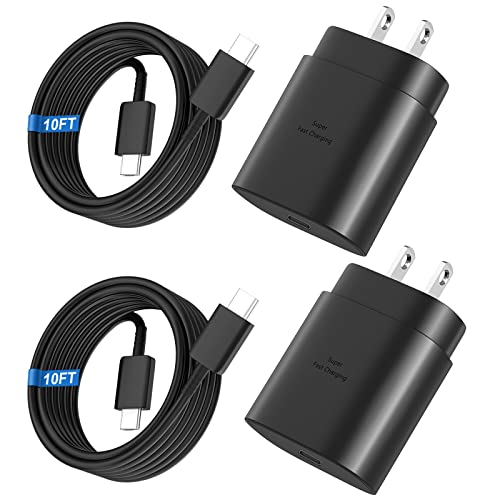
Small & Powerful: With 25W charging power but smaller size, this Vilive Samsung charger fast charging cord is more convenient and portable. Equipped with a type c port, you can charge your device back to full power in no time by using the 25W USB C fast charger for Samsung Galaxy S26 S25 series. It takes about 1 hour to fully charge your Samsung Galaxy S26 ultra, S25 ultra, S24 ultra, S23 ultra, 3 times as fast as standard PC USB-C charger.

LIGHTNING FAST AND EFFICIENT: The new power adapter accommodates your active lifestyle by giving you up to 25W of Super Fast Charging* for devices compatible with USB Type-C cables**; So when you do run low on power, it won't be for long
Common Mistakes to Avoid
- Overcharging: Leaving your phone plugged in after reaching 100% can create heat, damaging the battery. Unplug it once charged.
- Deep Discharging: Letting your battery drain to 0% regularly strains it. Charge when it reaches around 20% to help maintain health.
- Using Non-Genuine Chargers: Cheap or counterfeit chargers can harm your device. Use Samsung-certified chargers for optimal performance.
- Extreme Temperatures: Exposing your phone to very hot or cold conditions damages the battery. Keep your device in a stable temperature range.
- Ignoring Software Updates: Skipping updates can limit performance improvements. Regularly check for software updates to ensure optimal battery management.
Myths About Battery Charging
- Charging Overnight Is Harmful: Modern smartphones have systems to manage charging. While it’s best not to let your phone stay at 100% for long, charging overnight is generally safe if you follow good practices.
- You Must Fully Discharge Before Charging: It’s a myth that you should let your battery fully discharge before recharging. Doing so can actually degrade battery health. Recharge whenever convenient.
- Leaving Your Phone Plugged In Is Okay: While topping off the charge is fine, keeping it plugged in longer than necessary can lead to battery strain. Avoid prolonged charging sessions.
- Battery Health Only Reduces with Age: While age does affect battery health, poor charging habits can accelerate this decline. Practice good habits for better longevity.
- Using Battery Saver Mode Is Always Good: While it can help extend battery life, constant use may limit functionality. Use it when necessary but don’t rely on it at all times.
By avoiding these common mistakes and misconceptions, you enhance your Samsung phone’s battery health, ensuring reliable performance over time.
Conclusion
Taking care of your Samsung battery isn’t just about avoiding frustration; it’s about enhancing your overall experience. By following the tips and best practices shared, you can breathe new life into your device and enjoy longer usage times.
Remember to stay mindful of your charging habits and keep an eye on those signs of battery health decline. With a little effort, you can ensure your phone remains reliable and ready for whatever your day throws at you.
So go ahead and implement these strategies to keep your Samsung battery in top shape. You’ll be glad you did!
Frequently Asked Questions
What causes battery drain in Samsung phones?
Battery drain in Samsung phones can be caused by a variety of factors including app usage, background processes, outdated software, and battery health deterioration over time. As the phone ages, the battery may hold a charge less effectively, leading to more frequent charging needs and reduced performance.
How can I check my Samsung phone’s battery health?
To check your Samsung phone’s battery health, go to Settings, tap on Battery and Device Care, then select Battery. Here, you can find information about usage patterns, charge cycles, and whether your battery health is good, average, or poor.
What are the signs of poor battery health?
Signs of poor battery health include shorter usage times, inconsistent charge levels, overheating, and unexpected shutdowns. If you notice these issues, it may be time to consider restoring or replacing your battery.
How can I improve my Samsung phone’s battery life?
Improving battery life can be achieved by keeping software updated, uninstalling unused apps, calibrating the battery, and utilizing battery saver modes. Regularly charging your device and avoiding extreme temperatures also contribute to better battery performance.
Should I avoid charging my phone overnight?
Charging your phone overnight is generally safe. Most modern smartphones, including Samsung, have built-in protections to prevent overcharging. However, it’s best to unplug it once it reaches around 80% to reduce battery strain and prolong its lifespan.
What charging habits should I adopt for better battery health?
To maintain battery health, avoid letting your battery drop below 20% frequently, charge regularly throughout the day, and use genuine Samsung chargers. It’s also beneficial to unplug the device once it reaches about 80% charge.
What should I avoid to extend my battery’s lifespan?
To extend your battery’s lifespan, avoid deep discharging, overcharging, using non-genuine chargers, exposing the phone to extreme temperatures, and ignoring software updates. These habits can significantly degrade battery performance over time.
