

Ever found yourself stuck with a car that just won’t start? Imagine being all set for a road trip, only to be met with silence when you turn the key. Frustrating, right? Don’t worry, we’ve all been there. Today, we’re diving into the world of car battery cells and why they sometimes decide to take an unexpected vacation.
Common Signs of a Failing Car Battery Cell
When your car battery cell starts to fail, it often gives off warning signs before completely dying on you. Here are some common indicators to watch out for:
- Dimming Headlights: Notice your headlights becoming less bright than usual? This could be a sign of a weakening car battery cell.
- Slow Engine Crank: If you hear a sluggish cranking sound when starting your vehicle, it might indicate a struggling battery cell.
- Frequent Jumpstarts: Finding yourself needing to jumpstart your car more often than usual? It could be due to a failing battery cell.
- Electrical Issues: Experience unusual electrical problems like flickering lights or malfunctioning power windows? Your battery cell might be the culprit.
- Battery Age: Keep track of your battery’s lifespan. Typically, a car battery lasts about 3 to 5 years. If yours is close to this range, it might be time for a replacement.
Be attentive to these signs to avoid getting stuck with a dead battery unexpectedly.
Diagnostic Steps to Identify the Culprit
When you suspect that your car battery cell is not working properly, performing some diagnostic steps can help you pinpoint the issue quickly. Here are some actionable tips to guide you through the process:
- Check the Battery Connections: Start by inspecting the battery terminals for any signs of corrosion or loose connections. Clean them if necessary to ensure a good electrical connection.
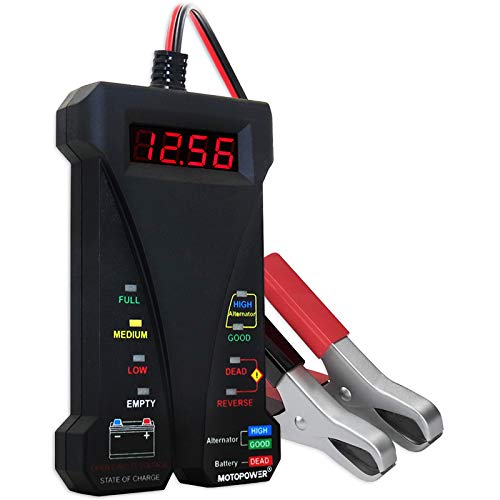
- Test the Battery Voltage: Use a multimeter to measure the battery voltage. A fully charged battery should read around 12.6 volts. Anything significantly lower might indicate a weak battery.
- Inspect the Battery Case: Look for any physical damage or leaks on the battery case. A bloated or leaky battery could mean it’s faulty and needs to be replaced.
- Perform a Load Test: Have a professional mechanic perform a load test to assess the battery’s capacity to hold a charge under various conditions.
- Consider the Alternator: If the battery seems fine, the issue might be with your car’s alternator not charging the battery properly. Have the alternator tested as well.
- Monitor the Battery After Charging: After charging the battery, keep an eye on it for a few days to see if it holds the charge properly or if it drains quickly.
By following these diagnostic steps, you can efficiently identify the root cause of your car battery cell issues and take the necessary actions to address them promptly.
Recommended Products

Additional Tips - The following incorrect operations may cause the multimeter not to show results: Firstly, the plugs of test leads are not fully inserted or not inserted into the correct sockets. Secondly, the manual rotary switch is not placed in the correct position. In addition, this meter can not test all AC Current and below 100mV AC Voltage. Please check the user manual carefully before measurement.

Catch Battery Problems Early: Featured in two videos by Project Farm, a popular YouTube channel with millions of subscribers, the ANCEL BA101 helps you quickly spot battery issues before they leave you stranded. It provides easy-to-understand readings for State of Health (SOH), State of Charge (SOC), voltage, current, CCA, plus cranking and charging system tests, so you can better understand your battery and help avoid unexpected breakdowns
Effortless Operation - Boasting a “plug-and-test” design, there's no need for complex set-up procedures. Just connect it to the battery following simple steps. Without starting the vehicle, you can read the battery status, and after starting, quickly obtain the alternator status. Whether you're a professional mechanic or an ordinary car owner, you can easily use it to quickly determine if the battery needs jump - starting, replacement, or if the alternator output is normal.
How to Test a Car Battery Cell
When checking for issues with your car battery cell, it’s essential to understand how to properly test it. By following these steps, you can efficiently diagnose the health of your car battery:
- Visual Inspection: Start by examining the battery case for any physical damage like cracks or leaks. Any visible issues could indicate a problem with the battery cell.
- Battery Voltage Test: Using a multimeter, measure the voltage of the battery. A healthy battery typically reads around 12.6 volts. Anything significantly lower could signify an issue within the battery cell.
- Load Test: Conduct a load test on the battery to evaluate its capacity to deliver power under stress. This test helps determine if the battery cell can sustain its charge efficiently.
- Alternator check: Ensure your car’s alternator is functioning correctly as it plays a crucial role in charging the battery. A faulty alternator can lead to a battery cell not working optimally.
- Post-Charge Monitoring: After charging the battery, monitor it closely for any signs of rapid discharge or irregularities. This observation can help identify if a particular cell is failing within the battery.
Remember, regular testing and maintenance of your car battery can prolong its lifespan and prevent unexpected breakdowns on the road. It’s crucial to stay proactive in monitoring your battery’s health to ensure your vehicle runs smoothly.
Recommended Products

3 Tests with 1 Device - Battery analysis, charging system test, and starter motor test

Universal Battery Tester 12V / 24V: TopDiag BT300 battery load tester is able to detect the faults of car starting system and charging system, perform quick test and standard test, can test all automotive starter batteries, such as ordinary lead-acid batteries, AGM flat batteries. AGM spiral batteries and gel batteries. BT300 car battery checker can test most of the current battery standards, include: CCA, JIS, GB, SAE, MCA, CA, DIN, IEC, EN, BCI, etc. Notice: It's not compatible with 6V batteries and is not suitable for use with lithium batteries.

Versatile Battery Load Tester & Voltage Tester: Effectively check the battery and voltage of various vehicles including cars, trucks, RVs, and golf carts. This powerful diagnostic tool ensures accurate results for both 6V and 12V batteries.
Repair Options for a Malfunctioning Battery Cell
If you find that a car battery cell is not functioning properly, there are several repair options you can consider to address the issue efficiently. Here are some steps you can take:
- Replace the Faulty Cell: If a specific cell within the battery is malfunctioning, you may opt to replace that particular cell instead of the entire battery.
- Battery Reconditioning: Some specialized tools and techniques exist for reconditioning batteries, which may help revive a failing battery cell.
- Seek Professional Help: For complex issues or if you’re unsure about the extent of the problem, it’s advisable to consult a professional who can diagnose the battery accurately.
- Consider Battery Desulfation: Sulfation is a common issue in old batteries. Battery desulfators can be used to help break down sulfation and restore battery function.
Remember that safety is paramount when handling car batteries. If you’re uncertain about the repair process, it’s always best to seek assistance from a qualified technician to avoid any potential risks.
By exploring these repair options and taking appropriate action, you can effectively address a malfunctioning battery cell to ensure your vehicle’s optimal performance.
Recommended Products

Don't Replace Your Battery, Restore It - Battery Restore, made in the USA, is a non-toxic formula that penetrates lead acid battery cells and chemically dissolves sulfation, the #1 cause of premature battery failure. Increase charge capacity and get more run time from batteries you already own. Can take up to 10 days of regular charging for full effect

AUTOMATIC OPERATION: Features pulse technology that automatically reconditions lead-acid batteries through controlled charging cycles

【As Seen on TV】The Battery Guyz has been seen on USA TODAY, Bloomberg, and ABC! Our battery maintainer boots charge capacity and performance. For dead, weak, or underperforming golf cart batteries, Battery Renew is your easy fix
Conclusion
Ensuring your car battery cell is in optimal condition is essential for preventing unexpected breakdowns and maintaining your vehicle’s performance. By following the diagnostic steps outlined in this article, you can identify potential issues early on and take appropriate repair actions. Remember to prioritize safety by seeking help from qualified technicians for complex problems and adhering to proper maintenance practices. Regular testing and monitoring of your battery’s health will help extend its lifespan and keep your car running smoothly. Stay proactive in caring for your car battery cell to avoid inconvenience on the road.
Frequently Asked Questions
What are common signs of a failing car battery cell?
Common signs include slow engine crank, dim headlights, electrical issues, and the check engine light coming on.
How can I diagnose a failing car battery cell?
You can check for corrosion on battery connections, test voltage with a multimeter, inspect for physical damage, perform a load test, and assess the alternator’s functionality.
What are the repair options for a malfunctioning battery cell?
Options include replacing the faulty cell, battery reconditioning, seeking professional help, and utilizing battery desulfation for sulfation issues.
Why is it important to monitor the battery post-charge?
Monitoring ensures optimal performance, helps prevent breakdowns, and allows early detection of potential issues.
What safety precautions should I take when dealing with a car battery?
Seek assistance from qualified technicians if unsure, avoid shortcuts, wear protective gear, and follow proper handling and disposal guidelines.
